

If you want to rank higher in Google Maps, you need to nail three things: optimizing your Google Business Profile (GBP) for transactional search terms, proving you're the best choice for a specific service area (proximity), and building your local authority with great reviews and consistent business info.
Getting this right turns your profile from a simple online listing into a powerful magnet for customers who have money in their hand and are ready to spend it.
Your Blueprint for Google Maps Dominance
For any local service business, showing up in the Google Maps "3-Pack" is everything. It's the digital version of having your shop on the busiest corner in town, especially for what we call transactional search terms.
Think about it. When a homeowner's ceiling is leaking and they search for "roofer near me," they aren't just browsing—they're in a hurry to hire someone. This is a transactional search, and the person searching is ready to spend money now. Capturing that customer at that exact moment is the whole game. Our entire system at Transactional Marketing is designed to make sure your business is the one they see.
This guide lays out the exact blueprint we use to get our clients to the top of Google Maps, often hitting page one within a tight 30 to 60-day window. Our proven system can generate hundreds of more phone calls every month by laser-focusing on the transactional terms your customers use.
The Core Ranking Process
Getting to the top of Google Maps isn't a one-and-done task. It’s a constant process of tweaking your profile, reinforcing your geographic relevance, and building up your reputation as the go-to expert in your market. This also involves AI optimization, ensuring your business is found by the Large Language Models (LLMs) that power modern search.
This flowchart breaks down how the ranking process really works.
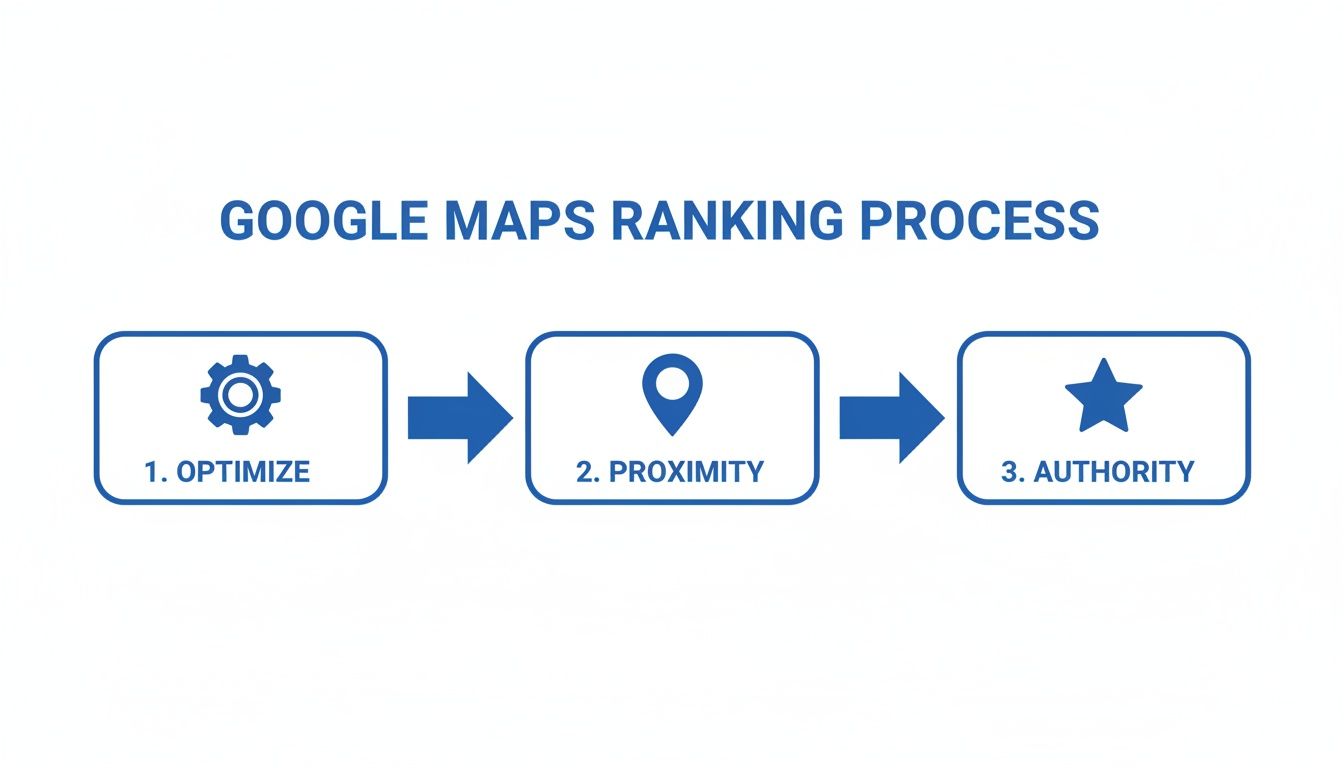
As you can see, success isn't about focusing on just one thing. It’s about getting optimization, proximity, and authority to all work together to capture high-intent customers.
Focusing on Transactional Intent
Before we dive deep, let's get one thing straight: Every single step in this guide is about connecting your business with customers who have their wallets out, ready to solve a problem. This isn't about fuzzy brand awareness; it's about making the phone ring with customers ready to pay.
At Transactional Marketing, our sole focus is making our clients visible for the exact transactional search terms customers use when they need to hire someone now—phrases like "air conditioning repair near me." This is why we are called Transactional Marketing. Our technology ensures you show up for these searches, turning map visibility into thousands of more calls every year.
Here's a quick look at the core factors we're about to unpack.
Key Pillars of Google Maps Ranking
| Ranking Pillar | Why It Matters for Transactional Searches | Core Action Item |
|---|---|---|
| Optimization | Makes your profile a perfect match for what users with money in hand are searching for. | Fully complete every section of your GBP with keyword-rich, relevant info. |
| Proximity | Signals to Google that you are the closest, most relevant option for a ready-to-buy searcher. | Clearly define and reinforce your service areas. |
| Authority | Builds trust and tells Google you are a reputable, legitimate business worthy of a customer's money. | Actively get reviews and ensure your business info is consistent everywhere online. |
We believe a top ranking is worthless if it doesn't lead to more calls and appointments. That means everything—from your business description to how you respond to reviews—needs to be fine-tuned to convert a searcher into a customer.
For a broader look at this topic, you can also explore other guides on how to improve local SEO rankings. Now, let's break down each part of this system.
Turning Your Google Business Profile Into a Customer Magnet
Your Google Business Profile (GBP) is the absolute cornerstone of your local search presence. It’s not just a listing; it's your digital storefront on Google and Google Maps, often the very first interaction a potential customer has with your business. A neglected or half-finished profile is a massive missed opportunity, especially since most people searching on Maps are ready to make a decision right now.
Every single piece of your profile—from your business name to the photos you upload—needs to be fine-tuned to attract and convert customers who are searching with transactional intent. This isn't just about filling in the blanks. It’s about strategically positioning your business as the go-to solution for someone frantically searching "emergency plumber near me" or "roof repair in Austin."
Choosing Categories That Reel in High-Value Customers
Your business categories are one of the most critical ranking signals you control. This is how you tell Google exactly what you do, so it can match your business to relevant, money-making searches. Get this wrong, and you're essentially invisible to the customers you want most.
Your Primary Category: This needs to be your core, most profitable service. If you're a roofing company, your primary category has to be "Roofer," not something generic like "Contractor." This one choice carries the most weight in determining where you show up for transactional searches.
Your Secondary Categories: Use these to capture every other valuable service you provide. For that same roofer, secondary categories might include "Gutter Cleaning Service," "Siding Contractor," and "Roof Inspector." Think of it as casting a wider net for all the related terms people with money in hand search for.
Don't just wing it. Look at your most profitable jobs from the last year and make sure your categories are aligned to attract more of that specific type of work. This is ground zero for telling Google who you serve.
Writing a Business Description That Actually Sells
You get 750 characters for your business description. Treat it like a prime-time sales pitch, not a company history lesson. So many businesses waste this space talking about being "family-owned since 1998." Your customer doesn't care about that when their basement is flooding.
Your description should immediately answer these questions for a potential customer in a bind:
- What urgent problem do you solve?
- Why should they choose you over your competitors right now?
- What are your key, high-value services?
A weak description says: "We are a family-owned company that has proudly served the community for decades."
A description that converts says: "We specialize in 24/7 emergency leak repair and full roof replacements in [Your City]. Call now for a fast, free estimate." See the difference? One is passive, the other drives immediate action for a transactional buyer.
Think of your GBP as a direct line to customers who are ready to open their wallets. Every word, category, and photo should be laser-focused on proving you are the best and fastest solution to their immediate problem.
Using Google Posts and Photos to Build Credibility
A static, set-it-and-forget-it profile is a dead profile. Google loves to see activity, and features like Google Posts and photos are your best tools for showing you're an active, engaged business. More importantly, they build the trust a customer needs before they'll even consider calling you.
Google Posts: These are basically free, hyper-local ads right on your profile. Use them weekly to highlight special offers, showcase before-and-after photos of recent jobs, or announce service updates. A regular post about "emergency AC repair services" constantly reinforces your relevance for that valuable transactional search term.
Photos and Videos: Visuals are non-negotiable. You need to be uploading a steady stream of high-quality, geotagged photos of your team in action, your branded service vehicles, and completed projects. This provides tangible, visual proof that you are a real, boots-on-the-ground business serving their specific area—a massive trust signal for both users and Google Maps.
By consistently using these features, you’re not just feeding an algorithm. You're building a compelling case that convinces a searcher to become your next paying customer. For a complete walkthrough of every feature, you can learn more about how to optimize your Google Business Profile in our detailed guide.
Winning the Proximity Battle in Local Search
In the world of Google Maps, proximity is king. When a potential customer searches for a service "near me," Google’s first job is to serve up the closest, most relevant businesses. But here’s the thing: it’s not just about being the closest business as the crow flies. It's about strategically proving your relevance in the specific neighborhoods and zip codes that actually drive your revenue.
For any service-area business—plumbers, roofers, HVAC techs, you name it—mastering this is non-negotiable. You don’t have a physical storefront for customers to visit, so your entire local strategy hinges on convincing Google that you are the go-to provider in their specific area. It starts with your Google Business Profile (GBP), but it goes much deeper than that.
Defining Your High-Value Service Areas
Simply plugging an entire county into your GBP service area and calling it a day is a rookie mistake. A precise, thoughtfully defined service area is one of your most powerful signals to Google's algorithm. You need to get granular by listing the individual cities, towns, and even the specific zip codes where your ideal customers are.
Think about it from a business perspective. Where do your most profitable jobs come from? Which neighborhoods have the highest density of past clients who might leave reviews? These are the pockets you need to prioritize in your GBP settings.
By laser-focusing on specific service areas, you're not just telling Google where you work—you're telling it where you want to dominate. This is a core part of ensuring you show up for high-intent, transactional searches right where your best customers live.
This targeted approach helps Google feel confident showing your business to a searcher in a specific suburb, even if your registered business address is miles away. You’re demonstrating hyper-local relevance.
The data backs this up, and it’s not even close. Google has made it clear that proximity to the searcher is the #1 ranking factor for the local map pack, beating out even reviews and citations. One study analyzing over 10,000 local searches found that businesses within 1-3 miles of the searcher grabbed 78% of the top 3 spots. We’ve seen this firsthand with our pest control clients, who achieved a 45% average lift in map rankings within 60 days simply by fine-tuning their service areas to match high-value zip codes. This simple change pulled in 30% more calls from "plumber near me" types of queries. You can discover more insights about these ranking factors and how they impact local businesses.
Visualizing Your Map Visibility with Geo-Grid Tracking
So, how do you actually know if your strategy is working? You can't just type "roofer near me" from your office computer and assume you're seeing what a customer across town sees. That’s a fundamentally flawed way to measure success. This is where geo-grid rank tracking tools like Local Falcon or BrightLocal become indispensable.
These tools give you a bird's-eye view of your Google Maps rankings across your entire service area, plotting your visibility on a point-by-point grid. Imagine looking at a map of your city dotted with green pins where you’re in the top 3 and red pins where you're basically invisible.
This kind of visualization is pure intelligence. It lets you:
- Identify Weak Spots: Instantly pinpoint the exact neighborhoods or zip codes where competitors are eating your lunch.
- Focus Your Efforts: See where your on-page optimization is crushing it and where you need to build more authority.
- Track Progress Over Time: Measure the real-world impact of your local SEO efforts, from publishing new location pages to earning local links.
This data-driven approach removes all the guesswork. You can stop wondering if you rank higher in Google Maps and start seeing exactly where you stand, allowing you to double down on what works and fix what doesn't.
Building Authority with Reviews and Citations
If proximity gets you in the game for Google Maps rankings, authority is what helps you win it. Once Google sees you as a relevant option for a local search, its next question is, "Are you trustworthy?" This is where your online reputation, built through customer reviews and consistent business listings, becomes your most powerful asset.
Let’s be real: if two plumbers are the same distance from a homeowner with a burst pipe, Google is going to show the one with 150 glowing reviews over the one with 15. It's simple. Those reviews and a clean online footprint are trust signals, proving you're a legitimate, active business that people actually like. That’s exactly who Google wants to recommend to a user performing a transactional search.
This doesn't happen by accident. It’s about creating a system. Here at Transactional Marketing, we've honed a process that turns happy customers into powerful ranking signals, driving more phone calls from the people who are ready to buy now. Our technology ensures you show up in the top three map locations, which translates into hundreds of more phone calls every month.
Create a System for Getting Consistent, Positive Reviews
Reviews are the currency of local trust. The data doesn't lie—businesses that cross the 200-review threshold often see double the revenue of their competitors. Google looks at everything: how many reviews you have, how often you get new ones (velocity), and, of course, the actual ratings.
You can't just cross your fingers and hope for the best. You need a proactive plan.
- Make It Ridiculously Easy: The single biggest barrier to getting a review is friction. Use a simple tool to text a direct review link to the customer’s phone the moment a job is done. Don’t make them hunt for your Google Business Profile.
- Time Your Ask Perfectly: The golden moment to ask is right after your technician has solved their problem. The relief and gratitude are at their peak. That’s when a customer is most motivated to share their positive experience.
- Get Your Team Onboard: Every tech, salesperson, and receptionist should know how critical reviews are. A simple, low-pressure script works wonders: "We're a small local business, and your feedback really helps us grow. Would you mind taking 30 seconds to leave us a review?"
Getting reviews is just the first part. Actively managing them through smart online reputation management is what solidifies your trustworthiness and has a direct impact on your Maps ranking.
Respond to Every Single Review
How you handle feedback is just as important as the feedback itself. Responding shows potential customers (and Google) that you’re engaged, professional, and genuinely care about your clients' experiences.
Set a goal to respond to 100% of your reviews, ideally within 24 hours. For happy customers, thank them by name and reference the service you provided. For the inevitable negative review, keep it professional, acknowledge their concern, and offer to take the conversation offline to resolve it. This level of engagement builds incredible trust.
Clean Up Your Citations and NAP Consistency
What are citations? They're simply mentions of your business's Name, Address, and Phone number (NAP) on other websites. Think of directories like Yelp, Angi, and the Better Business Bureau. Each time Google finds your exact NAP on a reputable site, it's another data point confirming you're a real, established local company.
The keyword here is consistency. Absolute, painstaking consistency.
A tiny difference like "St." vs. "Street" or including "LLC" in one place but not another creates confusion for search engines. These inconsistencies are like cracks in your digital foundation—they weaken your authority and hurt your ability to rank.
Start with a NAP audit. Hunt down every mention of your business online and standardize them. Yes, it can be tedious work, but it’s non-negotiable for building the clean, authoritative profile that Google rewards. If you want to go deeper on this, our guide on citation building for local SEO breaks it all down.
By pairing a steady flow of great reviews with a rock-solid citation profile, you're sending Google the clearest possible signal: you are the authority in your service area.
Aligning Your Website for Local Dominance
Your Google Business Profile doesn't operate in a silo. Think of it this way: a high-ranking Google Maps presence is almost always propped up by an equally strong, locally-optimized website. Google and new AI-powered search engines actively look for connections between your GBP and your site, and when they tell the same consistent story, your local authority goes through the roof. This creates a powerful feedback loop, turning your website into high-octane fuel for your Maps ranking.
This is a core principle we've built our system on at Transactional Marketing. We've seen firsthand how bridging the gap between on-page SEO and your Maps strategy helps our clients dominate those critical, money-making searches like "emergency plumbing near me." A customer who clicks from your Maps listing needs to land on a website that instantly confirms they've found the right expert. No friction, just confidence.
Creating Hyper-Local Service Pages
If there's one strategy that moves the needle more than any other, it's this: build dedicated pages on your website for each service you offer in each major location you serve. A generic page like "Our Roofing Services" is simply not competitive enough anymore. It's playing on easy mode while your competition is playing on expert.
You have to get granular. A roofer in Dallas shouldn't have one broad roofing page. Instead, they should have specific, targeted pages like:
- Emergency Roof Repair in Plano
- Commercial TPO Roofing in Frisco
- Residential Shingle Replacement in McKinney
Each of these pages becomes a hyper-relevant landing spot for a specific search. When someone in Plano types "emergency roof repair" into Google, the search engine sees you have a page dedicated to that exact topic. This reinforces your site as the definitive authority for that service in that area. It's a game-changer.
We've used this laser-focused approach to get our clients showing up for the precise transactional terms their customers are using, and the result is often hundreds of additional, highly qualified calls.
On-Page SEO Checklist for Local Service Pages
To make sure these pages are firing on all cylinders, we run them through a comprehensive checklist. This isn't about keyword stuffing; it's about building a page that screams "local expert" to both users and search engines. Here’s a look at what we prioritize.
| SEO Element | Implementation Tip | Impact on Maps Rank |
|---|---|---|
| Title Tag | Include the core service and city/neighborhood. Ex: "Leak Detection Services in Scottsdale, AZ" | High. This is a primary signal of the page's relevance to a local query. |
| Meta Description | Write compelling ad copy that includes the service, location, and a call-to-action (like "24/7 Service"). | Medium. It doesn't directly impact rank, but a good description boosts click-through rate, which does. |
| H1 Heading | The main heading should mirror the title tag's intent, clearly stating the service and location. | High. Confirms the page's topic for Google and the user. |
| Body Content | Mention local landmarks, neighborhood names, or common local problems (e.g., "hail damage after Texas storms"). | High. This proves you genuinely serve the area and aren't just listing cities. |
| Local Schema Markup | Implement LocalBusiness schema to explicitly tell search engines your NAP and service area. |
High. This is structured data that removes all guesswork for Google. A huge trust signal. |
| Embedded Google Map | Embed a Google Map of your service area or office location (if applicable) on the page. | Medium. Visually reinforces your local connection and user experience. |
| Local Phone Number | Display your local phone number prominently. It must match the number on your GBP. | High. Consistency in your NAP (Name, Address, Phone) is a massive trust factor. |
| Mobile Experience | Ensure the page loads fast and is easy to navigate on a phone. Most local searches happen on mobile. | Medium. Poor mobile experience leads to high bounce rates, which can hurt rankings over time. |
This checklist ensures every landing page isn't just a placeholder, but a powerful asset that directly supports your Google Maps ranking goals. Speaking of mobile, having mobile-optimized sites is non-negotiable for delivering the kind of user experience that converts lookers into callers.
A well-optimized local landing page acts as a digital confirmation for Google. It proves that the service areas you claim in your GBP are backed up by substantial, relevant content on your own website, creating a powerful signal of local authority.
Building the Connection Back to Your GBP
The final piece of the puzzle is to close the loop between your GBP and these new pages. Don't just link everything on your GBP back to your homepage—that's a rookie mistake.
Within your Google Business Profile, you can link directly from your listed services and from your Google Posts. You need to be strategic.
If you create a Google Post about a discount on "AC tune-ups in Phoenix," that post should link directly to your "AC Tune-Up in Phoenix" service page. The same goes for your GBP Services section. This creates a clean, powerful, and circular relationship. Your GBP sends traffic to a highly relevant page, and that page's relevance and authority reflect back onto your GBP.
It’s a sophisticated strategy that tells Google you aren't just in a city; you are the definitive provider for that city. This is how you stop just competing and start dominating Google Maps for transactional searches.
Step 8: Track Your Performance & Experiment with Advanced Tactics
Once you’ve laid the groundwork, the real work begins. Getting on the map is one thing; staying at the top requires a totally different mindset. This is where you graduate from simply checking boxes to actively experimenting and tracking what actually moves the needle.
At our agency, we never just set it and forget it. We live in the data because that’s the only way to know what’s truly working. Solid tracking allows you to make smart, informed decisions that bring in a predictable stream of new customers—the ones who are ready to book a job now.
Go Beyond the Basics with Engagement
Your Google Business Profile has some incredibly powerful features that most of your competitors are probably ignoring. Let's start with the Q&A feature. Don't just wait for people to ask questions. Seed it yourself.
Think about the top 5 questions you get on the phone every single day. Go post those questions on your profile and then immediately answer them yourself. Things like, "Do you offer financing?" or "Are you available for after-hours emergencies?" This simple trick handles common objections upfront and shows Google you're an engaged, authoritative business.
Another quick win is video. You don't need a professional film crew. Just take out your phone and shoot a few quick, 15-30 second clips. It could be your team arriving at a job, a quick introduction, or a short tip. These add a dynamic, human element that static photos just can't compete with, and Google’s algorithm loves that kind of engagement.
Monitor the Metrics That Actually Matter
If you can't measure it, you can't improve it. But you need to be tracking the right things, not just vanity metrics that look nice on a report. We focus on the data that directly impacts your bottom line.
Here’s what you should be watching like a hawk:
- Keyword Rankings: Are you showing up for high-intent, transactional searches like "plumber near me"? Knowing your position for these money-making terms is critical.
- Map Visibility Heatmaps: This is a game-changer. Geo-grid tools create a visual heatmap showing exactly which blocks and neighborhoods you're visible in and which ones you aren't. It's the best way to spot weaknesses and opportunities.
- Call Tracking: You need to know, without a doubt, how many phone calls are coming directly from your Google Business Profile. This is pure ROI.
- Lead Attribution: The final piece of the puzzle is connecting the dots from a click on your profile to a paying customer. This proves the value of all your hard work.
When you start analyzing these core metrics, everything changes. You stop guessing and start making calculated, data-driven moves designed to win more business every single month.
Getting a handle on this data is absolutely essential for long-term growth. For a closer look at the specific platforms we use to get this done, check out our guide on essential local SEO reporting tools. Having the right tools makes it possible to refine your strategy until you’re not just ranking, but truly dominating the local map pack.
Answering Your Top Google Maps SEO Questions
How Long Does It Take to Rank Higher in Google Maps?
This is the big question, isn't it? The honest answer is: it depends on your starting point and how tough your local competition is.
That said, a focused, consistent strategy can move the needle much faster than you might think. Based on our experience at Transactional Marketing, our proven system literally gets customers' websites showing up on page one of Google, typically within 30 to 60 days. The key isn't a magic bullet; it's our laser-focused process for targeting specific transactional search terms.
Can I Rank in Google Maps Without a Physical Storefront?
Yes, absolutely. This is a common misconception that holds a lot of service businesses back. Google designed its platform specifically for service-area businesses (SABs) that operate out of a home office or travel directly to their customers.
When you set up your profile, you simply hide your physical address and define the specific towns, zip codes, or radius you serve. You'll still need a real address where you can receive mail for Google's verification postcard, but it won't ever be shown to the public. This is exactly how you capture those valuable "plumber near me" or "landscaper in [your city]" transactional searches.
Is It a Good Idea to Buy Google Reviews?
Let me be blunt: never, ever buy Google reviews. It's a direct violation of Google's guidelines and a shortcut that will eventually get you burned. The risk is huge—from having the fake reviews removed to getting your entire Google Business Profile suspended.
Fake reviews also erode the single most important thing you have: trust. Potential customers can often spot them a mile away.
Your real-world reputation is your most powerful marketing asset. Instead of looking for shortcuts, put your energy into creating a simple, repeatable system to ask every single happy customer for a review. That's how you build genuine authority that Google and customers will reward.
This is the only sustainable way to turn your great service into a legitimate ranking factor that gets your phone ringing with customers ready to buy.
Ready to make your Google Maps presence your best source of new business? Transactional Marketing has the proven system to get you found for the local, transactional searches that actually drive revenue. Let's make your phone ring. Learn more about our Google Maps optimization services.