


A homeowner searches “air conditioning repair near me” after the system fails on a hot afternoon. A patient searches “dentist near me” while comparing appointment options. A property owner looks for “roofer near me” after spotting a leak. In each case, the searcher has moved past general research. They're looking for a nearby business they can contact now, and the Google Business Profile reviews often decide which listing earns the click.
That's why GMB reviews, now managed through Google Business Profile, aren't just a reputation feature. They're part of the local search system that connects transactional search terms with calls, appointments, and booked jobs. Transactional Marketing focuses on those high-intent searches because a person searching for a roofer near me or dentist near me is usually looking for a business they can contact or visit immediately, as explained in Google local pack guidance.
Why GMB Reviews Decide Who Gets the Call
A Google review sits inside the business listing a customer sees in Search and Maps. It appears alongside the business name, category, service information, rating, location, contact options, photos, and other profile details. Google's official documentation shows that businesses can view reviews through the Business Profile dashboard, check review status, and use the Performance section to monitor ratings and customer actions over time through Google Business Profile review management.
That placement matters because the customer often doesn't begin on your website. They begin with a local result, compare several businesses, and choose the listing that looks most relevant and trustworthy. A roofing company can have a technically strong website, but if its Maps listing looks inactive or its recent customer feedback raises concerns, the searcher may call another roofer first.
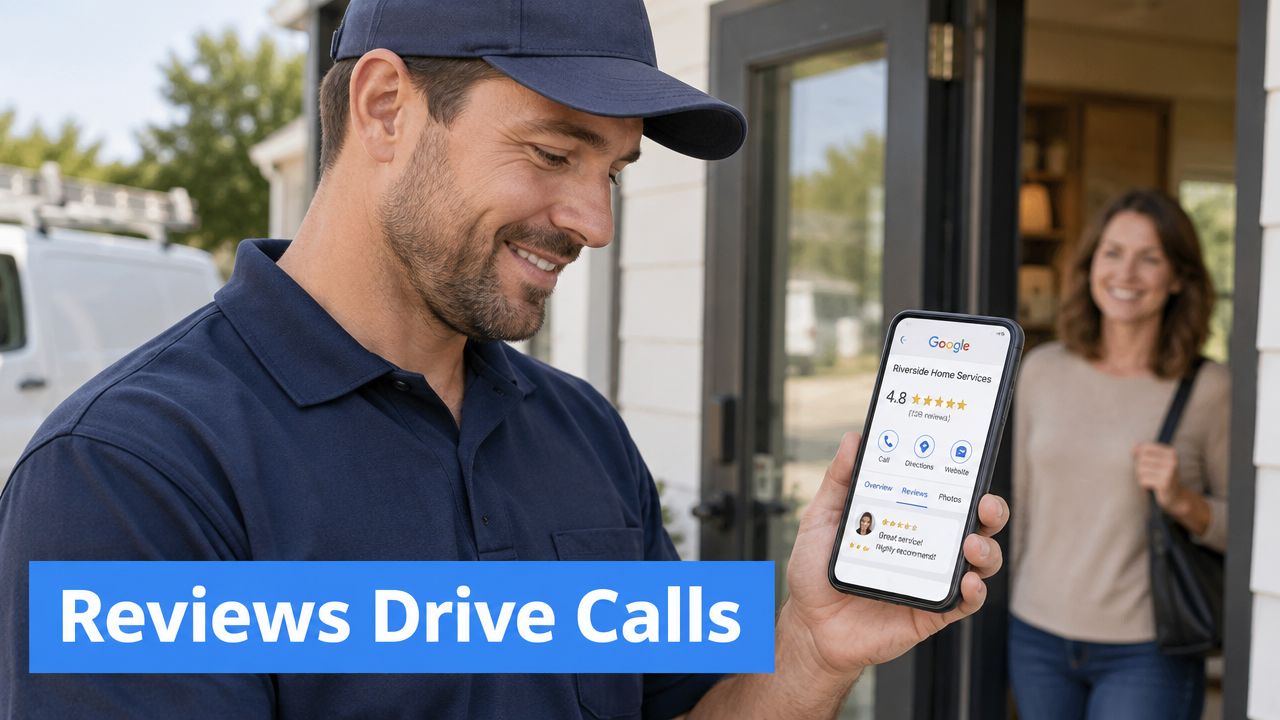
Reviews sit close to the buying decision
For a home service company, a review can answer questions that a service page can't answer quickly. Did the technician arrive when promised? Did the plumber explain the repair? Did the roofing crew leave the property clean? For dental and med spa businesses, reviews often address communication, comfort, professionalism, and the quality of the patient experience.
The customer may never read every review. They may compare the visible rating, review count, and the freshness of recent feedback before tapping the call button. That makes reviews a conversion asset, not merely a collection of testimonials.
Google says local results are mainly based on relevance, distance, and prominence, and it confirms that reviews contribute to prominence. Google also says that more reviews and positive ratings can help local ranking, while it doesn't publish a precise review weighting in its official local ranking explanation.
Transactional Marketing prioritizes searches such as “roofer near me,” “dentist near me,” and “air conditioning repair near me” because those phrases describe immediate commercial intent. The objective isn't to collect visibility for disconnected informational terms. It's to help the right service business appear where nearby customers are already deciding whom to contact.
For operators managing citations, categories, hours, photos, and reviews together, a practical guide on local listing management for business can help organize the broader profile work. The review strategy should sit inside that operating system, not in a separate marketing folder that nobody checks.
You can also review the foundation in what is Google Business Profile. The important point is simple: a profile that earns attention and trust has a better chance of turning a transactional Maps search into a phone call.
How Reviews Influence Google Maps Rankings and Conversions
Review count is visible social proof, but it's only one part of the ranking and conversion picture. Google evaluates local prominence alongside relevance and distance, so a business won't automatically reach the top three by collecting reviews. The profile still needs accurate service information, a legitimate location or service area, strong category alignment, and a landing page that supports the query.
Industry survey summaries have placed review signals at roughly 15% to 20% of local pack ranking factors, with the figures and methodology summarized by UENI's analysis of reviews and local SEO rankings. That figure shouldn't be treated as a Google-published formula. Google doesn't disclose a precise weighting, so the practical takeaway is that reviews matter, but they work alongside the rest of the local search system.
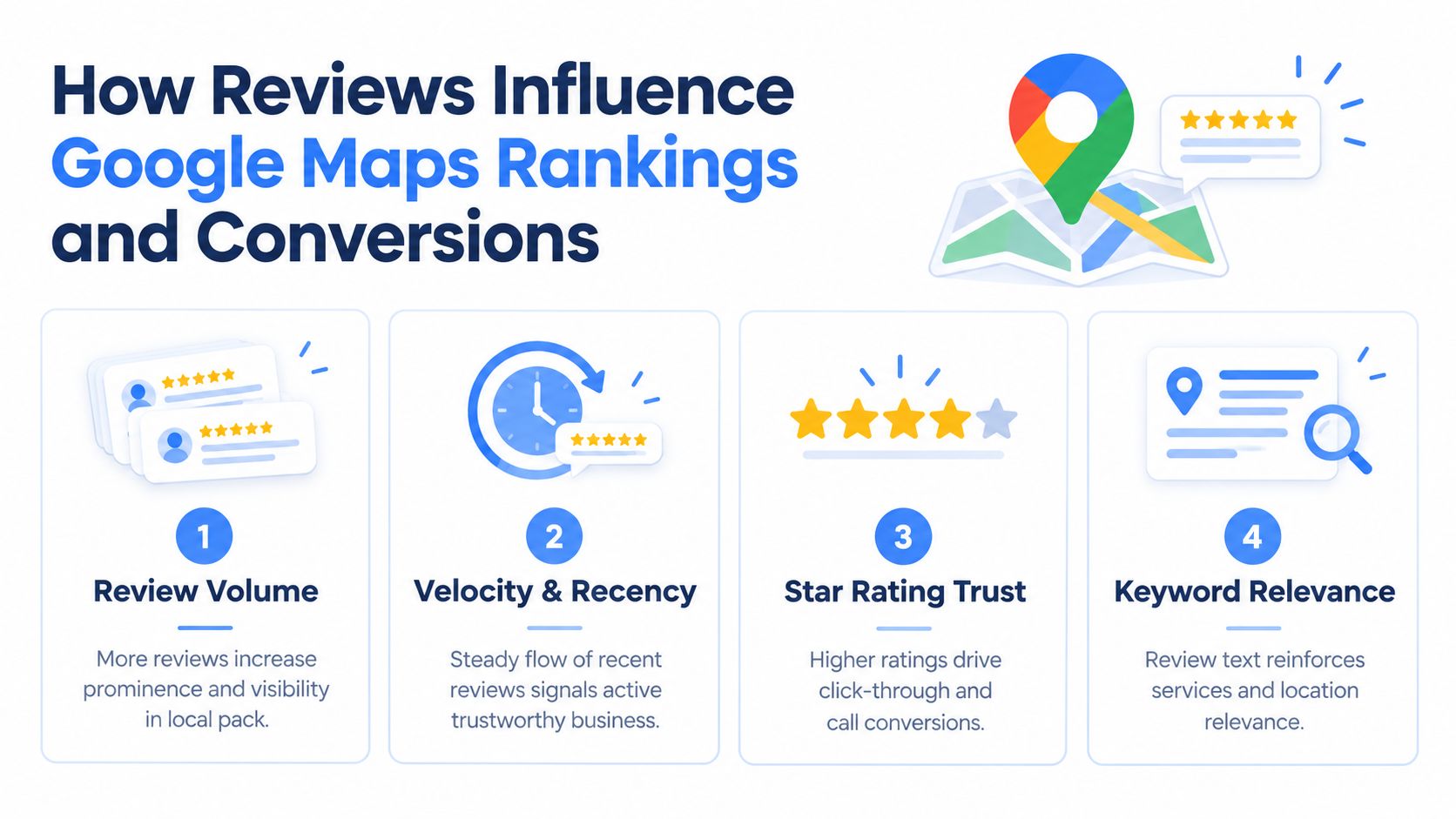
Volume creates a baseline, recency keeps the listing credible
One industry dataset reported an average of 39 reviews per Google Business Profile, while a later summary reported an average of 66 reviews per location as of 2023, according to Google Business Profile statistics from The Media Captain. The same industry coverage cited 255 reviews for a position-one local listing, illustrating how prominent businesses can accumulate substantially more social proof than an average profile.
Those figures are benchmarks, not ranking guarantees. A business with a large lifetime total but no recent activity can still look less active than a competitor that consistently receives authentic feedback. BrightLocal data summarized by Campbell Digital Studio's local SEO statistics reports that 73% of consumers pay attention only to reviews from the past month, 74% say reviews older than three months don't matter, and 41% always read reviews before choosing a local business, up from 29% in 2025.
That changes the operating target. The goal isn't a one-time review drive followed by silence. It's a sustainable flow of recent reviews that reflects real completed jobs and appointments.
Review text can reinforce transactional relevance
A review that naturally mentions an HVAC repair, a neighborhood, or a specific service can help a search system understand the relationship between the business and the customer's need. That doesn't mean asking customers to insert keywords or supplying scripted language for them to copy. It means delivering a clear service experience and allowing customers to describe it in their own words.
This matters for AI-driven local discovery as well. Recent coverage of LLM-based local search reports that semantic relevance is becoming more important in “near me” discovery, with citation ordering depending heavily on how closely a business's content matches user intent rather than relying only on proximity, domain authority, or Maps strength, as discussed by Search Atlas on how LLMs rank local businesses.
For Transactional Marketing, that means review work supports two connected outcomes: stronger trust inside Maps and clearer evidence for systems trying to match a business with a specific high-intent request. A location that consistently demonstrates relevance for the services it provides is better positioned to compete for calls.
You can connect review signals with categories, service areas, profile activity, and website relevance through Google Maps ranking factors. The practical rule is to optimize for the complete customer decision, not an isolated star count.
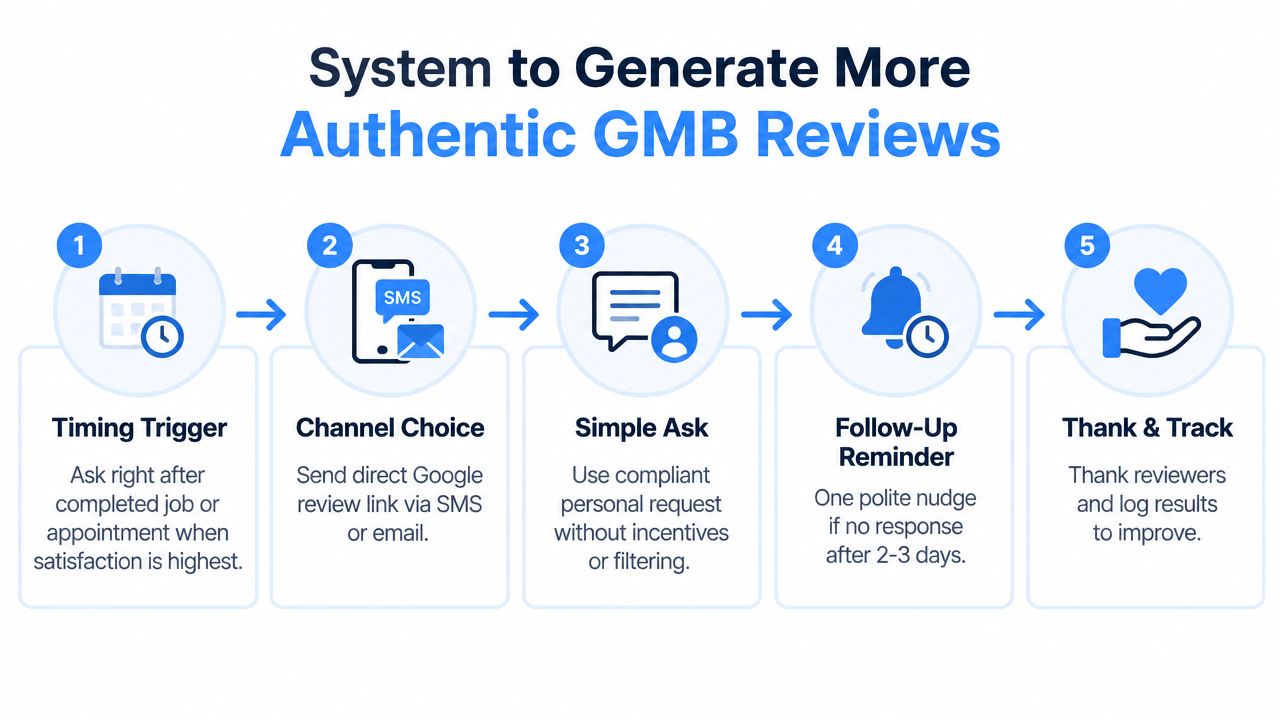
A Proven System to Generate More Authentic GMB Reviews
The most reliable review process starts at the moment a customer has experienced the service. For an HVAC company, that might be immediately after the technician explains the repair and confirms that the system is operating. For a dentist, it could follow an appointment when the patient has completed checkout and received follow-up instructions.
Build the request around a real service trigger
Make the request part of the existing workflow. A field-service CRM can trigger an SMS after a completed job. A dental practice can add a review request to its appointment follow-up sequence. A pest control company can ask after a treatment visit, while a roofing company can ask after the customer approves the completed work.
Use a direct Google review link. Don't make the customer search for the business, open Maps, and identify the correct profile. A QR code on a leave-behind card can support in-person requests, but the digital message should remain the easiest path.
A compliant request can be short:
- HVAC: “Thanks for choosing our team for your air conditioning repair. If you'd like to share your experience, you can leave an honest Google review here: [review link].”
- Plumbing: “We appreciate the opportunity to help with your plumbing service. Your honest feedback helps local customers choose a plumber. You can share it here: [review link].”
- Roofing: “Thank you for trusting us with your roofing project. If you have a moment, please share an honest review about your experience: [review link].”
- Dental: “Thank you for visiting our dental office. We welcome honest feedback about your appointment and patient experience: [review link].”
- Pest control: “Thanks for having our team out today. If you'd like to share how the service went, you can leave an honest Google review here: [review link].”
Ask everyone, not only customers you expect to praise you
Review gating creates compliance risk and distorts the feedback loop. Don't send satisfied customers to Google while routing unhappy customers to a private form. Ask for an honest review from every customer using the same basic process.
One polite reminder is reasonable when a customer hasn't responded. The workflow can send a follow-up after 2-3 days, then stop. Avoid repeated messages that make the request feel like pressure.
The request should never include a discount, gift, payment, or other incentive. It also shouldn't tell the customer what rating to leave. A short personal ask, a frictionless link, and consistent timing produce cleaner feedback than aggressive campaigns.
For additional guidance on getting more 5-star reviews, focus on making the request easy without trying to control the customer's opinion. You can adapt the scripts and workflow ideas in Google review request templates to your CRM, scheduling software, or front-desk process.
This video can help staff understand how to make the request naturally:
How to Respond to Every Review and Turn Negatives Around
A review response is public customer service. Future customers read it while deciding whether to call, so the response should do more than acknowledge the reviewer. It should demonstrate that the business pays attention, communicates clearly, and handles problems without becoming defensive.
Google Business Profile reporting also makes response coverage measurable. Independent aggregated benchmark data reports an overall response rate of about 45%, meaning more than half of reviews remain unanswered, while restaurants and hospitality often reach roughly 55% to 70%, and retail and health and wellness often sit around 35% to 55%, according to SearchLab's Google Business Profile statistics.
Positive reviews deserve useful replies
A strong response thanks the customer, references the service naturally, and signals appreciation without stuffing locations or keywords.
Practical rule: Mention the service only when it fits the customer's actual experience. Don't turn a thank-you into an awkward list of city names and target phrases.
For example, a plumber might write: “Thank you, Maria. We're glad our team could resolve the leaking pipe and explain the repair clearly. We appreciate you trusting our plumbing team.” That reply reinforces the service context while sounding like a person wrote it.
Responding to negative feedback requires more restraint. Acknowledge the concern, apologize for the experience when appropriate, avoid debating details in public, and invite the customer to continue through a private channel. Never reveal appointment information, medical details, addresses, or other private facts.
A useful framework is:
- Recognize the concern: Show that you read the review.
- Take appropriate ownership: Apologize for the poor experience without making unsupported admissions.
- Offer a next step: Provide a phone number or manager contact.
- Move the details offline: Investigate privately.
- Follow through: Fix the operational problem, not just the public wording.
The SearchLab benchmark also associates businesses that respond to at least 25% of their reviews with about 35% more revenue than businesses that don't engage, based on cited industry datasets. That association isn't a promise of causation, but it supports treating response coverage as an operating KPI rather than cosmetic reputation work.
Use the Google review response templates as a starting point, then personalize every reply. A thoughtful response won't erase a legitimate service failure, but it can protect the next customer's confidence.
Staying Compliant While Protecting Your Maps Visibility
The old advice to “get as many five-star reviews as possible” leaves out the most important constraint. Google wants reviews to reflect genuine customer experiences, and shortcuts can put the entire Business Profile at risk.
Google's Business Profile policy identifies prohibited behavior involving fake engagement, incentives, review gating, in-store pressure, and other manipulative tactics. Enforcement can include review removal, a temporary block on receiving new reviews, unpublished existing ratings, and a warning displayed on the profile, as described in Google's official prohibited and restricted content policy.
Tactics that create unnecessary exposure
Don't offer a discount in exchange for a review. Don't ask employees, friends, vendors, or unrelated contacts to post reviews as customers. Don't write reviews for customers, rewrite their words, or provide a message that tells them which rating to choose.
In-store pressure can create a different problem even when the customer is satisfied. Staff should make a respectful request and give the customer freedom to decide later. A QR code may reduce friction, but it shouldn't become a device that directs only selected customers to Google.
Review gating is particularly damaging because it filters feedback before publication. A business might collect private complaints, but it shouldn't use a rating question to determine who receives the public review link. The cleaner system asks every customer for honest feedback and handles service recovery separately.
A safer operating standard
Use written staff guidance that says exactly what employees can and can't do. Automate timing, not sentiment. The CRM can send a request after a completed appointment, but it shouldn't generate fake language or target only customers who gave an internal positive score.
Keep records of the workflow, including the completed job or appointment trigger, the message sent, and any follow-up. This helps managers audit the process and identify whether the business is asking consistently rather than pressuring a narrow group of customers.
Google's enforcement makes review velocity a quality-control issue as well as a marketing issue. A sudden burst of questionable feedback can create more risk than a slower, authentic cadence. For a business competing for “roofer near me,” “dentist near me,” or “air conditioning repair near me,” protecting the profile that generates those calls matters more than chasing an artificial rating.
Track Measure and Scale Your GMB Review Growth
A review program becomes useful when the owner can connect activity with customer actions. Google's Business Profile Performance area lets a business inspect ratings and customer actions over a selected period, but Google's native interface doesn't provide one unified cross-location review dashboard. Operators generally need to inspect each profile individually, then export review text and timestamps from each location into a spreadsheet or analytics system, as described in Google's multi-location review analytics discussion.
Start with a location-level scorecard
Track the same fields for every service area:
- Review activity: Record new review dates, total review count, average rating trend, and response status.
- Service language: Tag reviews by the actual service discussed, such as emergency plumbing, root canal care, roof replacement, or AC repair.
- Customer actions: Compare profile interactions with calls, website visits, direction requests, messages, and booked appointments where your reporting setup supports the comparison.
- Search visibility: Monitor target phrases and cities, especially transactional terms such as “pest control near me” or “chiropractor near me.”
- Operational follow-through: Measure how quickly the team sends requests and responds to published reviews.
A multi-location brand shouldn't rely on a single company-wide average. One dental office may have a strong recent cadence while another location has an aging profile and unanswered feedback. Separate location reporting shows where the process works and where staff training or automation needs attention.
Use the data to choose the next action
If reviews are old, fix the request trigger before changing the website. If customers leave reviews but the profile receives few calls, inspect category relevance, service-area targeting, photos, landing pages, and call handling. If the listing gets attention but staff misses calls, better Maps visibility won't solve the conversion problem.
Transactional Marketing's operating model pairs Google Maps optimization with focused content and reporting around specific transactional search terms in specific local cities. Its dashboard approach can include keyword timelines by service city, Maps ranking heat maps, Search Console queries, traffic, and recurring reporting. That combination helps separate a review problem from a relevance problem, distance limitation, website problem, or sales follow-up problem.
A practical 30 to 60 day sequence
During the first phase, verify the profile, identify the completed-job or completed-appointment trigger, create the direct review link, train staff on the request language, and start responding consistently. Then audit the first group of incoming reviews for service themes, customer concerns, and gaps in the delivery experience.
During the next phase, compare review cadence with profile actions and target-term visibility. Improve the service pages and internal links that support phrases such as “air conditioning repair near me,” “dentist near me,” and “roofer near me,” while continuing the review workflow.
The objective is not a temporary review surge. It's a healthy profile that stays relevant, current, compliant, and easy to contact when a customer has money in hand and is ready to spend it.
Transactional LLC helps service businesses build Google Business Profile review workflows, improve Maps visibility, and target transactional searches that connect nearby customers with the right business. Visit Transactional LLC to discuss a focused strategy for your service area, including Google Maps optimization, review management, and AI-ready local content.