

A lot of business owners look up one day, search their own service plus “near me,” and realize they're not where the money is. Someone in your city searches “air conditioning repair near me,” “roofer near me,” or “dentist near me”, they're ready to spend, and Google shows three map results before almost anything else. If your profile isn't set up right, you're invisible at the exact moment a buyer wants to call.
That's the whole game Transactional Marketing cares about. Transactional search terms bring in people with intent, not browsers. If your Google Business Profile is weak, unverified, or sloppy, you won't own those searches, and you also won't be well-positioned for the next wave of AI optimization, where LLMs and AI-driven search experiences pull from structured local business data to decide who gets surfaced.
Why Your Business Profile Is Your Most Powerful Sales Tool
Your Google Business Profile isn't a directory listing. It's a sales asset sitting in front of local buyers who are already making a decision.
An average local business gets 1,260 views per month, and 48% of searches with local intent lead to a direct interaction with a profile within 24 hours, according to Google Business Profile statistics compiled by Publer. That means this profile affects calls, direction requests, clicks, and booked jobs fast. Not later. The same day.
If you want to understand the basics before you overhaul anything, start with this overview of what a Google Business Profile is. Then treat it like a lead source, not admin work.
Transactional searches are where the money is
When somebody searches “dentist near me” or “plumber near me,” that isn't casual research. That person is trying to hire. Transactional Marketing is built around ranking businesses for those exact searches because that's where revenue comes from.
A strong profile helps you compete in the map pack, but it also feeds the data layer that AI systems rely on. LLM-driven search results don't guess. They pull from business names, categories, service areas, reviews, and other structured signals. If your profile is incomplete, inconsistent, or unverified, you're harder to trust in both classic search and AI-assisted discovery.
Practical rule: If your business depends on local calls, your Google Business Profile should be treated like your primary conversion page.
Why this matters more now than it did a few years ago
Google Maps has become the front door for local service businesses. People don't always click through five websites anymore. They compare businesses inside Google, call directly, and move on.
That's why I also recommend reviewing practical examples from specialists who write often about local visibility, such as Digital Skyrocket on Google Business Profiles. The useful takeaway is simple. Businesses that control their local profile control more of the buying moment.
Transactional Marketing focuses on those buying moments. Not vanity traffic. Not broad awareness. Transactional terms like “air conditioning repair near me” are the target, because that's where local SEO turns into phone calls and jobs.
Laying the Foundation for a High-Ranking Profile
Most ranking problems start before optimization. They start during setup, when the business owner picks the wrong business type, adds extra keywords to the name, or shows an address Google doesn't want displayed.

Google's rules are stricter than most owners realize. To set up a valid profile, your business name must exactly match official documents, and you may only display a physical address if you have permanent signage at that location, based on the requirements summarized by Digisnare's Google Business Profile setup guide.
Get the core identity right
If your legal or real-world name is “Smith Plumbing,” don't enter “Smith Plumbing Emergency Drain Cleaning Water Heater Repair.” That's keyword stuffing. It's sloppy, easy to flag, and not worth the risk.
Use this sequence:
- Create or use a business Google account tied to the company, not your personal login.
- Enter the exact business name shown on official records.
- Choose the closest core category to what you sell.
- Add the primary phone number and website you want customers to use.
- Decide whether customers visit your location or you go to them.
That last point matters a lot for home services.
Physical location versus service area business
Roofers, plumbers, HVAC companies, pest control companies, and mobile service providers usually fit the service area business model. If customers don't visit your office the way they would a dental practice or med spa, don't force a storefront setup just because you want a visible pin.
Use this quick comparison:
| Business type | Best setup choice | Address display |
|---|---|---|
| Dental office, chiropractor, med spa | Physical location | Show address if you have permanent signage |
| Roofer, plumber, HVAC, pest control | Service area business | Usually hide the address from public view |
| Mixed model business | Depends on actual customer behavior | Only show address if eligible |
A bad setup choice at the start creates cleanup work later. Google usually trusts accurate structure more than aggressive optimization.
Your citations have to match the profile
Once the profile foundation is built, make sure the rest of your web presence supports it. If your name, address details, and phone data vary across directories, you create trust issues before you even try to rank. Consequently, citation building for local SEO becomes part of setup, not an afterthought.
For businesses that want to show up for transactional searches in specific cities, consistency matters because Google needs to connect every mention of your company to one legitimate entity. If your goal is to rank for searches like “roofer near me” or “dentist near me,” don't build on a crooked foundation.
Navigating the Google Verification Gauntlet
A lot of owners think setup ends when they hit submit. It doesn't. Verification is where many listings stall, especially in home services.
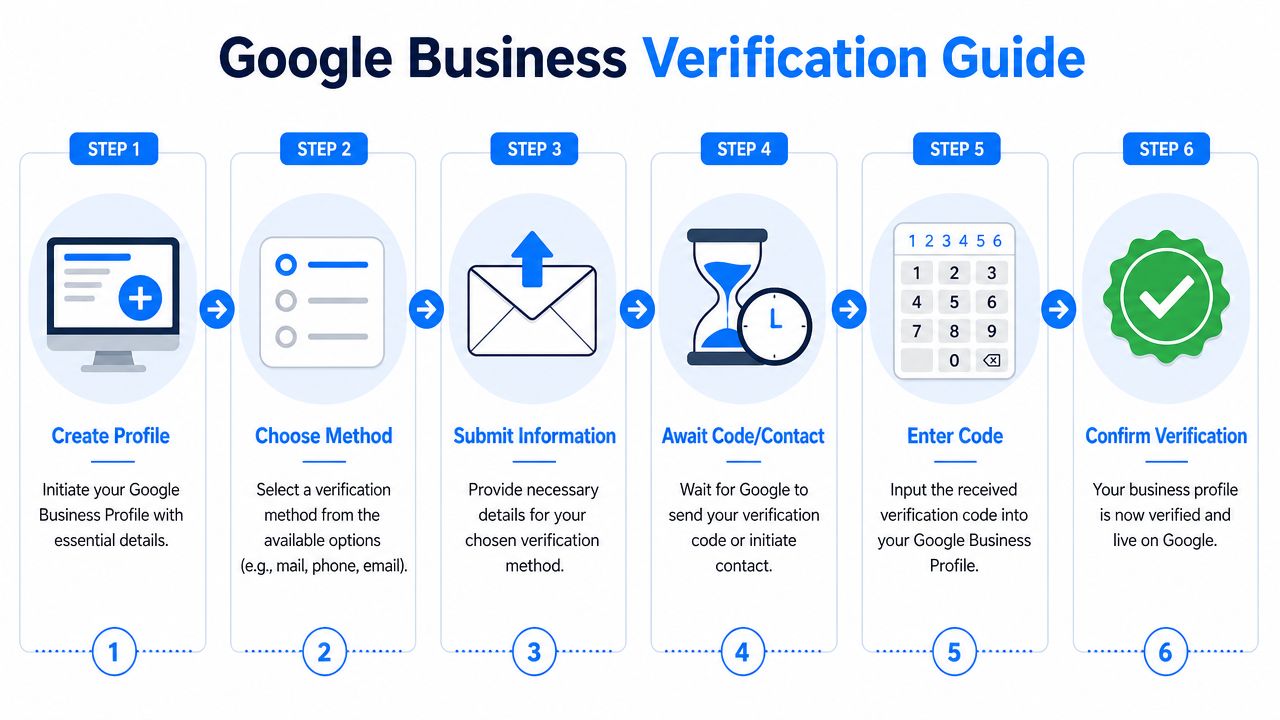
Google may take up to 5 days to verify a new profile after submission, and the process often uses a unique code sent by text or post, with video verification sometimes used if other methods fail, according to this walkthrough on Google Business verification timing and methods. That's the clean version. The messy version is what happens when your records don't line up.
Why service businesses hit problems more often
For service area businesses, Google still requires a real mailing address for verification, even when the public listing hides that address. There's a documented 15 to 20% failure rate for new listings due to address mismatch errors, and those errors can reduce local finder ranking by up to 30%, based on Rinard Media's guide to setting up and verifying a Google Business Profile.
That means your SAB setup has to be precise:
- Use a valid mailing address: Google needs it for verification, even if customers never see it.
- Match your records everywhere: Website details, Google Maps details, and business documentation need to agree.
- Choose SAB only if it reflects reality: Don't fake a storefront model.
- Check your service area logic: Your setup should reflect where you work.
The verification path you should expect
Most businesses will move through a process like this:
- Profile submission: You enter your business details and wait for Google to decide the verification method.
- Method assignment: Google may offer text, postcard, or another route.
- Code or proof step: You submit the requested code or complete the requested verification action.
- Review period: Google checks the information and either approves, delays, or requests more proof.
If your listing isn't surfacing properly after setup, review common map visibility issues through this resource on why a business may not be showing up on Google Maps.
Verification failures usually aren't random. They come from mismatched business data, weak documentation, or the wrong profile structure.
What I tell service business owners to do before submitting
Don't rush verification. Audit your basics first.
Check your business name, address records, website footer, contact page, and any map references. If you operate in home services and want those high-intent calls from transactional searches, Google has to trust that your business is real, stable, and located where you say it is. Verification is not busywork. It's the trust gate.
Optimizing Your Profile to Dominate the Map Pack
A homeowner searches “emergency plumber near me” at 7:12 PM. They do not compare ten websites. They tap one of the top map results, scan a few photos, read two reviews, and call. Your Google Business Profile decides whether that call goes to you or to a competitor.

Your profile is not a directory listing. It is a sales page inside Google's results, and Google uses it to judge relevance for high-intent local searches. If you run HVAC, plumbing, roofing, pest control, dental, chiropractic, or a med spa, this is one of the clearest paths to more calls from people ready to book now. It also sets up your business for AI-driven discovery, because Google and AI systems both favor profiles with clear services, strong entity signals, and complete business data.
Fill out the profile like revenue depends on it
Half-complete profiles do not win competitive map pack terms.
Google gives you specific fields for a reason. Fill them with accurate, commercially useful information that matches what you sell and where you sell it. Categories, services, hours, photos, business description, attributes, and review responses all shape how your listing is understood.
Use this checklist:
- Choose the right primary category: Pick the category that matches your main money service, not a broad label that sounds nice.
- Add relevant secondary categories: Use secondary categories to support real service lines, not every category that loosely fits.
- Build out your service list: Add each legitimate service you want tied to the profile.
- Upload real photos: Use clean, current images of your team, trucks, office, equipment, and completed work.
- Manage reviews consistently: Ask for reviews after completed jobs and respond in a way that reinforces trust and service quality.
- Turn on conversion features where they fit: Booking, messaging, and appointment tools reduce friction for buyers who are ready to act.
For a stronger process, follow this guide on how to optimize a Google Business Profile.
Write for buyer intent
Your business description should help a prospect decide to contact you. It should also help Google connect your profile to the searches that drive jobs.
Be specific. An HVAC company should mention AC repair, furnace repair, system replacement, maintenance, and the cities it serves. A dentist should highlight the treatments patients search for when they want to book, not vague branding language about care and comfort. The businesses that win the map pack usually align their profile language with transactional searches, the terms people use when they need service now.
This video gives a useful visual breakdown of optimization priorities:
Use every field that helps rankings and conversions
Some fields strengthen relevance. Others make it easier for a ready-to-buy prospect to call, book, or trust you fast. You need both.
| Profile element | Why it matters |
|---|---|
| Categories | Defines the searches Google should test your profile against |
| Services | Expands visibility for specific service intent |
| Photos | Builds trust and confirms you are a real operating business |
| Reviews and responses | Adds proof, activity, and service context |
| Appointment tools | Reduces steps between search and conversion |
If you want another industry example, review Google Business Profile optimization for manufacturers. The market is different, but the principle is the same. Specific profiles outperform generic ones.
The map pack goes to the business that gives Google the clearest answer to three questions: what do you do, where do you do it, and why should the customer contact you now?
Advanced Strategies to Outrank Your Competition
Most competitors stop after setup, categories, and a few photos. That leaves a lot of room to pass them.
The fastest gains often come from activity layers that business owners ignore. Google Posts, Q&A management, service updates, and profile freshness all help reinforce relevance. Beyond that, they give you control over the language attached to your business.
Use Posts to reinforce transactional intent
Google Posts aren't there to entertain people. Use them to support real services, seasonal demand, and urgent buying scenarios.
A roofing company can post storm repair updates. An HVAC business can post about AC repair and system replacement. A dental office can post around emergency visits, implants, or new patient offers. Keep the writing direct. Tie it to the service and the city. That supports the exact type of searches Transactional Marketing targets, where the person searching is ready to buy.
Own your Q and A before strangers do
The Q&A section is one of the most underused assets on the profile. If you leave it empty, Google has less context. If you let random users shape it first, you lose message control.
The stronger move is to seed common questions yourself. The Seed-and-Verify strategy, where owners post and answer their own Q&A, has been shown in 2025 to 2026 tutorial data to produce a 15 to 20% increase in local search impressions for service businesses in major markets, according to this video explaining the Seed-and-Verify method.
Examples that work well:
- Do you offer same-day AC repair in Phoenix?
- Do you handle emergency roof leak service after storms?
- Do you accept new dental patients this month?
- What areas do you serve for pest control?
Then answer clearly, with service and location context.
Seed the questions your buyers already ask. Then answer them better than your competitors would.
Build for AI optimization, not only old-school local SEO
Many local businesses lag in this area. AI systems and LLM-driven search experiences need structured, reinforced business information. They work better when your business profile, service pages, city pages, reviews, and FAQs all tell the same story.
That's why one blog post per industry and per topic matters. Roofing SEO content should stand on its own. Dental SEO content should stand on its own. Don't blur industries together. A roofing company needs relevance around roofing terms. A dental practice needs relevance around patient intent. AI optimization rewards specificity.
If you want to rank for “air conditioning repair near me,” don't publish vague content about “home services.” Build a profile and content ecosystem around that exact revenue term.
Troubleshooting Common Issues and Next Steps
You submit verification on Monday. By Friday, your profile is still stuck, your phone is quiet, and Google wants another video. That usually comes down to one problem. Your business details do not line up across the assets Google checks.
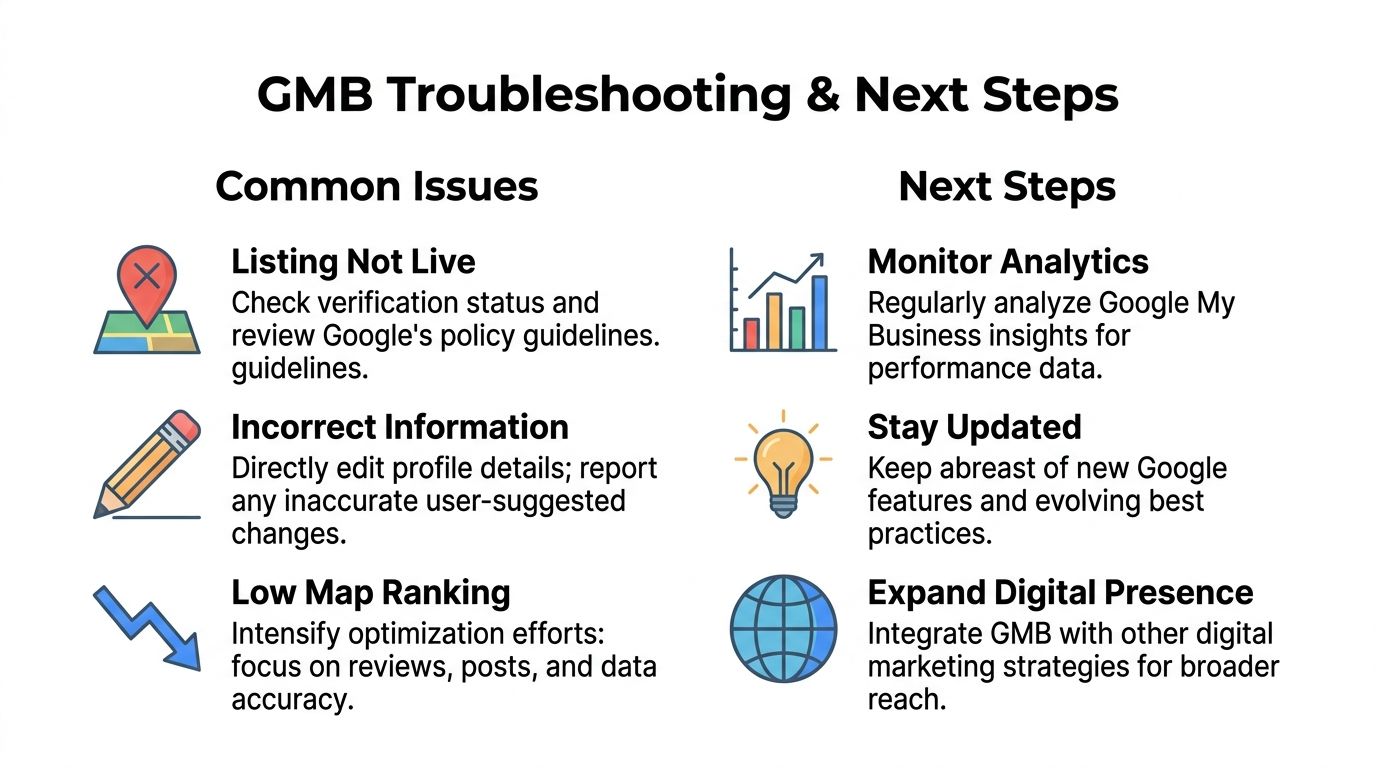
Video verification failures are common for service businesses, especially after a move, a rebrand, or a sloppy website update. Google support explains the verification process and the reasons businesses may need to verify again through its Business Profile verification help documentation. The practical takeaway is simple. If your address, business name, service area, signage, and public web references conflict, expect delays.
Why your website alone won't save you
A website does not prove operational legitimacy by itself. Google checks whether the business behind that site looks real, active, and consistent.
That is where many contractors and multi-location service brands get into trouble. The footer shows one address. The contact page shows another. An old suite number still lives on directory listings. The profile is set up like a storefront even though the business runs as a service area business. Those mixed signals slow verification and weaken trust after the profile goes live.
Run this check before you retry verification:
- Website contact details: Match your current business records exactly.
- Business name: Use the same real-world name everywhere. No extra keywords.
- Address and map signals: Remove outdated location references and fix old citations.
- Service area setup: If you visit customers, configure the profile like a service business, not a retail shop.
- Proof in your video: Show branded vehicles, tools, work materials, signage, and access to the business location if applicable.
Common issues that keep profiles weak
A profile can be verified and still fail to produce calls. That is a setup problem, a maintenance problem, or both.
| Problem | Likely cause | Practical fix |
|---|---|---|
| Listing is live but barely shows | Weak relevance and low trust | Tighten primary category choice, complete services, add recent photos, and keep reviews coming |
| Duplicate listing confusion | Old or auto-generated profile still exists | Find the duplicate, request removal or merge, and keep one clean version active |
| Wrong edits showing publicly | User edits or stale third-party data | Check the profile every week and reverse bad edits fast |
| Bad review panic | Defensive or delayed response | Reply with facts, offer a resolution path, and show prospects you handle problems like a pro |
A bad review does less damage than a bad response. Buyers read your reply to decide whether to call.
What happens after setup
Treat your profile like a revenue asset, not a one-time task. The businesses that win local search keep their profile active, accurate, and aligned with the rest of their online presence.
That means new photos, review responses, service updates, and regular checks for unwanted edits. It also means your profile, website, city pages, and FAQs need to support the same high-intent searches. If you want to dominate terms like “roofer near me,” “dentist near me,” or “air conditioning repair near me,” your Google Business Profile has to operate as part of a larger local authority system built for map pack rankings and AI-driven discovery.
If you want help setting up and optimizing your Google Business Profile around real transactional search terms, Transactional LLC can help you build the local SEO, Google Maps, and AI optimization system behind it. The focus is simple: get your business found when local buyers are ready to spend, then turn that visibility into calls, jobs, and patients.