


Naming your pictures for SEO is one of the most powerful and frequently missed opportunities in local search and the new world of AI optimization. It seems simple, but switching a filename from something generic like IMG_1234.jpg to a keyword-rich name like 'emergency-roof-repair-dallas-tx.jpg' sends a crystal-clear signal to Google and AI models.
This small change is what helps you get found by high-intent customers—the ones searching for your services right now, ready to make a call. At Transactional Marketing, our entire system is built to get our clients to show up for these valuable transactional search terms.
Your Untapped SEO and AI Optimization Superpower For Local Search

Here at Transactional Marketing, our entire game plan revolves around one thing: capturing transactional search traffic. We’re talking about the people typing "dentist near me" or "air conditioning repair near me" into Google. They have a problem and money to solve it. This is why we are called Transactional Marketing—we get our clients found for the searches that lead directly to transactions.
Every single piece of your website needs to be working toward that goal, and that absolutely includes your image files.
Think of each photo on your site as a miniature billboard. A generic filename like ‘photo-1.jpg’ is a blank sign, telling search engines and Large Language Models (LLMs) absolutely nothing. On the other hand, a descriptive name acts as a bright, clear signpost, reinforcing exactly what you do and where you do it. This isn't just a minor tweak anymore; it's a core component of modern search engine optimization and AI optimization, especially as AI search models get smarter.
Why Descriptive Filenames Drive Real-World Results
Search engines and the AI systems powering them are built to understand context. When they crawl your site, they analyze everything—the text, the links, and yes, the image filenames. A properly named image gives them the exact data they need to rank you for specific services in your local area, targeting the transactional search terms we go after.
This is the kind of detail that can push your business into the Google Maps pack, a move that Transactional Marketing’s technology excels at. Ranking in the top three map locations translates into hundreds of more phone calls every month and literally thousands of more phone calls every year.
The table below breaks down just how significant this is for a local business trying to attract customers who are ready to buy.
Image Filename SEO Impact Analysis
| Filename Type | Example | SEO Value | Impact on Transactional Search |
|---|---|---|---|
| Generic | DCIM_0257.jpg |
Zero | Invisible to search engines for service and location queries. Misses the opportunity to attract ready-to-buy customers. |
| Descriptive | commercial-hvac-repair-austin-tx.jpg |
High | Directly signals service type and location, increasing relevance for high-intent transactional searches like "commercial HVAC repair Austin." |
As you can see, the difference is night and day. A generic filename adds no value, while a descriptive one actively works to bring you transactional traffic.
This isn't just a theory we have. Research from an analysis of 50,000 search queries showed that pages with descriptively named images ranked, on average, 2.3 positions higher in image search results. In competitive local markets, that’s a game-changing advantage. Discover more insights from this image SEO study.
This direct link between descriptive names and visibility is exactly why we bake this into our process. It's a key part of the proven system Transactional Marketing uses that helps our clients start showing up on the first page of Google, often in just 30 to 60 days.
Of course, this technique works best as part of a complete strategy. For a broader look at building an online presence, many of the same concepts can be found in guides covering digital marketing for real estate agents, as the core principles of local visibility are universal. By optimizing every element you can—especially your Google Business Profile—you create an undeniable signal of authority that search engines can't ignore. If you're new to that, our guide on what a Google Business Profile is is a great place to start.
The Transactional Blueprint for Image Filenames
Forget the generic advice you've read elsewhere. At Transactional Marketing, we've refined a battle-tested approach for naming image files. This isn't just a suggestion; it's the exact blueprint we use to help our clients attract customers who are ready to hire someone right now by showing up for transactional search terms.
It's time to leave IMG_1234.jpg in the past. Our go-to structure is both simple and incredibly effective:
[Main Service] + [Qualifier] + [City] + [State]
Following this structure turns every single image on your site into a hard-working asset. It clearly tells search engines and AI models like Google's what you do and where you do it, targeting the high-intent, transactional searches that actually lead to phone calls and revenue.
Putting the Naming Convention to Work
This isn't just theory—it's a practical method that works for any local service business because it's built around how real customers search for help. The trick is to put yourself in their shoes. What specific, urgent problem are they trying to solve?
Here’s how this plays out for a roofing business, which is just one example. We craft a unique blog post for every industry we work with, from dentists to HVAC companies.
- For a Roofing Company: A photo of a roof damaged by a recent storm shouldn't be
roof-photo.jpg. It should beemergency-roof-repair-dallas-tx.jpg. A shot of a new installation? Tryasphalt-shingle-replacement-dallas-tx.jpg. - For an HVAC Business (a different article): A picture of a tech servicing an air conditioner becomes
air-conditioning-repair-near-me.jpgor24-hour-ac-repair-phoenix-az.jpg. These are the exact search terms we get our customers to show up for. - For a Dentist (another separate article): An image of a smile makeover would be
cosmetic-dentist-beverly-hills-ca.jpg, targeting a high-value transactional term.
The logic is simple. The filenames are designed to perfectly match the transactional search terms a customer in a bind would be typing into their phone. This is a fundamental step in dominating the search results for your most profitable services.
Expert Tip: Don't just describe what's in the photo. Name the file for the transactional search query you want to own. You're turning each image into a magnet for customers ready to make a call.
Why This Laser-Focused Approach Is So Powerful
This method works because it leaves zero room for misinterpretation. When a Google crawler analyzes your site, it sees the file name emergency-leak-repair-austin-tx.jpg and instantly connects it to the content on your Austin plumbing services page. This creates a powerful signal of relevance that's hard to ignore, perfectly aligning with our goal of capturing transactional searches.
That direct alignment is a game-changer for ranking in the Google Maps pack, which is where most ready-to-buy customers find local businesses. Transactional Marketing has the technology to make sure our clients show up in the top three of these map locations. Every signal you send to Google confirming that you are the top result for "emergency leak repair in Austin" increases your chances of landing one of those top three spots. That visibility is what can lead to hundreds of additional calls.
Of course, choosing the right keywords for your filenames is a science in itself. To really master this, take a look at our guide on keyword research best practices for local businesses to see how we pinpoint these high-value transactional terms. When you combine strategic image naming with smart keyword targeting, you build a powerful foundation for growth.
More Than Just a Filename: A Complete Image SEO Strategy
A smart filename is a fantastic start, but it's only one piece of the puzzle. To really make an impact in local search, dominate AI optimization, and get your phone ringing, you need to think about the entire picture—literally. This means paying close attention to your alt text, captions, and even the file size of your images. Each element works together, sending strong, clear signals to Google about who you are, what you do, and where you do it.
Getting these details right is what separates the businesses that show up on page one from those that don't. It’s not about finding one magic bullet; it’s about making every single part of your website pull its weight to attract customers who are ready to buy. This is how Transactional Marketing gets clients to show up for transactional search terms.
We've refined our approach into a simple, repeatable formula for naming images to target those high-value local searches.
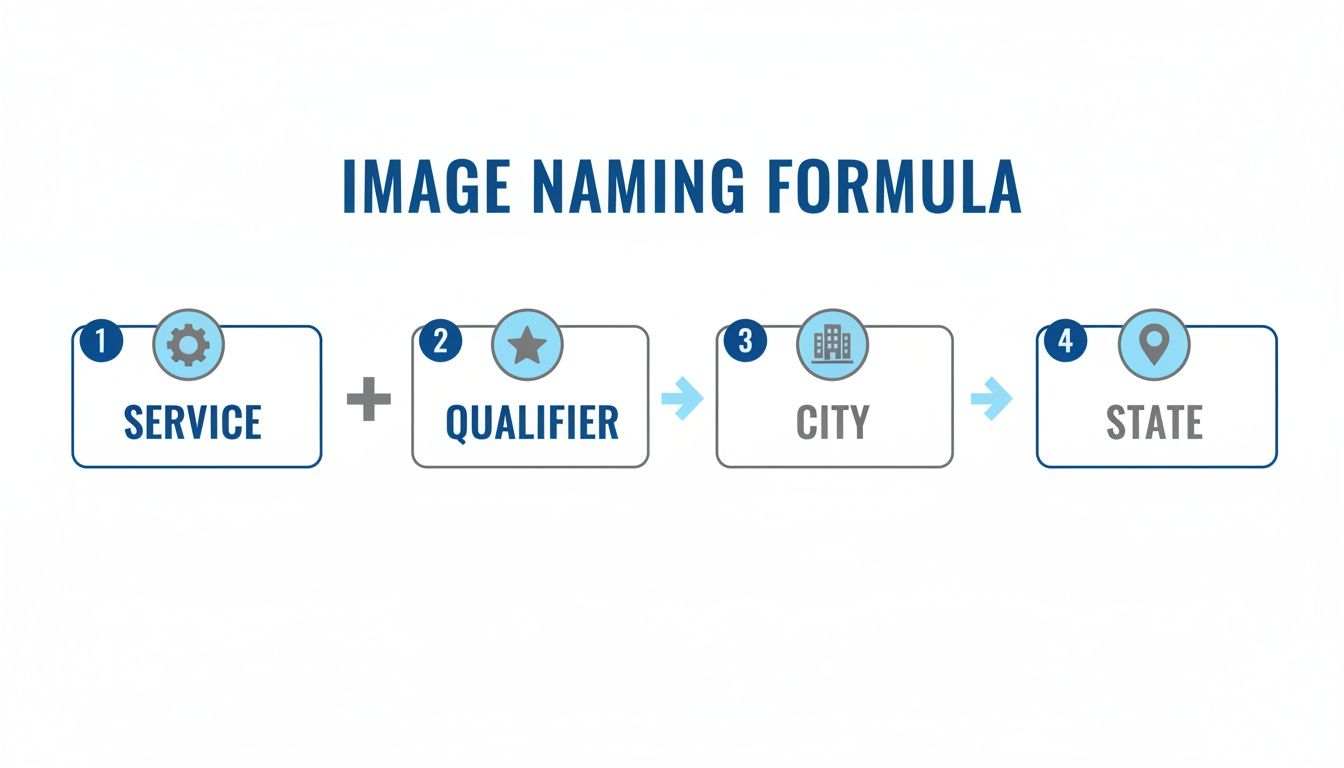
This simple equation ensures every image you upload clearly communicates your core service and specific location, leaving no room for guesswork for search engines or LLMs.
Crafting Alt Text That Actually Works for SEO and AI
Alt text (or alternative text) is what shows up if an image doesn't load. It’s also what screen readers use to describe images to visually impaired users. But for our purposes, it’s a golden opportunity. Search engines and AI models lean heavily on alt text to understand an image’s content, making it the perfect place to reinforce your transactional keywords.
The key is to be descriptive, not spammy. Think about what’s actually happening in the photo.
- Weak Alt Text:
roofer on a roof - Better Alt Text:
Licensed roofer performing emergency storm damage repair on a home in Dallas, TX
See the difference? The second example gives Google and AI systems rich, contextual information, helping you rank for the exact phrases your ideal customers—the ones with money in hand—are typing into the search bar.
Don't Forget Captions and Surrounding Content
While alt text is primarily for search engines, captions are for your human visitors. A good caption adds context, explains what’s happening in a "before and after" shot, or tells a quick story about the job. This boosts engagement, and when users spend more time on your page, Google takes that as a positive sign.
The text around your images matters, too. Search engines and AI optimization don't just look at the image; they analyze the entire page to understand its topic. Make sure the paragraphs and headings near your photos support the services and locations you're targeting. Thinking like a copywriter and learning the basics of writing compelling real estate descriptions, for example, can give you great ideas for framing your images with effective, persuasive text.
Why File Size and Site Speed Are Non-Negotiable
Finally, you could have the most perfectly optimized images in the world, but if they’re too big, they’ll sink your site. Large image files are the number one cause of slow-loading websites, and site speed is a massive ranking factor.
Think about it from the customer's perspective. Someone with a burst pipe or a downed tree on their roof isn't going to wait ten seconds for your gallery to load. They’ll hit the back button and call your competitor. This is a lost transaction.
To prevent this, always compress your images before uploading them. You should aim to keep file sizes under 500KB whenever possible, without making the quality noticeably worse. This creates a fast, smooth experience that keeps users on your site and converts them into paying customers. For an extra local SEO boost, it's also worth learning how to geo-tag images to embed location data directly into the file.
Connecting Your Image SEO to Your Google Business Profile
Smart image optimization isn't just for your website. Your Google Business Profile (GBP) is arguably your most powerful tool for attracting ready-to-buy local customers, and your photos are the fuel that makes it run. At Transactional Marketing, we see a well-maintained GBP as a direct line to customers searching with transactional intent, and every image is a new opportunity to prove you're the right choice. Our Google Maps optimization service is designed to dominate this space.
When you upload a photo to your profile, you're sending a clear signal to Google that your business is active. This consistent activity is a major factor in boosting your Google Maps ranking and getting you into that all-important "map pack" for transactional searches like "roofer near me."
Before you even think about uploading, make sure you're naming pictures for SEO using the same formula we've been talking about: [Service]-[Qualifier]-[City]-[State].jpg. A photo named finished-bathroom-remodel-houston-tx.jpg gives Google so much more context than the default IMG_9876.jpg from your phone.
A Winning Strategy for GBP Photos
The key here is consistency. Routinely adding new, properly named photos to your GBP is like sending a steady stream of positive updates to Google. It proves you're still in business and actively serving customers, building a visual portfolio that speaks directly to your next client.
To get even more mileage out of your photos, take a moment to place them in the correct GBP categories. This adds another layer of context that helps both the algorithm and your potential customers understand what they're looking at.
- At Work: Show your crew in action. Think
commercial-hvac-maintenance-austin-tx.jpg. - Team: Put a face to the name. A great example would be
licensed-plumbing-team-dallas-tx.jpg. - Interior/Exterior: Feature your office or, even better, a finished project. Try
modern-dental-office-interior-phoenix-az.jpg.
This is a core part of the system we use to land our clients in the top three map pack spots. It’s a proven method that directly translates into hundreds more calls each month simply by showing your authority right where customers—with money in hand—are looking for it.
Organizing Website Images for Maximum Impact
This entire approach should mirror how you organize images on your own website. By creating a logical folder structure for your site's images, you provide even more powerful clues to search engines about what your content is about. Think of it as a digital filing cabinet that makes Google's job easy.
For example, a folder path like /images/roofing/dallas/ instantly tells a search engine crawler that the pictures inside are about roofing in Dallas.
When you pair that with a keyword-rich filename like tile-roof-repair-dallas-tx.jpg, you're sending an undeniable signal of relevance for that exact service in that exact city. This is how you start to dominate the search results for transactional search terms.
This kind of detailed organization is non-negotiable for building a strong local presence. To go even deeper on this topic, check out our full guide on how to optimize your Google Business Profile.
Common Mistakes That Sabotage Image SEO
You can put in all the effort to optimize your images, but a few simple mistakes can undo all of that hard work. It's frustrating, but we see it happen all the time. When the details are wrong, you're essentially letting your competitors scoop up the high-value, transactional customers that should be calling you.
Getting this right is a huge part of why our clients see such fast results. The proven system at Transactional Marketing often lands businesses on page one of Google within 30 to 60 days. It’s not about working harder; it’s about avoiding the common slip-ups that trip up every other boring marketing company.
Using Underscores or Spaces in Filenames
This one is probably the most frequent technical error we see. People use spaces or underscores (_) to separate words in an image file name, thinking it helps with readability. Unfortunately, Google doesn’t see it that way.
Search engines read hyphens (-) as a space, properly separating the words. But underscores are often ignored, mashing your keywords together into a nonsensical string. Spaces are even worse, as they can break the image URL entirely.
- What Not to Do:
hvac repair austin tx.jpgorhvac_repair_austin_tx.jpg - What to Do Instead:
hvac-repair-austin-tx.jpg
It’s a tiny detail that makes a world of difference in how Google interprets what your image is about, and it's a key part of targeting a transactional search term.
Keyword Stuffing Your Files
In the rush to rank for everything, it's tempting to cram every possible keyword variation into a single file name. This is called keyword stuffing, and it's a major red flag for search engines. It looks spammy, feels unnatural, and can actually get you penalized.
Your file name should be descriptive and focused, not a chaotic list of terms.
- What Not to Do:
best-roofer-roofing-dallas-tx-roof-repair-company.jpg - What to Do Instead:
commercial-roof-repair-dallas-tx.jpg
A tightly focused file name signals authority and expertise for a specific service. That’s exactly what you need to attract a customer who is ready to make a purchase.
Forgetting to Add Your Location
For any local service business, where you operate is just as critical as what you do. A file name like emergency-plumbing-repair.jpg is only half the story. It doesn't tell Google which city or neighborhood you serve, making it incredibly difficult to show up in local search results or the Google Maps pack.
Industry analysis shows that default or generic image filenames do nothing for SEO, representing a massive untapped opportunity. To make your images work for you, studies suggest using 2–5 descriptive words that include relevant keywords and separate them with hyphens, not underscores. Discover more insights about naming images for SEO.
Always including your city and state helps you target those high-intent, transactional searches—like "plumber near me"—that drive immediate business right to your phone. At Transactional Marketing, we laser-focus and target specific search terms in specific local cities, right where your customers are.
Using Generic or Default Filenames
Of all the mistakes, this is the most common and easily fixed. Using the default name from your camera (IMG_4077.JPG) or a generic label (team-photo.jpg) gives search engines zero context.
Think of every single image on your site as a tiny billboard. Each one is a chance to reinforce what you do and where you do it.
- What Not to Do:
DSC_0054.jpg - What to Do Instead:
dental-implants-scottsdale-az.jpg
Skipping this step is like leaving your most valuable marketing assets completely blank. By sidestepping these simple but critical errors, you ensure every image you upload is actively working to bring you the transactional customers you need to grow your business.
Frequently Asked Questions About Image SEO
We've walked through the core strategy for naming images, but this is usually where the specific questions start popping up. Let's tackle the ones we hear most often from service business owners we work with.
Getting these details right is what separates a generic SEO effort from a targeted strategy that drives high-intent, transactional customers—the ones who are actively looking to hire someone right now.
How Many Keywords Should I Use in an Image Filename?
Keep it simple and direct. The sweet spot is a concise phrase of 3-5 words that clearly states the service and location. The goal isn't to cram in every keyword you can think of; it's to create a label that's instantly understandable to both Google and a potential customer.
Our Pro-Tip: Just think about how a real person would search. Someone with a broken AC in Phoenix is going to type in "AC repair Phoenix," not a jumbled list of related terms. Your filename should mirror that exact transactional intent.
Here’s what that looks like in practice:
- Good:
24-hour-ac-repair-phoenix-az.jpg - Bad:
best-ac-repair-hvac-service-phoenix-arizona-near-me.jpg
The first example is laser-focused on a valuable transactional service term. The second one just looks like spam and actually weakens your message.
Does Naming Pictures for SEO Work for All Service Industries?
Yes, without a doubt. This is a foundational tactic that works for any local service business, whether you're a plumber, roofer, dentist, or even a med spa. At Transactional Marketing, we believe in creating separate, dedicated blog posts for each industry, like SEO for roofing or SEO for dentists, to ensure the content is laser-focused.
The principle is universal: you're aligning your website's assets with the specific transactional searches your ideal customers are making in your service area. It doesn't matter if they're searching for "emergency plumber denver" or "cosmetic dentist miami"—the logic holds true.
Should I Go Back and Rename All My Old Images?
Here's our practical advice: prioritize new images first. Get your process down for everything you upload from this point forward.
For your most important existing pages—think your primary service and city pages—it can absolutely be worth the effort to go back and optimize those images. However, a word of caution: changing an image's filename will break the old link. If you decide to update old images, you must implement 301 redirects from the old image URLs to the new ones. This tells Google where to find the new file and preserves any SEO equity you've already built.
How Quickly Will I See Results From Naming My Images?
Image SEO is a crucial piece of a much larger puzzle. When you combine this targeted approach with a fully optimized Google Business Profile and strong on-page SEO—the exact system Transactional Marketing provides—the results can be surprisingly fast. Our proven system gets a customer's website showing up on page one of Google, typically within 30 to 60 days.
Consistency is what makes the difference. Applying these granular, focused principles across your entire digital footprint is what generates real, measurable movement for the transactional search terms that lead directly to paying customers.
Ready to stop missing out on those transactional customers? At Transactional Marketing, we apply this exact level of detail to your entire online presence to make your phone ring. Visit us at https://transactional.net to see how our system can get you to page one.