

Negative keywords are words or phrases that prevent your Google Ads from showing on irrelevant searches, protecting your budget from wasted impressions and unqualified clicks. In Search campaigns, Google Ads supports broad, phrase, and exact negative match types, so you can control exclusion with different levels of precision.
A local service campaign can look perfectly targeted at launch and still attract searches from people looking for DIY instructions, replacement parts, employment, free services, or businesses in cities you don't serve. That's why choosing strong target keywords isn't enough. You also need a system for shaping which searches your ads should avoid, while preserving the transactional search terms that signal a customer is ready to book.
The Budget Drain Every Local Business Faces
A business owner launches a campaign around “air conditioning repair near me.” The service is specific, the landing page is ready, and the ad promises fast help. Then the search terms begin arriving: how to repair an air conditioner, air conditioner parts, HVAC jobs, and air conditioning repair in a city outside the company's service area.
Those searches are related to the keyword. They still aren't good prospects for the business.
The DIY searcher wants instructions. The parts shopper wants a component. The job seeker wants employment. The person in another city may need the service, but not from this company. Each search can consume attention, impressions, and clicks without moving the business toward a booked job.
Practical rule: A keyword can be topically relevant and commercially irrelevant at the same time.
This problem is common with broader keyword targeting because Google Ads has to interpret what a person means, not just compare one word with another. If the account doesn't clearly exclude unwanted intent, an ad for a roofer, dentist, plumber, or pest control company can appear beside searches that never had a realistic path to a sale.
Negative keywords provide the control layer. Google defines them as a way to prevent ads from being triggered by specific words or phrases, helping advertisers exclude irrelevant search terms and focus spend on the keywords that matter to customers. The platform also supports negative keyword lists, account-level negatives, campaign-level negatives, and ad-group-level negatives, which makes the feature suitable for ongoing account management rather than one-time cleanup. See Google's negative keyword documentation for the platform's current workflow.
For a local service business, the commercial distinction matters. Transactional Marketing focuses on searches such as “roofer near me,” “dentist near me,” and “air conditioning repair near me,” because those searches often come from people actively looking for a provider. Negative keywords help keep research traffic, job searches, parts queries, and irrelevant locations from competing with those high-intent opportunities.
The cost of poorly filtered traffic depends on the account, bid strategy, competition, and search behavior. A practical explanation of the broader factors behind Google paid search cost can help owners evaluate why a campaign may spend quickly without producing enough calls.
How Negative Keywords Actually Work
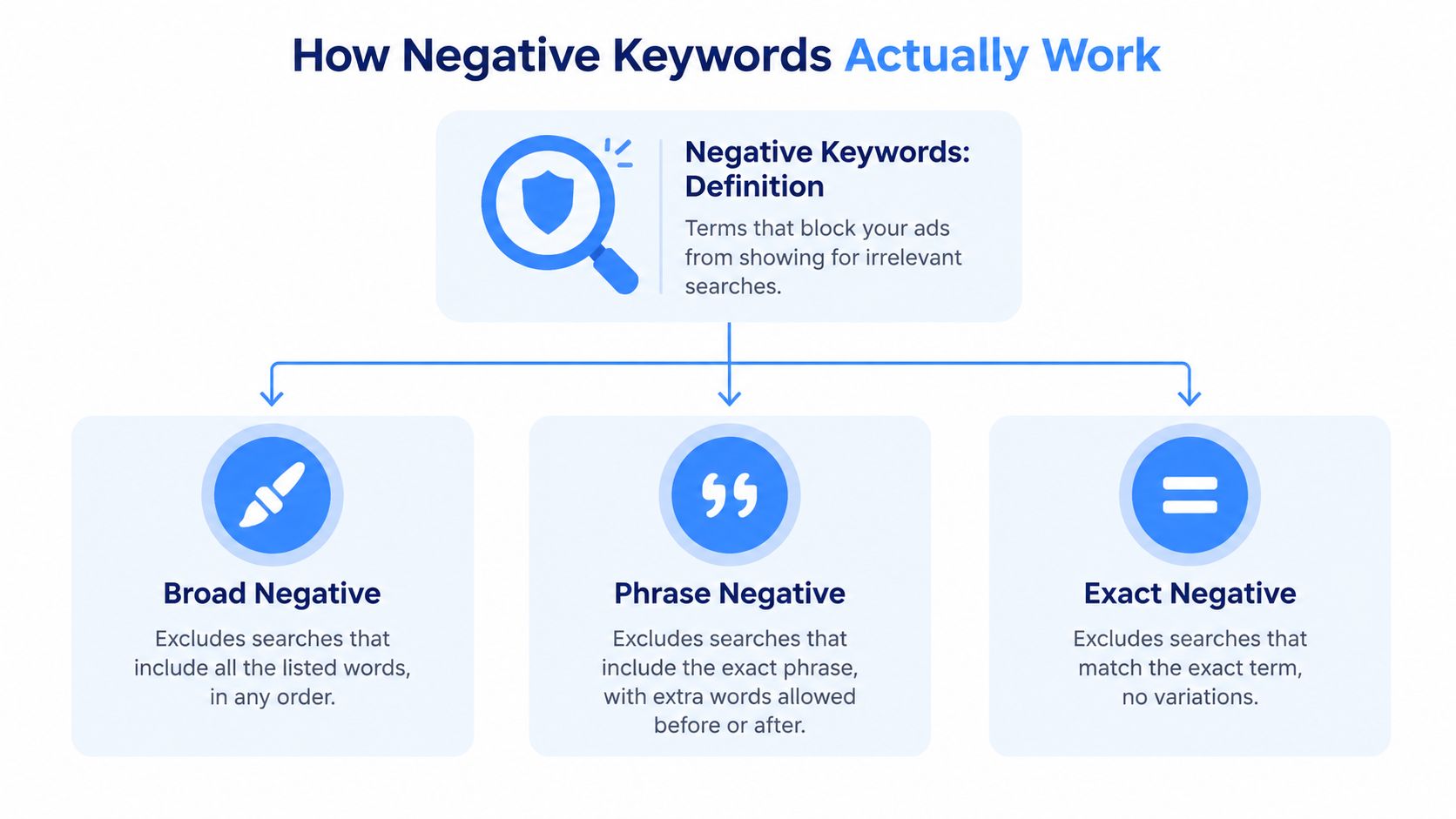
Negative keywords tell Google Ads when not to show an ad. For Search campaigns, the available negative match types are broad, phrase, and exact, and they don't behave exactly like their positive keyword counterparts. Google explains the distinctions in its guide to negative keyword match types.
Broad negatives
A broad negative blocks a search only when all the negative terms appear somewhere in the query, in any order. Suppose a roofer adds the broad negative keyword free. Searches containing that term are excluded, including queries such as “free roof estimate” or “free roofing advice.”
Broad negatives are useful for clear, universally unwanted themes, such as jobs, salary, or training, when the business has no employment or educational offer. They become risky when the individual words have legitimate commercial uses. A term like parts may be inappropriate for a full-service repair campaign, but it could be valuable for a company that sells replacement components.
Phrase negatives
A phrase negative blocks searches containing the exact ordered phrase, while allowing additional words before or after it. A roofer could add "free roof inspection" as a phrase negative. That would exclude searches containing that sequence, while avoiding a blanket exclusion of every search containing only free, roof, or inspection.
Phrase matching is often the safer choice when the unwanted intent is expressed through a recognizable multiword pattern. It gives the advertiser more control without suppressing every long-tail search that happens to share one word.
Exact negatives
An exact negative blocks the precise query, with no additional words. If a dental practice adds [free teeth whitening] as an exact negative, that specific search is excluded, but a longer query such as “free teeth whitening consultation near me” may still be eligible.
The right match type depends on certainty. Use broad when the term is never relevant, phrase when the sequence clearly identifies unwanted intent, and exact when only one known query is problematic. For readers who want a wider explanation of how keyword categories fit together, SemDash's guide to keyword types offers useful context. Search-term organization also becomes easier when you understand what search queries reveal about user intent.
Measurable Benefits for Ad Performance and Budget
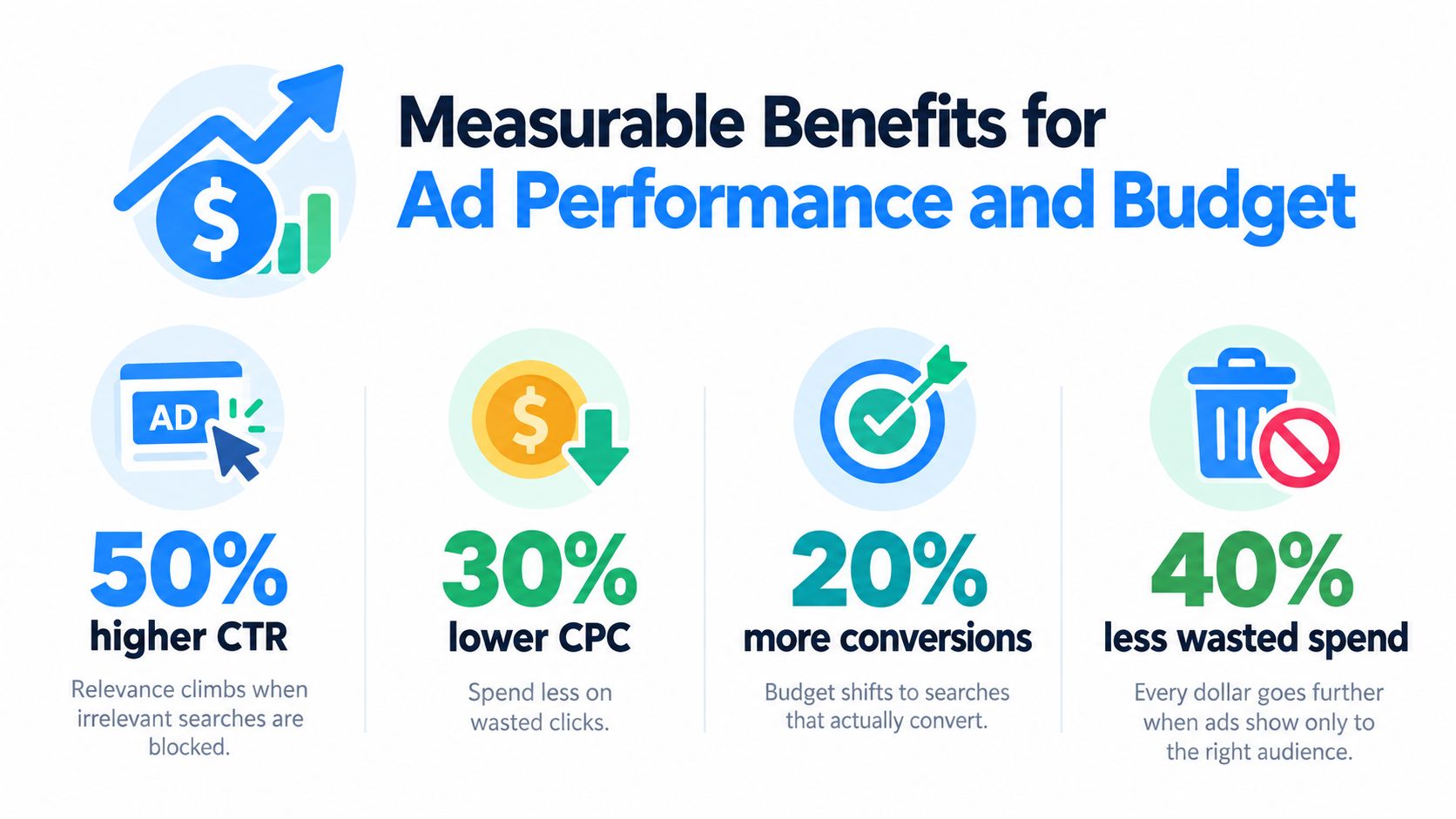
Correct exclusions improve campaign quality by removing searches that don't belong in the account. The immediate effect is cleaner traffic. Ads appear to a more relevant audience, and the remaining clicks give the campaign stronger information about which searches deserve budget and landing-page attention.
A tighter relationship between query, ad, and landing page can support stronger click-through rate, cost-per-click efficiency, conversion rate, and Quality Score. These outcomes aren't automatic, and negative keywords won't repair weak offers, poor landing pages, slow response times, or inaccurate location targeting. They remove a source of noise so the rest of the campaign has a better chance to perform.
What changes after filtering
Consider a campaign before and after search-term cleanup. Before filtering, the account may record impressions from DIY researchers, job seekers, and unrelated locations alongside genuine service searches. After filtering, the campaign's visible traffic better reflects the offer, which can improve the percentage of clicks that turn into calls or forms.
That doesn't mean every excluded term should be judged only by whether it converted once. A research query may produce an occasional lead, but if the business is paying to reach people who generally aren't looking to hire, the account needs a deliberate decision. The strongest measure is whether the search fits the company's service, location, capacity, and desired customer.
- Higher relevance: Ads and landing pages can align more closely with the remaining queries.
- Cleaner budget allocation: Spend shifts away from searches that cannot realistically produce the intended job.
- Better conversion interpretation: Call and form data become easier to evaluate when irrelevant clicks aren't mixed into the campaign.
- Stronger testing decisions: New keyword and ad tests produce more useful feedback when the audience is properly filtered.
Negative keywords work best as part of a measurement system. Businesses comparing spend with booked calls should also review HelloMail's ROI measurement tips and connect campaign results to a meaningful acquisition outcome. For a practical framework, see how to calculate cost per acquisition.
Negative Keyword Examples by Service Industry
Negative keyword strategy has to reflect the service being sold. A roofing company, dental practice, and pest control company may all want to block jobs, but their other exclusions should reflect different forms of irrelevant intent.
The purpose isn't to make a campaign show as little as possible. The purpose is to preserve searches from people with money in hand who are ready to hire, while preventing research, employment, product, and self-service queries from taking priority.
| Industry | Negative Keyword Examples | Why Block |
|---|---|---|
| Roofing | shingles for sale, roofing jobs, how to replace a roof yourself |
These searches indicate product shopping, employment intent, or DIY research rather than a request for a roofing contractor. |
| Dental | dental school tuition, free teeth whitening, dentist salary |
These queries concern education, free services, or employment information instead of a patient seeking an appointment. |
| Pest control | DIY pest control, bug identification, pest control jobs near me |
The searcher may want instructions, species information, or a job, not a professional pest control visit. |
A roofing company selling shingles would handle the first row differently from a roofing contractor. A dental practice offering a free consultation would also need to review whether free is a universal exclusion. The word itself doesn't reveal enough. The surrounding phrase and the actual offer matter.
Apply the intent test
For every candidate negative, ask whether the searcher is trying to hire, buy, learn, identify, compare, or get employed. Transactional Marketing's approach is to prioritize hiring and booking intent, such as “roofer near me,” “dentist near me,” or “pest control near me,” then separate the other categories when they don't fit the business model.
Be especially cautious with terms that can appear in both valuable and irrelevant queries. Estimate, inspection, emergency, and repair may signal strong intent in one account and a mismatch in another. Review the full search query before applying a broad negative.
Why Static Negative Lists Fail Over Time
A negative keyword list is a record of past decisions, not a permanent definition of the business. Search behavior changes as seasons shift, service areas expand, and the company adds or removes offers.
A term that was irrelevant last quarter can become commercially valuable later. An installation-only plumbing campaign might reasonably exclude emergency-related searches, but that exclusion becomes a problem if the company begins offering emergency plumbing. The list must change with the service menu.
The same issue appears geographically. A business may start in one city, then add nearby service areas. A city name that once belonged on a negative list may later represent a profitable route. Applying location exclusions permanently without checking current coverage can block customers the company is now equipped to serve.
Overblocking is a targeting error, not a sign of campaign discipline.
Govern the query stream
Google recommends using the Search Terms report to find negative keyword ideas. That report shows the searches that triggered ads, giving the account manager a practical record of how Google interpreted the targeting and how local searchers describe their needs. The review should ask:
- Does the query describe a service the company provides?
- Is the searcher trying to hire a provider or only gather information?
- Is the location inside the current service area?
- Does the query belong in this campaign, even if it belongs elsewhere in the account?
- Would a phrase or exact negative be safer than a broad exclusion?
A dynamic list also protects valuable long-tail searches that resemble unwanted traffic. “How much does emergency roof repair cost” contains research language, but it may come from a person deciding whether to call. Blocking every query containing how much could remove prospects who are close to contacting a provider.
Continuous query governance means adding clear exclusions, testing their scope, and removing them when the business, season, or service area changes. The objective is not maximum restriction. It's a current, accurate map of transactional intent.
Finding and Adding Negative Keywords in Google Ads
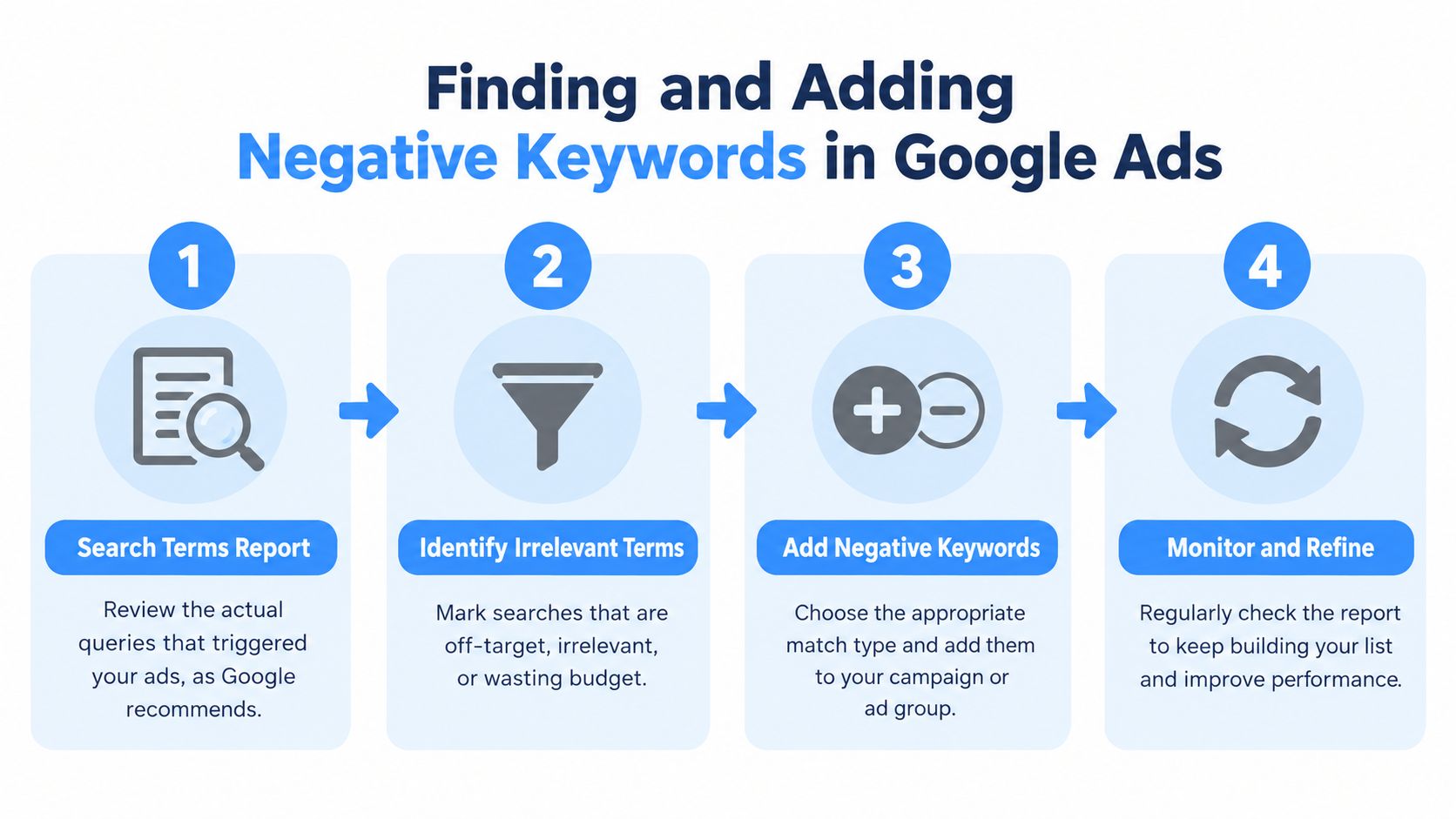
The most reliable starting point is the Search Terms report, which Google identifies as a source for negative keyword ideas. Instead of guessing every unwanted variation, review the actual searches that triggered the ads, identify patterns, and apply the narrowest exclusion that matches the problem.
Start with observed searches
Open the report and group unwanted queries by intent. Common themes for local services include DIY, parts, jobs, salary, training, free services, unrelated cities, and services the company doesn't provide. Don't add a negative because a query looks unfamiliar. Confirm that it conflicts with the offer.
Google's workflow distinguishes between campaign-level and ad-group-level negative keywords, and Google Ads supports adding negatives one per line. That makes it practical to maintain organized groups rather than pasting an unstructured block of terms.
Choose the right scope
Use an ad-group negative when the exclusion applies only to one tightly defined service theme. A dental ad group for implants may need a different filter from an ad group for emergency appointments.
Use a campaign-level negative when the term is irrelevant to every ad group in that campaign. For a campaign restricted to one service area, location terms outside that area may belong at this level, provided the business has confirmed it doesn't serve those locations.
Use an account-level negative or shared negative keyword list for terms that should never trigger any campaign, such as employment queries for a company that isn't recruiting. Google's negative keyword management guidance explains how these controls fit into the editor workflow.
Transactional Marketing's Google Ads campaign setup guidance can sit alongside this process, but the account owner still needs to validate every exclusion against real services and service areas.
Review the result
After adding negatives, return to the Search Terms report. Look for new variations, accidental exclusions, and search terms that should be moved into a more specific campaign. A negative keyword list should get more accurate over time, not larger.
Connecting Negative Keywords to Local Search Dominance
Negative keywords help paid campaigns concentrate on transactional searches, but they don't replace organic local SEO or Google Maps optimization. A local business wants to appear when someone searches “roofer near me,” “dentist near me,” or “air conditioning repair near me,” then make the next action obvious through a call, form, appointment, or visit.
Google's local ranking guidance identifies relevance, distance, and prominence as core factors in local visibility. Relevance reflects how well a Business Profile matches the search, while distance and prominence also influence local pack visibility, as described in this overview of how Google Maps ranking works. Negative keywords directly improve paid-search relevance by removing queries that don't match the service or commercial intent.
A coordinated strategy aligns the ad campaign, website content, Business Profile, and landing pages around the service terms customers use in each city. Transactional Marketing is built around that focus, combining local SEO, Google Maps optimization, paid campaigns, and AI-driven content designed around high-intent search terms. The aim is simple: help service businesses become visible where local customers are ready to spend, not merely where people are researching.
Transactional LLC helps local service companies manage negative keyword strategy, paid search, Google Maps optimization, and SEO around transactional terms such as “roofer near me” and “dentist near me.” Visit Transactional LLC to discuss a campaign built around the searches that can lead to booked jobs and patients.