


You log into Google Analytics after paying for SEO, Google Maps work, or a new landing page for terms like roofer near me. You expect good news. Then you see bounce rate sitting over 60% and your first thought is simple. Is my site failing?
For a roofing company, that number often gets misread.
A homeowner searching for roof repair after a storm doesn't want to browse five pages and admire your brand story. They want proof you serve their area, a phone number they can tap, and a fast path to booking an estimate. If they land on your site, get what they need, and call, that visit can still look bad in analytics if your tracking isn't set up right.
That’s why the question what is a bounce rate in google analytics matters more now than it used to. Google changed the way bounce rate works when it moved from Universal Analytics to GA4, and that shift matters a lot for local service businesses that depend on high-intent traffic from Google Search, Google Maps, and Google Business Profile.
This article is for owners who care about booked jobs, not vanity metrics. Roofing companies live on transactional searches. Searches like roof leak repair near me, metal roofer in [city], and emergency roofing contractor come from people ready to spend money. When you target those terms well, some visitors will convert fast. Fast conversions can look like bounces unless you measure the right actions.
Your Introduction to Bounce Rate
A roofing owner usually sees bounce rate at the worst possible moment. Leads feel inconsistent, ad spend is under review, and someone opens analytics hoping for a clean answer. Instead, they find a metric that looks negative and vague at the same time.

A bounce rate over 60% can look like people hate your website. That isn't always true. For local service businesses, especially roofing companies that depend on urgent searches and Google Maps traffic, a visitor may land on one page, tap the phone number, and leave. That's not failure. That's the job.
The problem is that many owners still think about bounce rate using the old rules from Universal Analytics. GA4 changed the definition. That means the same visit can be interpreted very differently depending on whether your setup tracks meaningful actions like call clicks, quote requests, and form starts.
If you want a clean way to connect analytics to revenue, start by treating bounce rate as a diagnostic metric instead of a scoreboard. It can help you find weak pages, traffic mismatches, and mobile friction. It can't, by itself, tell you whether your SEO is producing booked roofing work.
A proper analytics setup for local marketing decisions gives you a much better view of which pages and traffic sources turn transactional searches into calls.
A roofing site doesn't win because visitors click around. It wins because the right person calls before they call a competitor.
The Shift from Universal Analytics to GA4 Engagement
A lot of roofing owners still read bounce rate with Universal Analytics in mind. That creates bad calls.
GA4 changed the way Google classifies a visit, and that matters if your best leads come from mobile search, Google Maps, or branded local searches. Those visitors often want one thing fast. Call, submit a form, confirm service area, or book an inspection. If your tracking is set up right, GA4 can treat that session as engaged instead of writing it off as a bounce.
How Universal Analytics used to count a bounce
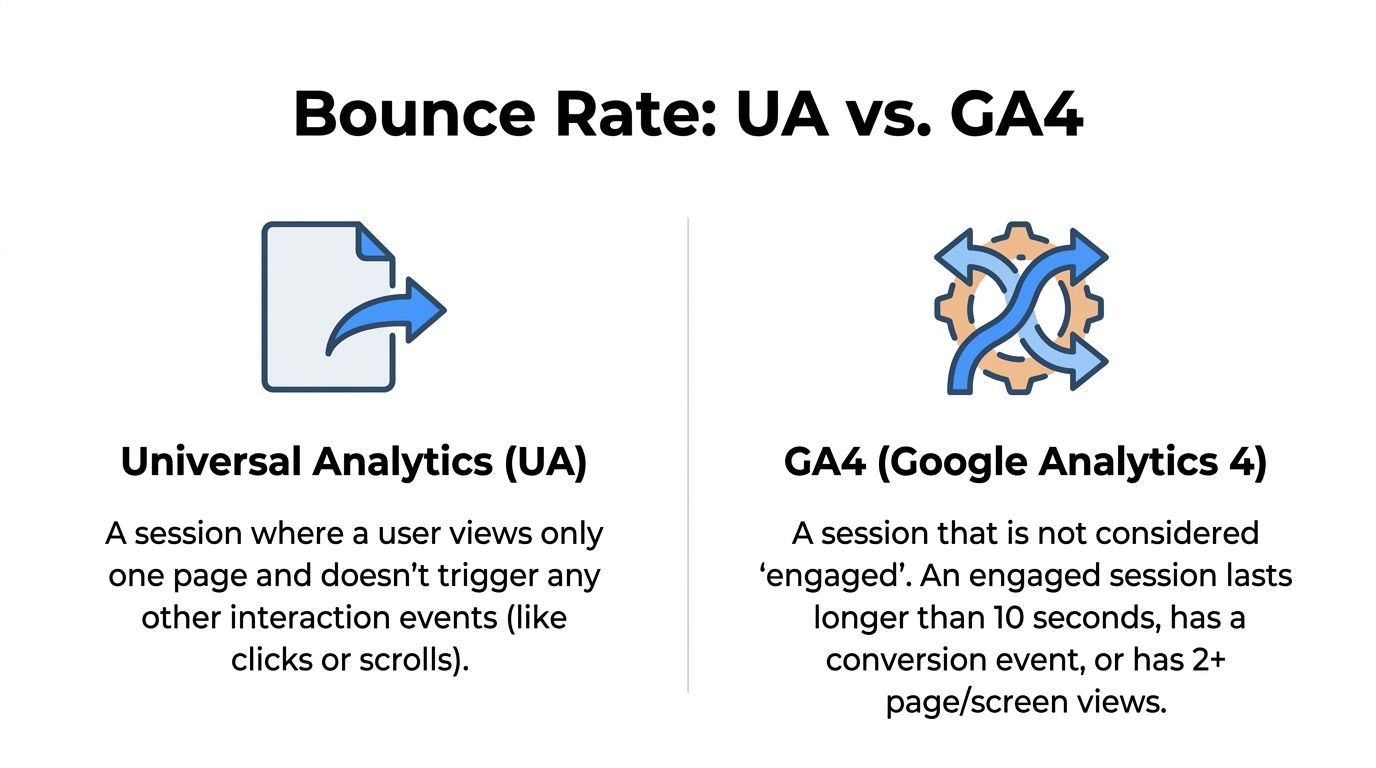
Universal Analytics used a simpler rule. One pageview with no recorded interaction counted as a bounce.
For a local service business, that setup missed a lot. A homeowner could land on your storm damage page, tap the phone number, and become a real lead. If that click was not tracked as an interaction, the visit still looked like failure in reports. That pushed owners toward the wrong fixes, such as forcing extra pageviews instead of making it easier to call.
How GA4 defines bounce rate now
Google Analytics 4 replaced that model with engagement-based reporting. Bounce rate in GA4 is the percentage of sessions that were not engaged. Google counts a session as engaged if it lasts longer than 10 seconds, includes a key event, or has at least 2 page or screen views, as explained earlier from the cited Contentsquare reference.
The practical shift is more important than the formula. GA4 gives you a way to credit visits that produce real business actions, but only if you define those actions clearly.
For roofing companies, that means setting up events for:
- click-to-call taps on mobile
- quote request submissions
- form starts for longer estimate forms
- thank-you page views
- appointment or inspection booking confirmations
If those actions are missing, GA4 can still understate performance. If they are tracked well, bounce rate becomes more useful because it filters out empty visits while keeping fast-converting sessions in the engaged bucket.
Why this works better for local service traffic
High-intent local traffic rarely behaves like research traffic.
A Google Maps visitor may never read three pages. They may check reviews, verify you serve their city, and call within seconds. Under the old setup, that kind of session was often misread. Under GA4, you have a better shot at measuring the result that matters.
That does not mean GA4 fixes everything by default. It only improves the picture if the account is configured around lead actions instead of generic page activity. In practice, I want roofing clients to review their GA4 setup with one question in mind: does this account record the moments that lead to booked jobs?
A few configuration choices make a real difference:
- Mark primary lead actions as key events, especially phone clicks and completed estimate forms.
- Use Google Tag Manager to track tap-to-call clicks consistently across mobile devices.
- Separate branded traffic, Google Maps traffic, and local organic landing pages so you can compare intent by channel.
- Check landing pages with high bounce rate but strong call volume before treating them as a problem.
- Tie GA4 conversions back to CRM outcomes when possible, so you can see which sessions produced qualified estimates and closed work.
If your team is still setting up GA4 properly, this practical guide on how to add Google Analytics 4 to your store is useful because it shows the implementation side clearly, even if your site isn't an ecommerce build.
For owners who want cleaner reporting beyond the default dashboard, this guide on how to measure marketing effectiveness across channels and lead actions is the right next step.
Why High Bounce Rates Can Deceive Service Businesses
A homeowner finds your roofing company on Google Maps after a leak starts during a storm. They tap through, confirm you handle emergency repairs in their city, hit the call button, and leave the site in under a minute. GA4 may still classify that session as a bounce if the call click is not tracked correctly. That is not a weak visit. It is exactly the kind of visit that should turn into revenue.

That is why bounce rate confuses so many local service businesses. A roofing site does not need every visitor to read three pages and watch a video. It needs the right visitor to call, submit an estimate request, or confirm you serve their area.
Fast exits often mean the page worked
High bounce rate can reflect weak page quality. It can also reflect urgency and clear intent.
Maps traffic is the best example. Many of those visitors already decided they want a local roofer. They are checking a few things fast. Do you handle roof repair or full replacement? Do you work in their town? Can they call now? If the page answers those questions and the visitor converts offline, a short session is a win.
I see owners make the wrong call here. They look at a city page with a high bounce rate, assume it is failing, then add extra links, long blocks of text, pop-ups, or chat prompts to force more activity. The bounce rate may drop, but lead quality often drops with it because the page gets slower and harder to use on mobile.
Source and intent matter more than the sitewide average
A visitor who lands on a blog post about hail damage has different intent from a visitor who comes from Google Business Profile or Maps on a branded search. One is still researching. The other may be ready to book an inspection.
Treating those sessions as if they should behave the same is how service businesses misread analytics.
Look at bounce rate by:
- landing page
- traffic source
- device type
- location
- new vs. returning visitor
- branded vs. non-branded search intent
That breakdown usually shows the underlying issue. A service page with high bounce and strong call volume is different from a service page with high bounce, no scroll depth, no call clicks, and no form starts.
The useful question is not whether bounce rate looks high. The useful question is whether the visit produced a lead signal or helped a prospect reach your office.
Low bounce rate can mislead too. If GA4 fires engagement events too easily, reports can look healthier than reality. I have seen accounts where timer events, aggressive pop-ups, or automatic scroll triggers made engagement look strong while call volume stayed flat. That is a reporting problem, not a marketing win.
A quick visual explanation helps if you're comparing page behavior against call outcomes.
What actually matters for local lead generation
For a roofing company, bounce rate belongs in the background. The main scoreboard should track actions tied to booked work.
Prioritize these signals instead:
- Tap-to-call clicks from mobile visitors
- Completed estimate or inspection forms
- Form starts on high-intent landing pages
- Clicks to service-area pages that confirm coverage
- Direction requests or map interactions if customers visit your office
- Qualified lead outcomes in your CRM, if you can connect them back to the session
This is also where setup matters. If phone clicks are not marked as key events, GA4 can make strong pages look weak. If form submission tracking breaks, you may blame bounce rate for a conversion problem caused by bad measurement.
For local service businesses, a one-page visit is often enough. If someone searches roof repair near me, lands on the right page, calls your office, and books an inspection, that session did its job.
Setting Realistic Benchmarks for Your Service Industry
A roofing company can make the wrong call fast here.
If an owner sees a 62% bounce rate on a roof repair page, the first reaction is often that the page is failing. Sometimes it is. Sometimes that same page is producing solid phone calls from homeowners who searched on Google Maps, landed, confirmed the company serves their area, and called within 20 seconds. That is not weak traffic. That is a short buying cycle.
Benchmarks only help if they match the job of the page and the source of the visit. A blog post, a city service page, and a Google Business Profile landing visit should not be judged by the same number.
Start with page type and traffic source
Use internal benchmarks first. They are usually more useful than any broad industry average.
Compare pages and traffic in groups that reflect buying intent:
- City service pages against other city service pages
- Roof repair pages against roof replacement pages
- Google Maps and Google Business Profile traffic against the same source
- Mobile visitors against mobile visitors
- High-intent searches against research-driven searches
Local service traffic is uneven by nature. Emergency leak traffic behaves differently from someone reading about shingle options. A homeowner searching roof repair near me may bounce after one pageview and still become a qualified lead. A visitor reading an insurance claim guide may stay longer, visit more pages, and never call.
Use GA4 benchmarks carefully
GA4 defines bounce rate as the opposite of engagement rate. That makes the metric cleaner than old Universal Analytics reports, but it still does not solve the business question by itself.
For a roofing company, realistic ranges depend on what the session was supposed to do. Service pages built to get a call often have shorter visits than educational pages. Traffic from Maps is often even shorter because the visitor already knows what they want. They are checking service area, trust signals, and the phone number.
Here is a practical way to read it:
| Page or Traffic Type | What a healthy session often looks like |
|---|---|
| High-intent service page | Quick decision, call click, form start, or fast exit after getting needed info |
| Google Maps or GBP landing visit | Short session, limited pageviews, strong call intent |
| Blog or education page | Longer read time, more scrolling, more secondary pageviews |
| Retargeting or branded traffic | Lower friction, often better engagement because trust already exists |
That framing keeps teams from forcing every page to chase more clicks when the primary goal is more booked inspections.
What a roofing owner should actually benchmark
Track performance against business outcomes first, then use bounce rate as supporting context.
A useful review looks like this:
- Does the page generate call clicks?
- Does it produce completed estimate requests?
- Does mobile traffic convert at an acceptable rate?
- Do visits from Maps turn into leads or booked jobs at a higher rate than organic blog traffic?
- Did bounce rate rise while conversions also rose?
That last one matters. I have seen pages with a higher bounce rate outperform lower-bounce pages because the messaging was clearer and the call button was easier to find. Fewer pageviews. More jobs.
If you want a cleaner operating standard, set benchmark bands inside GA4 for each page group, then review them with CRM outcomes. A page that sends low-quality form fills is not winning. A page with a higher bounce rate and stronger close rate usually is.
For teams refining those page groups, this guide on improving website conversion rates for service businesses is a useful next step. Broader conversion rate optimization best practices also help, but local service companies need to judge every change against call quality and booked revenue, not page depth alone.
One more practical rule. Do not compare your roofing site to ecommerce behavior. An online store often needs multiple product views before a sale. A local roofing lead may need one good landing page, one tap-to-call, and one scheduler who answers fast.
Actionable Tactics to Improve Engagement and Conversions
When bounce rate points to a real problem, the fix usually isn't "make people click more." The fix is to make the page answer the search better and convert faster.
That matters most on pages built for transactional terms. If someone searches roofer near me, your page needs to confirm relevance in seconds. If it doesn't, they'll leave and call the next contractor.
Fix the first screen first
Most local service pages lose people before the page earns trust.
A roofing service page should make these things obvious immediately:
- What you do. Say roof repair, roof replacement, storm damage work, or emergency tarping clearly.
- Where you do it. Put the city or service area in the main headline or supporting copy.
- How to act now. Use a clickable phone button and a visible estimate CTA.
- Why you're credible. Reviews, insurance help, years in business, warranty language, or project proof all help.
If the first screen is vague, bounce rate usually isn't the root issue. Messaging is.
Match the keyword to the landing page
A lot of unnecessary bouncing starts before the visitor even sees the site. It starts when the wrong keyword maps to the wrong page.
If someone searches metal roof repair [city] and lands on a generic homepage, the message mismatch creates friction. The same thing happens when Google Maps traffic lands on a page that reads like a corporate brochure instead of a local service page.
The page title, heading, and first paragraph need to confirm the exact service intent. That's one of the simplest ways to improve engagement quality.
Make mobile action effortless
Roofing leads often come from mobile devices in urgent situations. If a user has to pinch, zoom, hunt for the phone number, or fill out a long form, the page leaks revenue.
Use a checklist like this:
- Clickable calls at the top of the page, not buried in the footer
- Short forms that ask only what your dispatch or estimator needs
- Service-area language near the top so people know you cover their location
- Fast-loading visuals instead of oversized image files
- Sticky CTA buttons when appropriate, especially on mobile
A strong page doesn't force exploration. It supports the next action.
Give the visitor one clear next step
Too many contractor pages try to do everything at once. They pitch every service, every financing option, every city, and every badge in one giant layout.
That usually hurts more than it helps.
A better pattern is:
- Confirm the service.
- Confirm the area.
- Show trust proof.
- Offer one immediate action.
If you want a broader framework for tightening pages around lead actions, these conversion rate optimization best practices are a useful reference because they keep the focus on user decisions, not just design preferences.
Use content that answers buying questions fast
On local service pages, content should reduce hesitation. For roof repair, that often means short sections that answer practical questions:
- Do you handle insurance claims?
- Do you offer emergency response?
- What roof types do you service?
- Do you work in my city?
- How do I request an estimate?
Those answers improve SEO, help AI systems understand your page context, and keep transactional visitors from bouncing because they couldn't confirm one key detail.
A strong website conversion rate improvement strategy usually starts by tightening those decision points before touching cosmetic design.
If a page gets the right visitors but not the right actions, improve clarity before you redesign the whole site.
Advanced GA4 Tracking for Transactional Success
A roofer can get 100 visits from Google Maps in a week, see a rough bounce rate in GA4, and still have no idea whether those visits produced phone calls or dead traffic. That happens because default GA4 setup measures page interaction, not job-producing actions.
For a local service business, the right setup starts with event tracking tied to buying intent. If someone taps to call from mobile, opens the estimate form, clicks for directions, or submits a quote request, GA4 should record that. Otherwise, a visitor who finds your number in 20 seconds and calls can look too similar to someone who lands, hesitates, and leaves.
Use event names your team can understand at a glance, such as:
- click_call_button
- form_submission
- request_quote_start
- map_direction_click
- contact_page_view
- schedule_button_click
Mark the actions that signal lead intent as key events. For most roofing companies, that means phone clicks, completed forms, and any booked-estimate step you can track reliably. If your CRM can pass booked appointments or closed jobs back into GA4, even better. That is how you separate traffic that looks active from traffic that turns into revenue.
GA4 also lets you adjust how it classifies an engaged session. As noted earlier from Analytics Mania, changing that timer can make bounce rate stricter, but it also changes your benchmark. I only change it when the business understands that historical comparisons become less clean after the switch.
For roofing companies, the bigger win usually comes from building reports around lead quality instead of trying to force bounce rate lower. In Explorations, compare Session source/medium or Landing page against bounce rate, key events, and users. Add filters for channels that matter to local service demand, such as organic search, paid search, and Google Maps related traffic if you can identify it through landing page patterns, UTM tagging, or connected campaign data.
That report answers useful questions fast:
- Which service pages attract visits but no quote starts?
- Which traffic source drives calls from mobile?
- Which locations bring in form fills but weak close rates?
- Which landing pages get activity that never turns into booked work?
Those are budget decisions, not vanity metrics.
If you want to tie this reporting back to profit, use a simple cost layer. Match channel spend against tracked leads and booked jobs, then compare that with your cost per acquisition calculation for service business marketing. A page with a higher bounce rate can still be a strong asset if it produces cheap, qualified calls. A page with a lower bounce rate can be a loser if it generates soft leads that never close.
One caution. Keep micro-conversions in their place. Scroll depth, long sessions, and page_view clusters can help diagnose behavior, but they should not sit in the same bucket as phone calls and completed estimate forms. For a roofing company owner, those actions do not carry equal value, and your GA4 setup should reflect that.
Done right, GA4 stops treating every quick exit like a problem. It shows whether your local traffic is producing conversations, inspections, and booked jobs.
Conclusion From Vanity Metric to Conversion Catalyst
Bounce rate isn't useless. It's just easy to misuse.
For a roofing company, the number only becomes valuable when it's connected to intent, page type, traffic source, and lead tracking. A high bounce rate on a page targeting a transactional search might signal a mismatch. It might also mean the visitor found your number fast and called. Without proper GA4 event setup, those two situations can look too similar.
The better question isn't, "How do I get bounce rate lower?"
It's, "Did this visit move a buyer closer to calling, requesting an estimate, or booking work?"
That's the standard that matters for local SEO, Google Maps visibility, and AI-oriented search optimization. Businesses don't grow because a dashboard looks cleaner. They grow because someone searches roofer near me, finds the right page, trusts what they see, and takes action.
If you're focused on transactional search terms, bounce rate should support decision-making, not drive panic. Use it to spot weak mobile experiences, mismatched landing pages, and missing lead events. Then fix what blocks conversion.
The companies that win local search usually do three things well. They target high-intent keywords, show up strongly in Google Maps, and measure the actions that create revenue. When that foundation is in place, bounce rate stops being a vanity metric and starts acting like a useful diagnostic tool.
Frequently Asked Questions about Bounce Rate
Is bounce rate in GA4 the same as it was before
No. In GA4, bounce rate is based on non-engaged sessions, not the old single-page-session logic. That change makes the metric more useful for local service sites where a one-page visit can still be valuable.
Is a 60 percent bounce rate bad for a roofing company
Not automatically. It depends on the traffic source, the page type, and whether the visit produced a lead action. A fast call from a Google Maps visitor can still look like a short session. That's why bounce rate should be reviewed next to calls, form submissions, and other key events.
Can a very low bounce rate be a problem
Yes. If bounce rate looks unusually low, your setup may be counting automatic or low-value events as engagement. That can make the data look healthier than it really is.
How often should I check bounce rate
For most local service businesses, weekly or biweekly review is more useful than constant checking. Daily swings can create noise. What matters is the pattern by landing page, device, and traffic source.
Does bounce rate affect SEO rankings directly
Treat bounce rate as a diagnostic metric, not a direct ranking factor. The more practical use is to identify pages that fail to satisfy search intent, especially on mobile or on transactional service pages.
What should I track instead of obsessing over bounce rate
Track actions tied to revenue:
- Call clicks
- Quote request submissions
- Form starts
- Direction clicks
- Booked appointment actions
- Landing pages tied to transactional keywords
Where do I find bounce rate in GA4
You can add it to your GA4 reports and Explorations. Most owners get the clearest insight by comparing bounce rate with conversions and source or medium, not by looking at the metric alone.
If you want help turning confusing analytics into a system that tracks calls, quote requests, Google Maps performance, and transactional search visibility, talk to Transactional LLC. They help local service businesses build SEO and AI-focused growth around the terms that lead to real jobs, not just traffic.