

You turn on Google Ads, the clicks come in, the spend climbs, and the trucks still aren't rolling to the right jobs. That's the contractor version of getting busy without getting profitable. A campaign can look active in the dashboard and still be a bad deal in practice.
Most contractors don't need more leads. They need better leads. The difference matters. A phone call from someone who needs service now is not the same as a form fill from someone comparing five bids, looking for DIY advice, or trying to price a job they won't approve.
That's where the transactional intent lens changes everything. Instead of buying traffic, you build Google Ads around the searches that signal money in hand. Terms like “repair near me,” “emergency service,” “replace,” and city-based service queries usually carry a completely different quality profile than research-heavy searches. The whole job is to filter hard, qualify fast, and push budget toward searches that can turn into booked work.
Stop Buying Clicks and Start Booking Jobs
Many contractor campaigns fail for a simple reason. They're built to chase activity, not revenue. The account gets judged on impressions, clicks, and lead volume, while the owner is looking at the schedule wondering why the ads aren't producing enough of the jobs that keep margins healthy.
That disconnect shows up everywhere in the trades. A plumber can get flooded with low-quality estimate requests. An HVAC company can pay for people searching troubleshooting tips. A remodeler can burn budget on broad terms that pull in homeowners months away from making a decision.
Lead volume is not the same as job quality
A lot of advice about Google Ads for contractors still centers on keywords and clicks without really solving the bigger business problem. Many guides miss how to filter for emergency, replacement, and higher-ticket jobs, even though those are often the calls that matter most to margins, and success depends on matching ads to ready-to-hire search intent, where one booked emergency call can outweigh many weak quote requests, as noted in this contractor Google Ads guidance from ServiceTitan.
Practical rule: If the campaign sends your office a lot of conversations but few booked jobs, you don't have a lead problem. You have a filtering problem.
That's why the best Google Ads strategy for contractors starts with a blunt question. Which searches are most likely to turn into profitable work right now? Not someday. Not after a long nurture sequence. Right now.
If you're weighing whether paid search can make sense for your company, this breakdown on understanding Google Ads profitability is worth reading because it frames the decision the right way. Profitability comes down to job value, close rate, and lead quality, not whether the platform generated “traffic.”
What wasted spend usually looks like
Bad contractor campaigns often share the same fingerprints:
- Broad keywords: They pull in research traffic instead of ready buyers.
- Weak ad messaging: It attracts anyone curious, not people who need the service now.
- No serious exclusions: DIY, free, cheap, jobs, and training searches slip through.
- No tie-back to revenue: The account can't tell you which leads became actual work.
If your goal is to lower waste before scaling spend, this guide on reducing customer acquisition cost lines up with the same principle. Cut what doesn't produce booked jobs, then push harder into what does.
Contractors win with Google Ads when they stop treating the platform like a billboard and start treating it like a filter. The campaign should screen out weak intent and pull in the people searching because they want a contractor, not information.
Build Your Foundation for Transactional Success
A lot of wasted ad spend happens before the first click. The campaign launches on top of loose tracking, weak location settings, and landing pages that don't match the service being advertised. Once that happens, every optimization decision gets built on bad information.
For Google Ads for contractors, the setup has to reflect how service businesses sell. People call from the ad. They call from the site. They submit a form, then book later after someone in the office follows up. If that path isn't tracked cleanly, the account can't separate profitable searches from junk.
The checklist that keeps you out of trouble
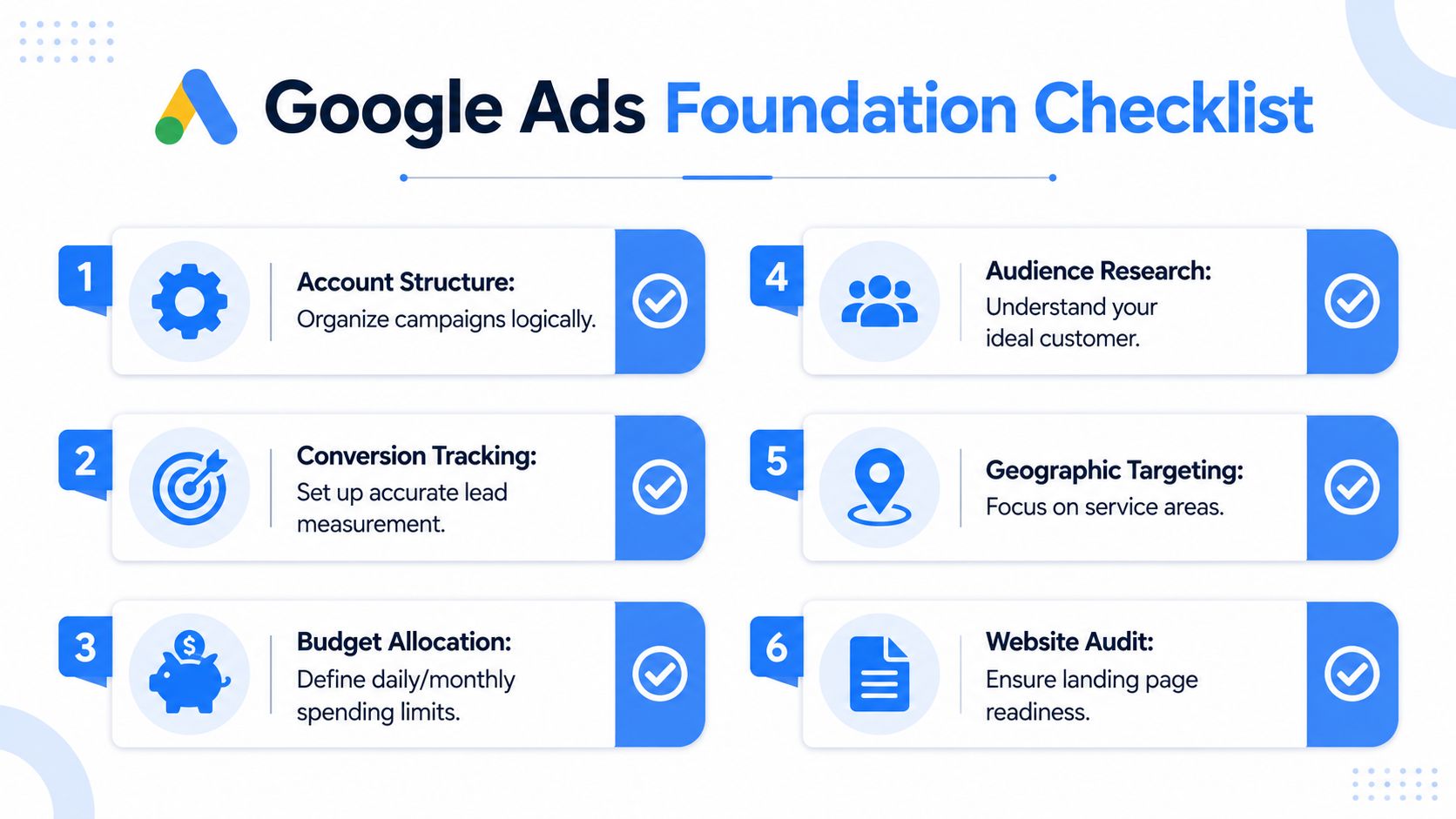
A neutral setup guide for commercial contractors recommends starting with an active Google account, a credible website, and a monthly budget in the roughly $150 to $900 range for small-to-mid-size local contractors, while also stressing tightly segmented ad groups, localized keywords, negative keywords, and 1:1 alignment between keyword, ad, and landing page so searchers land on the exact page they were looking for in this contractor setup guide.
That last point matters more than most contractors realize. If someone searches for roof repair in a specific city and lands on a generic homepage with ten services, the click gets weaker instantly.
What needs to be in place before launch
Call tracking from ads
You need to know which campaign, ad group, and keyword drove the phone call. For many trades, calls are the main conversion event, not form fills.Call tracking from the website
Some people won't call directly from the ad. They'll click through, scan the page, then tap the number. If you only track forms, you'll undercount your best leads.Form tracking that reflects real lead intent
A completed request form matters. So does a quote request, consultation request, or service booking inquiry. Track those actions cleanly.Google Analytics and Google Business Profile connections
These connections help you see user behavior, service-area patterns, and local intent signals in one system instead of guessing from partial data.
The account should tell you what happened after the click. If it only tells you how many clicks happened, it's half-built.
Build around your service map, not your ego
A lot of contractors waste money by targeting too wide an area. They want to cover the whole metro because it feels bigger. The problem is that service radius, crew availability, drive time, and job economics still run the business.
Use your real service area. Break it into markets if needed. Give stronger coverage to the places where your team can respond fast and where the work is worth taking.
A simple account structure also wins. Split campaigns by actual service lines and demand types. Emergency service is different from replacement. Repair is different from remodel. Commercial tenant improvement is different from residential renovation. Those differences affect keywords, ads, landing pages, and call quality.
The foundation isn't glamorous. It is what keeps you from pouring budget into noise.
Choose Your Campaign Structure for Maximum Impact
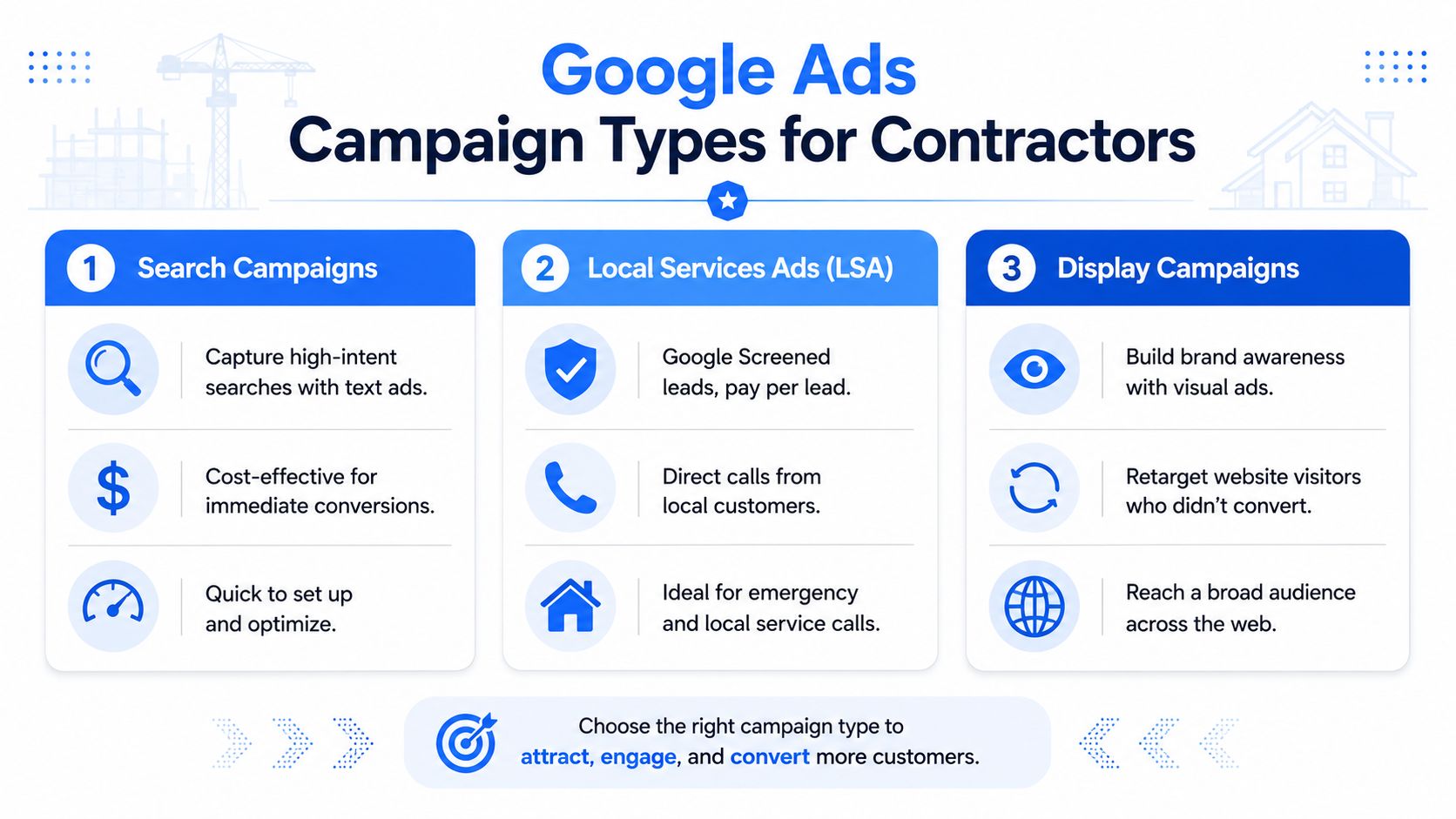
Most contractors don't need every Google ad product. They need the right tool for the right job. If you lump everything together, you lose control fast. Search, Local Services Ads, and display-based remarketing each do a different kind of work.
The mistake is assuming one campaign type should carry the whole load. In practice, the strongest accounts usually use different campaign types for different buying moments.
Search campaigns for control
Standard Search campaigns are still the best option when you want precision. They let you separate service lines, control keywords tightly, write ad copy around exact intent, and send traffic to the right landing page.
They're especially useful when the job type needs more filtering. Think remodeling categories, specialty roofing, electrical panel work, or commercial segments where the messaging needs to match the buyer exactly.
If you need a nuts-and-bolts reference for campaign buildout, this walkthrough on setting up a Google Ads campaign is a practical companion.
Local Services Ads for trust and direct lead flow
LSAs fit contractors who want local lead generation with a trust layer built into the ad format. They're often a good match for service calls, quick-turn jobs, and companies where phone handling is strong.
They don't give you the same keyword-level control as Search, but they can put your business in front of people who want a local provider now. For some trades, that's a strong complement to Search rather than a replacement for it.
Display and remarketing for second chances
Display campaigns usually shouldn't be your first move if you're trying to generate bottom-funnel demand fast. They're more useful after you already have decent traffic and want to stay in front of visitors who didn't convert on the first visit.
That matters more for considered purchases. A homeowner may not book a remodel on the first session, but remarketing can keep your company visible while they compare options.
Search captures intent. Remarketing follows up on interest. They do not solve the same problem.
A simple decision table
| Campaign type | Best use | Main strength | Main caution |
|---|---|---|---|
| Search | Service-specific and high-value jobs | Tight control over keywords and messaging | Needs disciplined structure |
| Local Services Ads | Local inbound leads and direct calls | Strong trust signal and simplified lead flow | Less control over targeting detail |
| Display remarketing | Re-engaging prior visitors | Keeps your brand visible after first visit | Weak choice for cold bottom-funnel demand |
If you want a good cross-industry example of how local service ads differ from broader campaign approaches, this guide to local cleaning market ads is useful because the same decision logic applies. Match the campaign type to the buying behavior, not to whatever feature sounds newest.
For contractors, the right structure usually looks boring on purpose. A lean search setup for high-intent services. LSAs where they fit. Remarketing only after the basics are already working.
Targeting Transactional Intent with Keywords and Bidding
A contractor can burn through a day's budget before the first truck rolls out. It usually happens the same way. Ads show on broad, low-intent searches, the phone stays quiet, and the clicks come from people looking for advice, prices, parts, or jobs instead of a contractor to hire.
Keyword strategy decides whether Google Ads produces booked work or just website activity. The job is deciding which searches deserve your budget and which ones should never trigger your ads.
Accounts waste money when match types are too loose, service terms are too generic, and negative keywords are weak. Then Google fills in the gaps. You end up paying for homeowners doing research, tenants who cannot approve the work, and DIY searchers who were never going to become profitable jobs.

What transactional intent looks like in the real world
High-intent searches usually carry clear buying signals. They tell you the person has a problem, wants a contractor, and wants help in a specific place.
Common signals include:
- Urgency: emergency, same day, now, fast
- Service action: repair, replace, install, contractor, company
- Local buying intent: near me, city name, service area
- Specific project need: roof leak repair, panel upgrade, slab leak detection
Low-intent searches read differently. They usually belong to someone learning, shopping loosely, or planning to do the work themselves.
| Better-fit keywords | Weak-fit keywords |
|---|---|
| AC repair near me | how to fix AC unit |
| emergency plumber city name | DIY plumbing repair |
| roof replacement contractor | roofing salary |
| commercial build-out contractor | free construction plans |
That split matters because the click prices in the trades are high enough that poor intent filtering turns into a margin problem fast. If you want a clearer budgeting framework, this breakdown of Google paid search costs for lead generation is a useful reference.
Negative keywords are where margin gets protected
Contractors usually spend too much time hunting for new keywords and not enough time blocking bad traffic. In trade accounts, profit often starts with exclusions.
A strong negative list usually filters out DIY, jobs, careers, salary, training, classes, free, cheap, wholesale, supplies, parts, and unrelated service categories. Then it gets better every week through the search terms report.
One irrelevant click does not look expensive in isolation. Fifty of them in a month can erase the profit from a good job.
This is also where trade-specific judgment matters. “Cheap” is often a bad fit for premium remodelers, but it may still convert for a drain cleaning company running a fast-turn offer. “Residential” might be a negative in a commercial-only account, but not in a mixed service business. Good keyword management is not about building the biggest list. It is about filtering for the work you want your crews doing.
Bidding should follow signal quality
Bidding strategy works only when the account is built around real buyer intent. If the keyword list is sloppy, Smart Bidding learns from sloppy inputs. It will often find more of the same.
Manual bidding can make sense early when you need tighter control, especially in a new account with thin conversion data. Automated bidding becomes more useful after the campaign has enough clean signals from calls, form leads, and booked jobs. The trade-off is simple. Manual gives you more control with less scale. Automation can improve efficiency, but only after you have protected the account from junk traffic.
For contractor accounts, I usually want bidding tied to actions that mean something in the field. Qualified calls. Estimate requests for the right service. Booked jobs if offline conversion tracking is in place. If Google is optimizing toward weak conversions, like short calls or low-quality form fills, the system will keep buying more low-quality leads.
A practical rule is to make bidding changes in small steps and give the campaign time to settle. Sudden swings in targets or budgets can distort lead flow and make it harder to tell whether performance improved or just got noisier.
The contractors who get paid search right do not win because they use a fancy bid strategy. They win because they filter hard for transactional intent, cut waste early, and train the account to chase searches that turn into revenue.
Writing Ads and Landing Pages That Get the Phone to Ring
A homeowner searches “emergency plumber near me” at 9:12 PM. If your ad says “Full Service Home Solutions” and sends them to a general homepage, you paid for curiosity, not a job. If the ad says “Emergency Plumber in [City]. Call Now” and the page repeats that promise with a tap-to-call number, you have a real shot at the call.
That is the standard for this part of the account. Every word in the ad and every block on the landing page should help filter for transactional intent. Ready-to-book prospects should feel like they found the right contractor fast. Everyone else should self-select out before they waste your budget or your office staff's time.

Write ads that mirror the search
Good contractor ads do not try to sound clever. They match the job the prospect wants done.
If the search is “water heater replacement,” the headline should say “Water Heater Replacement.” If the search includes a city, use the city. If the person likely needs help now, say “Same-Day Service” or “Call for Fast Service” only if you can deliver it. The closer the ad matches the search, the better your click quality tends to be.
Three elements do the heavy lifting:
- Service match: Name the exact service, not a broad category.
- Proof: Licensed, insured, financing available, family-owned, commercial experience, or years in business. Use only what matters to the buyer and what your team can back up.
- Action: Call now, request estimate, book inspection, schedule service.
Specificity filters traffic. “AC Repair in [City]” pulls in a different click than “Heating and Cooling Experts.” The first ad speaks to a buyer with a problem. The second often attracts shoppers, researchers, and people who are still deciding what they need.
As noted earlier, contractor accounts usually perform better when the campaign stays tight around high-intent searches and the message lines up with the job being requested.
The landing page should close the gap between click and call
The page does not need to say everything about your company. It needs to answer the buyer's immediate questions and make the next step easy.
For most trades, the best landing pages are simple. The headline repeats the service and location. The phone number is visible without scrolling. The form is short enough that a stressed homeowner will finish it. Reviews, licenses, service area details, and relevant job photos show the company is real. A slow page or a cluttered layout bleeds paid traffic fast.
A few practical trade-offs matter here. Long forms can screen out junk leads, but they also reduce total inquiries, especially on mobile. A page with every service listed may help SEO on the main site, but it usually hurts paid traffic because it weakens the match between search, ad, and page. For Google Ads, dedicated service pages usually win because they keep the prospect on one path.
If you want a useful framework for message construction, these elements of advertisements line up well with what tends to work in contractor campaigns.
If your ad promises one thing and the landing page talks about five other services, the lead quality drops before the office ever answers the phone.
A quick visual breakdown can help when you're reviewing your own pages and ads:
Extensions help pre-qualify the click
Ad extensions do more than fill space. They help the right prospect make a decision before the click.
For contractor campaigns, the extensions that usually matter most are practical:
- Call extensions for people ready to talk now
- Location extensions for local trust
- Callouts like “24/7 Service,” “Licensed & Insured,” or “Free Estimates”
- Sitelinks to focused pages for financing, estimate requests, emergency service, or specific service lines
Used well, these details screen traffic. Someone with an urgent issue responds differently when the search result makes emergency service obvious. Someone price shopping may click a financing sitelink. Someone outside your service area may move on if the location signals are clear. That is the point. You do not need every click. You need the clicks that turn into profitable jobs.
The Flywheel Your Simple Optimization Cadence
Most contractor campaigns don't fail because of one catastrophic mistake. They fail because small issues stay untouched for weeks. Search terms drift. ads go stale. Good keywords lose budget to weaker ones. Nobody checks what turned into actual jobs.
Optimization doesn't have to be complicated. It just has to be consistent.
For many contractors, effective paid search typically requires a monthly Google Ads spend between $1,500 and $3,000, with cost per lead around $150 to $250 for high-value jobs, which is why ad efficiency and sales performance become tightly linked at that budget level, according to this contractor Google Ads budget analysis.
That means every review should answer one question. Are you buying profitable opportunities, or just buying activity?
Your weekly review
A weekly cadence is usually enough to catch waste before it compounds.
- Pull search terms: Add negatives for junk traffic, especially DIY, research, careers, and unrelated services.
- Review calls and forms: Listen to call patterns if you can. Look for real buyer intent versus weak inquiries.
- Check spend by service line: Make sure the best job types aren't losing budget to lower-value traffic.
- Scan ad messages: If one service category is attracting poor-fit leads, the ad may be too broad.
Your monthly review
The monthly review is where you make bigger decisions about allocation and structure.
| Monthly checkpoint | What to ask |
|---|---|
| Lead quality | Which campaigns produced jobs your team actually wants? |
| Close feedback | What is the office hearing on the phone? |
| Landing page fit | Does each page match the search intent tightly enough? |
| Budget direction | Which services deserve more spend next month? |
The search terms report is one of the best profit tools in the account. It shows you how people actually ask for your services, and it shows you where Google is wasting your money.
Keep the flywheel simple
A useful flywheel for Google Ads for contractors looks like this:
- Target high-intent searches
- Filter out weak intent
- Track calls and qualified forms
- Feed close data back into decisions
- Shift budget toward the job mix you want
The key is staying tied to job reality. Some services fill the board but drain margin. Others generate fewer leads but better work. The account should reflect that difference.
If you're a contractor, that's the standard. Not more clicks. Not prettier reports. More of the right calls, more booked jobs, and less waste in the middle.
If you want help building a contractor-focused search strategy around transactional terms like “roofer near me,” “AC repair near me,” or other ready-to-buy searches, Transactional LLC specializes in local SEO, Google Maps optimization, paid ads, and AI-driven content built to get service businesses found where customers are searching to hire now.