


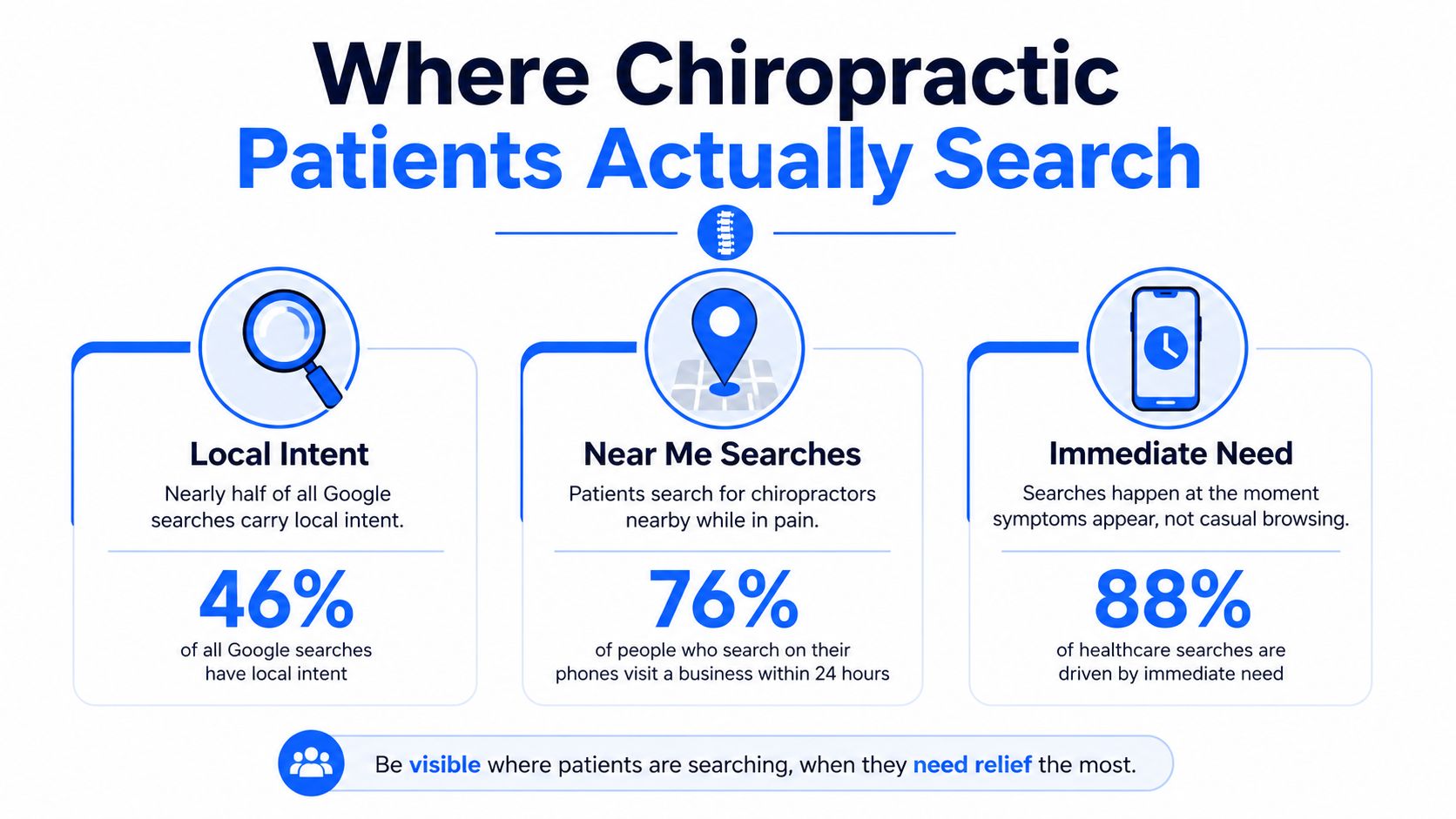
46% of Google searches have local intent, and nearly half of consumers add “near me” to local queries. To get more chiropractic patients, focus first on transactional searches such as “chiropractor near me,” symptom-based searches, and urgent care queries that connect a ready-to-book patient with your practice.
That distinction changes the entire marketing plan. General awareness, broad social posting, and untargeted website traffic may increase visibility without filling appointment slots. Transactional Marketing focuses on the searches patients make when they need help in a specific place and are prepared to contact a provider.
Chiropractic demand is already established and expanding. A national analysis found that U.S. adults receiving chiropractic care increased from 7.7 million in 2000 to 12.1 million in 2003, a 57% increase, while the number of people who visited a chiropractor rose from 7.5 million in 1997 to 12.6 million in 2006, a 68% increase (national chiropractic utilization analysis). The opportunity isn't just to attract more people to chiropractic care. It's to capture the patients searching for a solution in your city today.
Understanding Where Chiropractic Patients Actually Search
Local intent shapes how to get more chiropractic patients. Industry guidance from GoChiroPro places local intent at 46% of Google searches, with nearly half of consumers adding “near me” to local queries (local chiropractic marketing guidance). A search such as “what causes back pain” signals research. “Chiropractor near me” identifies a provider type, a location, and a likely next action.
Build your keyword plan around patient readiness:
- Category searches: “chiropractor near me” and “chiropractor in [city]” identify the provider and location.
- Problem searches: “neck pain chiropractor,” “lower back pain chiropractor,” and “chiropractor for numbness in arm” connect a symptom with treatment.
- Urgency searches: “car accident chiropractor same day” signals that speed, availability, and a visible phone number may decide the booking.
- Qualification searches: “chiropractor that accepts [insurance]” and “new patient chiropractor near me” show that the searcher is checking practical fit.
Use these phrases naturally across your website and Google Business Profile. A general chiropractic care page cannot answer every intent. A page focused on one symptom, one location, and one action gives Google and AI search systems a clearer match. Review what search queries reveal about customer demand when grouping terms by intent.
Start with the audience most likely to use care
CDC reporting found that women were more likely than men to have seen a chiropractor in 2017, while adults ages 45 to 65 were more likely than younger or older adults to use chiropractic care (CDC summary of chiropractic use). That profile can guide page priorities and ad language.
It should not exclude athletes, parents, older adults, or accident victims. Build core messaging for the groups most consistently seeking care, then create focused pages for additional situations. Include the symptoms and urgent needs patients type, not just the treatment category. That alignment gives your Maps listing, website, and AI-facing content a better chance of matching a ready-to-contact searcher.
Optimizing Your Google Business Profile for the Map Pack
Google says local results are primarily shaped by relevance, distance, and prominence (Google Business Profile local ranking guidance). Those three factors explain why a complete website alone won't guarantee visibility in the top three map locations.
Relevance improves when your profile accurately represents your practice and services. Choose the correct primary category, add relevant secondary services where appropriate, write a clear description, and ensure your website uses consistent language. If you treat back pain, neck pain, sports injuries, or auto accident cases, those services should be represented accurately in the profile and supported by useful pages on your site.
Distance can't be rewritten through copy. A searcher's location affects which practices can appear, so a clinic should maintain a precise address and define its service area. Don't create duplicate profiles for nearby cities or stuff city names into the description. That approach creates confusion rather than durable local relevance.
Prominence reflects how well-known and trusted the practice appears. Reviews, complete business information, local authority, and consistent activity all contribute to the signals patients and search systems use to evaluate a clinic.
A practical profile checklist
- Complete the essentials: Verify the name, address, phone number, hours, website, appointment URL, and holiday hours.
- Describe real services: Include accurate service names rather than a list of repetitive keywords.
- Use authentic imagery: Add current photos of the exterior, reception area, treatment rooms, team, and parking experience.
- Request reviews consistently: Ask appropriate patients for honest feedback and respond professionally without revealing private health information.
- Answer common questions: Keep profile Q&A information accurate, concise, and aligned with the services your office provides.
A focused profile makes the practice a clearer candidate for searches such as “chiropractor near me” and “back pain chiropractor in [city].” Clinics that want a detailed operational checklist can review this guide to getting into the local 3-pack before making profile changes.
The objective is Google Maps dominance in the service area, not visibility for an irrelevant audience. Transactional Marketing's Google Business Profile optimization process follows that same principle by connecting profile details, service relevance, reputation signals, and conversion paths.
Building Landing Pages for Symptom-Based and Emergency Searches
Patients rarely describe their need in the same language a practice uses internally. They may search “neck stiffness after sleeping,” “lower back pain after gym,” “chiropractor for numbness in arm,” “pediatric chiropractor for newborn latch issues,” or “car accident chiropractor same day.” Each phrase expresses a distinct concern, and each deserves a page that answers it directly.

A symptom page shouldn't promise a medical outcome. It should help a searcher understand whether your clinic handles that concern, what the first visit involves, where you're located, and how to request an appointment. Use plain language, accurate clinical information, and a clear boundary between education and diagnosis.
Build one page around one intent
Start with the query, then design the page around the decision the visitor needs to make:
- Use a descriptive URL: A slug such as
/neck-pain-chiropractor-[city]/is easier to understand than a generic service identifier. - Match the title to the search: Write a title that combines the patient concern, service, and location without forcing repetitions.
- Answer the immediate question: Explain common reasons people seek care for the symptom and what your practice can evaluate.
- Show practical details: Include location, parking, accepted payment information if applicable, availability, and what to bring.
- Use one primary action: Offer a prominent “Book an Appointment” or “Call the Office” action, not a page crowded with competing buttons.
Emergency-intent pages need especially clear access information. A car accident page should state whether same-day requests are considered, explain how to contact the practice, and avoid implying that chiropractic care replaces emergency medical evaluation when urgent symptoms require it.
AI systems also benefit from this structure. A page with a specific heading, concise answer, visible FAQ, accessible HTML, and clearly marked booking action gives automated systems identifiable passages to surface when a patient asks a related question. Broad homepage copy can't provide the same precision.
Paid Search and Patient Reactivation as Complementary Channels
Paid search can put your practice in front of urgent, transactional queries quickly, including “car accident chiropractor same day” or “chiropractor for lower back pain near me.” It can also spend budget on clicks that never become appointments. Benchmark data place average Google Ads cost per click at $5.42 across industries and around $8.00 for healthcare and dental, so a $1,000 monthly budget may purchase roughly 125 to 180 clicks (chiropractic marketing benchmark discussion).
Use that budget to test demand, not to buy traffic without feedback. Build ad groups around symptom, treatment, emergency, and location terms. Review search terms weekly, exclude irrelevant research queries, and send each ad to a page that answers the exact concern. A same-day accident campaign should show access details and a direct booking or call action, rather than send visitors to a generic homepage. Track calls and completed appointment requests, not clicks alone.
Patient reactivation addresses a different source of growth. Many practices have inactive patients who have not visited in three, six, or twelve months, according to independent industry content (chiropractic industry challenge overview). Segment outreach by time since the last visit, previous condition, and communication preference. A short reminder with a relevant reason to return can reach people who already know your office without paying for another acquisition click. Keep consent and opt-out requirements clear, and use a follow-up automation workflow so staff can respond consistently.
| Channel | Typical Cost Profile | Speed to First Appointment | Best For |
|---|---|---|---|
| Paid search | Ongoing cost for each click, with treatment and healthcare terms often expensive | Can generate inquiries within days | Capturing urgent, high-intent searches |
| Patient reactivation | Uses existing patient relationships and an owned database | Depends on message timing and patient readiness | Recovering lapsed patients who already know the practice |
| Referrals | Low direct media cost, but depends on patient experience and follow-up | Often varies by relationship and timing | Building trust through personal recommendations |
| Organic search | Requires investment in pages, technical work, and content | Usually develops over time | Creating durable visibility for symptom and local queries |
Recommendations still influence discovery. One study reported friends and family as the most common source at 50.62%, followed by organic search at 23.46% and organic social at 17.28%. Use paid search to capture immediate symptom and emergency demand, then protect margins through reactivation, referral processes, and stronger conversion paths. Consistent reviews and accurate Google Maps information also help those channels reinforce one another.
Reducing Booking Friction with Web-Based Scheduling
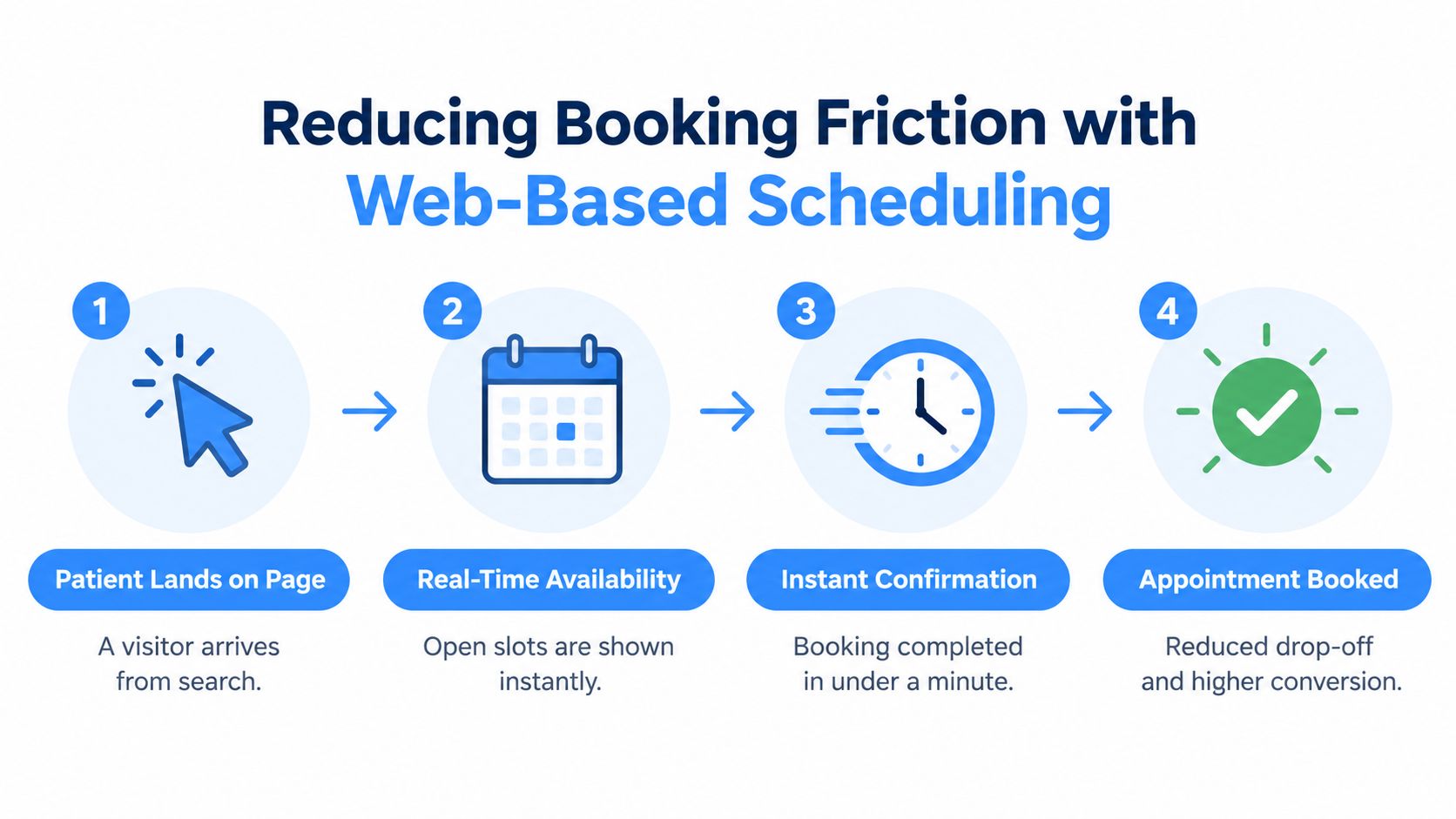
A patient can find your practice, trust the page, and still fail to book if the next step is cumbersome. Online scheduling removes some of that delay by showing available times and letting visitors act when the office is closed. In a 2025 digital-health study, the share of appointments scheduled through online systems reached 22.8% in a practice setting (digital-health scheduling study).
Broader medical literature links web-based scheduling with reduced no-show rates, lower staff labor, shorter waiting times, and improved satisfaction, although the workflow still needs thoughtful implementation. Put one clear booking action near the top of each intent page, keep the form short, and avoid sending a new patient through several unnecessary screens.
A practical booking path should:
- Show availability clearly: Let visitors understand what appointment types and times are available.
- Limit required fields: Ask only for information needed to request or confirm the visit.
- Support mobile users: Make the calendar, phone number, and primary button easy to tap.
- Confirm the action: Display a clear confirmation page and send the appropriate follow-up.
- Offer a human alternative: Keep the office phone number visible for patients who prefer to call.
Track completed bookings separately from page views and button clicks. A landing page may attract traffic while producing few appointments, or it may generate calls that staff fail to record accurately. A focused service landing page structure helps align the promise in the search result with the action on the page.
Writing Content That Ranks in Organic Search and AI Answers
AI search visibility is a separate measurement problem from traditional rankings. It concerns whether a practice is mentioned, cited, or recommended in AI-generated answers, and the useful way to measure it is with a repeatable prompt set across multiple AI engines (AI search visibility guidance).
For a chiropractic clinic, prompts might include “Who is a chiropractor near me for neck pain?” or “Which chiropractor offers same-day accident appointments in [city]?” Record whether the practice appears, which page an AI system cites, how the practice is described, and whether the answer presents it as relevant to the requested condition and location. Don't treat a single response as a ranking report. Look for patterns across a consistent set of patient-intent questions.
Give search systems clean evidence
Classic SEO and AI optimization share a practical foundation:
- Use semantic headings: Organize each page around one condition, service, location, or question.
- Publish accessible content: Critical information should be present in the initial HTML response, not hidden behind JavaScript-only interactions.
- Add visible FAQs: Answer actual patient questions in text that visitors and automated systems can access.
- Mark up key actions: Make contact details, appointment links, and relevant business information semantically clear.
- Build focused clusters: Keep chiropractic marketing content separate from unrelated industries and topics.
Adobe recommends updating roughly 10% to 15% of page content regularly as part of maintaining visibility (Adobe content visibility best practices). Refresh outdated appointment information, service descriptions, FAQs, internal links, and examples rather than changing text randomly.
A coherent content silo might include a core page about chiropractic services, supporting pages for back pain, neck pain, sports injuries, auto accidents, first visits, and insurance questions, plus location pages that serve distinct areas. For a disciplined production process, the six-phase SEO content workflow offers a useful framework for moving from intent research to publication and refinement.
Measuring Results and Iterating for Sustainable Growth
Marketing decisions should follow booked appointments, not vanity traffic. A page that ranks for an educational question may be useful for trust, but a page that earns impressions for “chiropractor near me,” receives calls, and produces consultations deserves a different level of attention.
Track performance at the keyword, city, page, and appointment levels. Review Google Search Console queries to find emerging symptom phrases, compare landing-page engagement, record calls and form submissions, and reconcile those leads with actual appointments in the practice-management system. For Google Maps, use local ranking heat maps rather than relying on one manual search from the clinic address.
Use a reporting rhythm the team can act on
Biweekly reporting creates a practical feedback loop:
- Review transactional terms: Identify which city and symptom searches produce qualified inquiries.
- Inspect map visibility: Look for service-area gaps in relevance, profile completeness, or reputation signals.
- Check conversion paths: Compare calls, forms, booking starts, and completed appointments.
- Refine paid campaigns: Remove wasteful search terms and shift attention toward useful intent.
- Update content: Improve pages that earn visibility but fail to answer the query or guide the visitor to book.
The dashboard should show what happened and what changes follow. If a neck-pain page receives impressions but few actions, improve the match between the title, opening answer, trust information, and booking path. If a map profile receives calls but staff miss them, the problem is operational rather than a keyword problem.
Transactional LLC offers local SEO, Google Maps and Business Profile optimization, AI-driven content planning, website management, and paid campaigns for service businesses, with reporting that can include keyword timelines by city, map-ranking heat maps, Search Console queries, traffic, and conversion activity. Visit Transactional LLC to discuss a chiropractic growth plan built around transactional searches, symptom-specific pages, and measurable appointment actions.