


A service business can have a polished website, strong reviews, and a capable team, yet still lose the call because its Google Maps listing sits below competitors. Someone searches “air conditioning repair near me,” “roofer near me,” or “dentist near me,” sees the local results, and contacts the business that appears credible, nearby, and ready to respond.
That's the purpose of Google Business Profile management. It isn't a one-time verification task. It's the ongoing work of making a service business visible for transactional search terms, the searches made by people who are ready to spend money, schedule an appointment, or request immediate help. Transactional Marketing focuses on those high-intent searches, combining Google Maps optimization, local SEO, and AI-driven content systems for specific industries and service areas.
Understanding Google Business Profile Foundations
Google's business-listing product has changed substantially. It launched as Google Local in 2004, became Google My Business in 2014, and was rebranded as Google Business Profile in late 2021. The product's evolution reflects a shift from a basic directory entry to a core visibility layer for Google Search and Google Maps, as documented in this history of Google Business Profile.
Today, businesses can manage profiles directly through Google Search or Google Maps. That matters because customers don't experience your listing as a back-office record. They see your category, services, hours, photos, reviews, location, website, and contact options at the moment they're deciding whom to call.
Google says local results mainly depend on relevance, distance, and prominence. Relevance measures how closely your profile matches the search. Distance reflects the relationship between the searcher, the location term, and your business. Prominence reflects how well-known and trusted the business appears, including reviews, links, and broader web signals, according to Google's local ranking guidance.
Why transactional searches require a different approach
A branded search such as a company name is valuable, but it usually captures demand that already exists. A transactional search such as “plumber near me” or “emergency electrician in [city]” creates an opportunity to reach someone comparing providers right now.
Your profile must communicate the exact services you provide, the areas you serve, and the next action a customer should take. Generic descriptions and broad categories make Google work harder to determine relevance, while precise service information gives both search systems and customers clearer context.
Google Business Profile management also connects with the broader shift toward answer engines and AI search. Businesses need consistent, structured information across their profiles, websites, and supporting pages so search engines and large language models can understand what the company does, where it operates, and which problems it solves. For a useful distinction between traditional SEO and newer search approaches, review ContentBuck's AEO vs GEO vs SEO guide.
For a practical explanation of the platform itself, see what a Google Business Profile is. Treat the profile as an active conversion asset, not a listing you check once after opening the business.
Completing Your Profile Setup for Local Services
A service business can lose leads before ranking work begins. An unclaimed listing, incorrect hours, or missing service details leaves customers unsure whether to call. Finish the profile first, then improve its visibility.
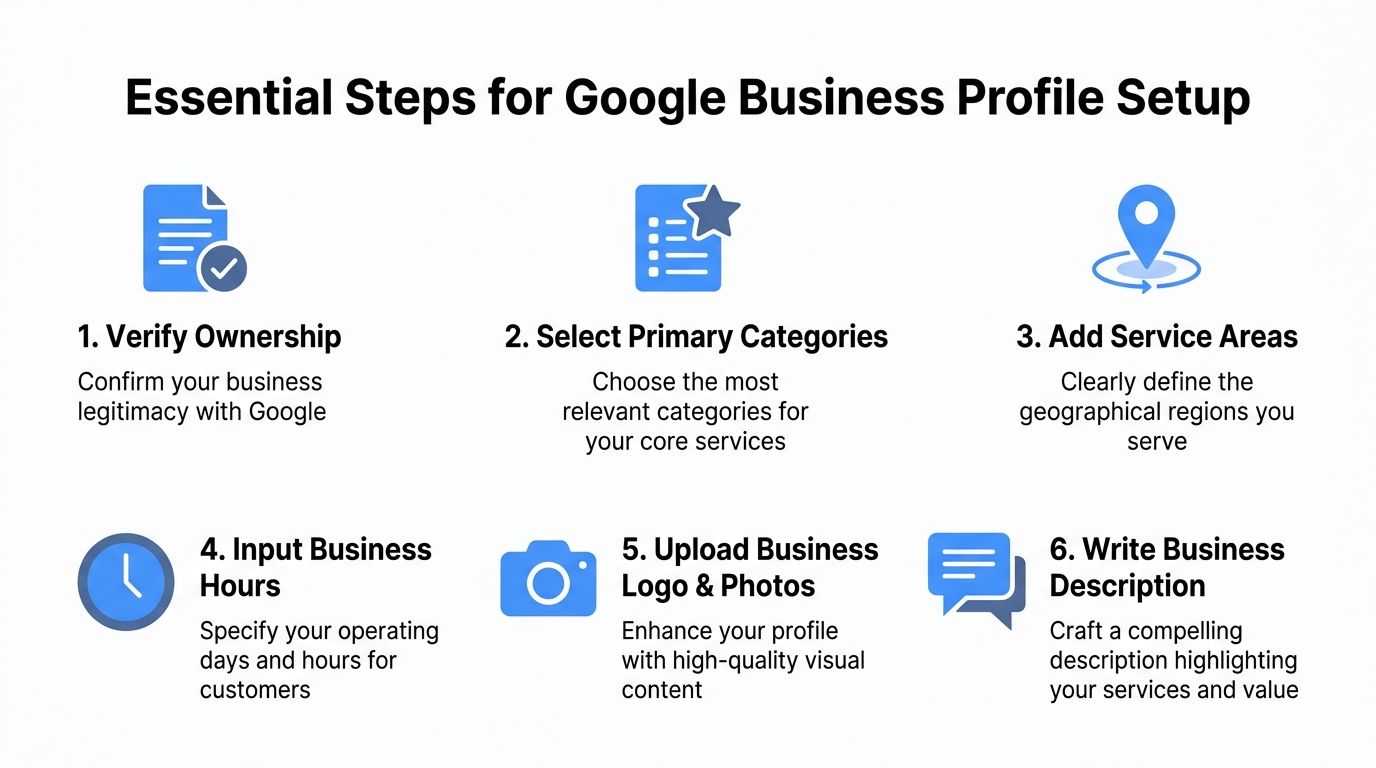
Start with ownership and verification
Search for the business on Google and Google Maps. Claim an existing listing rather than creating another one. If someone else controls it, request the right access. Follow Google's verification process, and keep evidence of the location, branding, equipment, and daily operations ready if video verification is requested.
Keep ownership with the business. Employees and agencies should receive only the access level their tasks require. This structure protects the profile when staff or vendors change.
Choose categories for the actual service
Select a primary category that describes the company's main business. Add secondary categories only when they accurately represent services the business provides. An HVAC contractor, dental practice, roofing company, pest control provider, or med spa should apply the same standard.
Irrelevant categories weaken the connection between the profile and the customer's search. Accuracy matters more than filling every available field.
Define service areas with operational accuracy
List the cities, towns, or regions the service business serves. Do not add attractive markets that the team cannot reach. Keep the profile, website service pages, and internal location records aligned, especially when several people manage multiple locations.
Complete the operating details before publishing:
- Business hours: Publish normal hours, then update holiday and emergency availability promptly.
- Phone number: Use a number customers can answer and track consistently across listings.
- Website: Link to the most relevant page, such as an HVAC repair page instead of a generic homepage.
- Services: Name the work customers seek, including repairs, installations, inspections, consultations, or treatments.
- Attributes: Add accurate attributes that help customers decide whether the business fits their needs.
- Photos: Upload real images of the team, vehicles, equipment, facility, completed work, and service environment.
- Description: Explain the business, service area, specialties, and customer problem solved without keyword stuffing.
Analysts at SearchLab report that complete profiles can receive 7x more clicks and 70% more in-store visits than incomplete profiles, while about 41% of small local businesses leave profiles incomplete, according to Google Business Profile statistics compiled by SearchLab. Treat completeness as the first management benchmark, not a final polishing task.
For a repeatable process, use this Google Business Profile setup guide to standardize new locations, assign ownership, and check every field before the profile goes live.
Optimizing Profiles for Transactional Search Terms
A customer searching “roofer near me,” “dentist near me,” or “air conditioning repair near me” is choosing a provider, not gathering general information. Your profile must answer three questions immediately: What do you do? Where do you work? How can I contact you now?
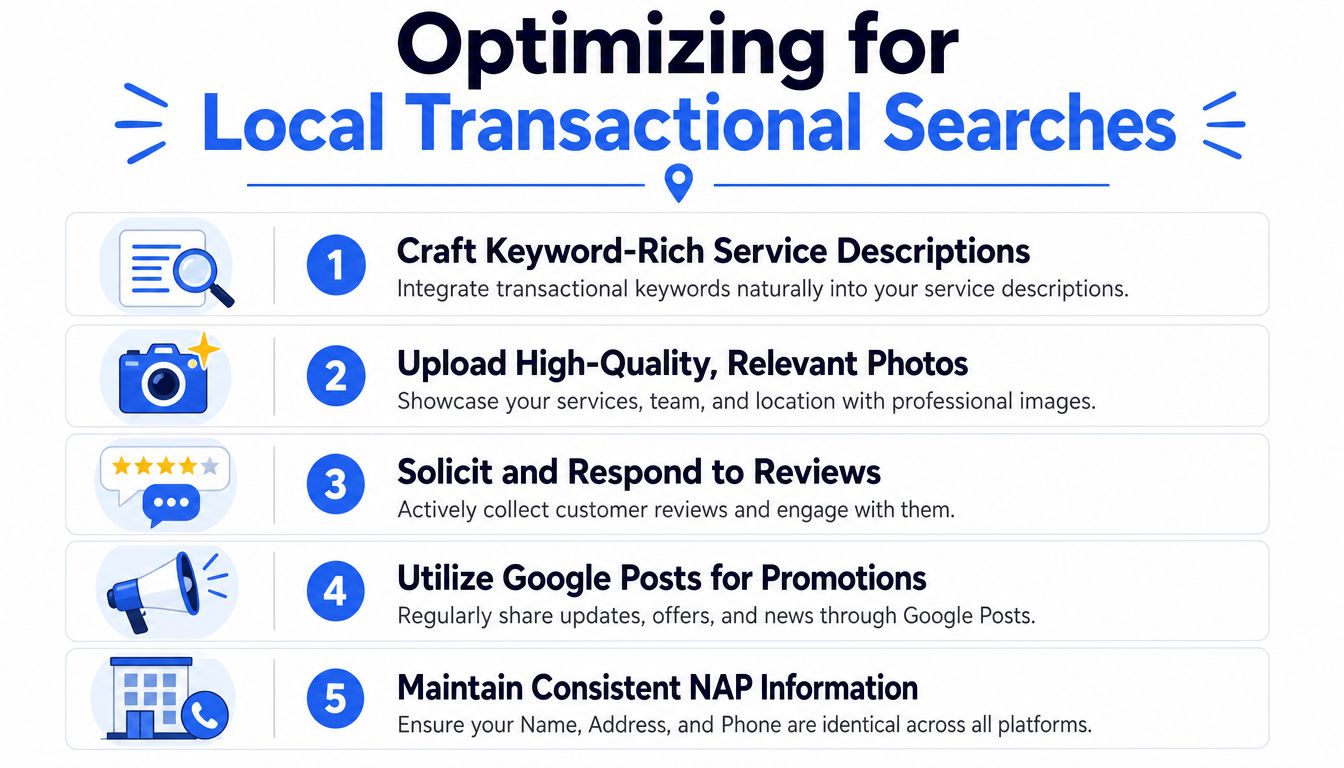
Set the primary category first. Then align services, review language, the business description, and relevant website pages with the work you perform. Use natural wording that connects the service, customer problem, location, and next action. Keyword stuffing makes the profile harder to trust and does not replace clear service information.
Build the profile around high-intent actions
Use photos to demonstrate capability. An HVAC company should show technicians, equipment, installations, and completed repairs. A roofer should show crews, materials, roof work, and finished projects. A dental practice should show the office, team, treatment environment, and patient-facing experience.
Reviews need a defined workflow. Ask satisfied customers to describe the service they received in their own words. References to furnace repair, roof replacement, emergency plumbing, or dental treatment give prospective customers useful context. Never script praise or pressure customers to use unnatural phrases.
Google Posts should help customers decide. Publish service availability, seasonal maintenance reminders, new services, appointment openings, and location-specific updates. Give each post one action, such as calling, booking, or visiting the relevant service page.
Practical rule: Write every profile element for the customer who is ready to act, not for an abstract audience browsing local information.
Profile interactions commonly include website visits, direction requests, and phone calls, according to its Google Business Profile statistics summary. Review that action mix alongside impressions. Visibility that produces no calls, visits, or bookings will not grow revenue.
For multi-location businesses, apply the same governance workflow at every profile. Assign an owner, document approved categories and service language, and require review before location-specific edits go live. AI can help identify unanswered reviews, suggest response drafts, and flag posts that lack a clear action, but a manager should approve customer-facing changes.
Use this weekly operating rhythm:
- Check hours, service areas, categories, and URLs.
- Add or review photos from recent work.
- Publish an update tied to a customer need.
- Request reviews from recent satisfied customers.
- Respond to every review with relevant, human language.
- Review calls, website clicks, and direction requests for changes.
Tracking Key Performance Metrics for Local SEO
A profile can appear busy without producing meaningful business. Measure the actions that connect Google Maps visibility to revenue, then compare those actions with booked appointments, estimate requests, and completed jobs.
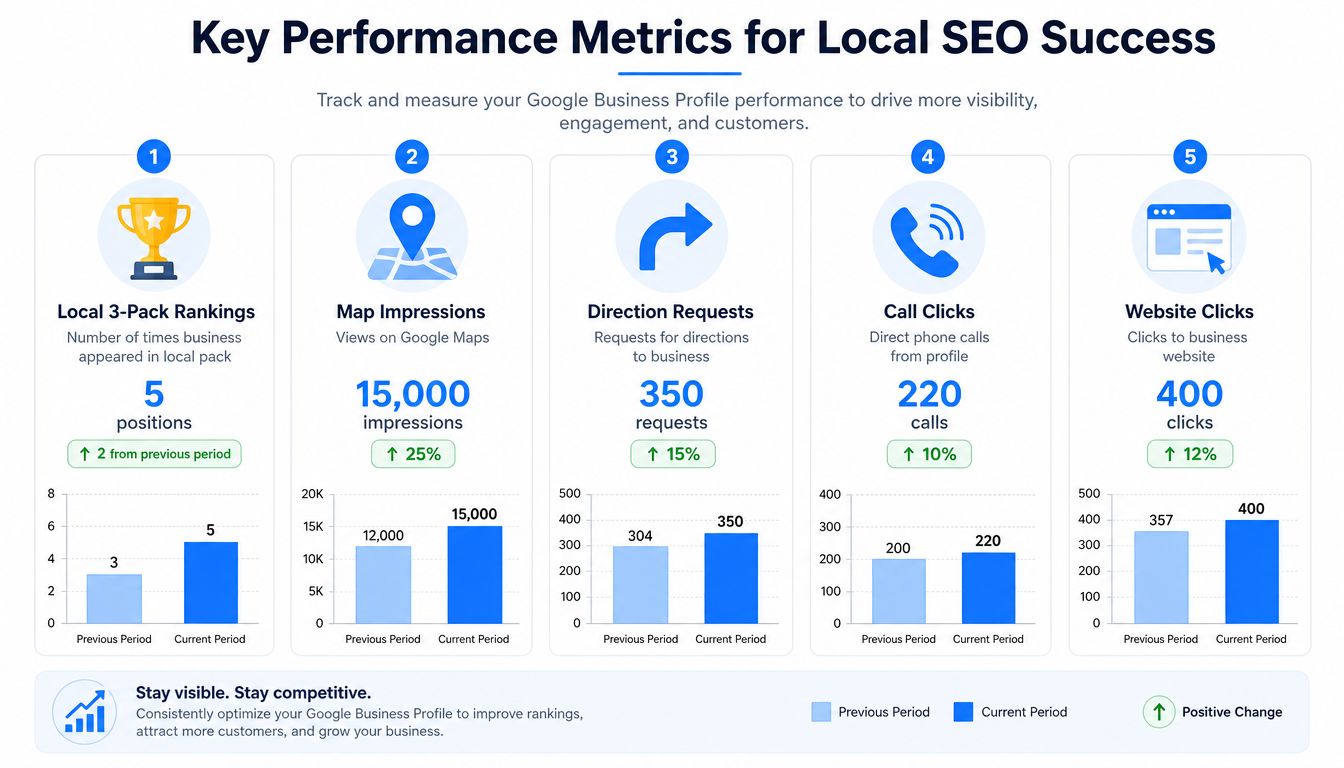
The most useful dashboard view combines rankings with behavior. Track local 3-pack appearances across the service area, map impressions, calls, website clicks, direction requests, and the search terms that lead people to the profile. A single rank check from the business address won't show how visibility changes across nearby neighborhoods.
Give the local 3-pack priority
The local 3-pack deserves special attention because it captures prominent map visibility and makes the next action easy. A SOCi analysis of 12.9 billion data points found that businesses in the local 3-pack received 126% more traffic and 93% more customer actions than businesses ranked from positions 4 through 10, as reported in this local search research summary.
That doesn't mean rankings alone guarantee sales. It means moving into the top map results can materially change the number of people who see the business and interact with it.
Report movement, not vanity metrics
A useful reporting cycle should show:
- Map visibility: Where the profile appears for target transactional searches across the service area.
- Customer actions: Calls, website visits, direction requests, and booking actions.
- Search intent: The service and location terms connected to profile discovery.
- Operational response: Whether calls are answered and leads receive prompt follow-up.
- Revenue connection: Which calls or forms became estimates, appointments, jobs, or patients.
Use a consistent reporting period and annotate major changes, such as a category update, new service page, review campaign, or profile suspension. The purpose isn't to make a colorful report. It's to identify which changes improve qualified demand.
For a broader tool comparison, review the local SEO reporting tools guide. A clear report should let an owner decide what to change next without needing an analyst to translate every chart.
Managing Multiple Locations Efficiently
Multi-location Google Business Profile management fails when every branch edits its listing independently. One location changes hours, another uses an outdated service description, and a third uploads the wrong phone number. Customers see inconsistency, while the corporate team loses confidence in the data.
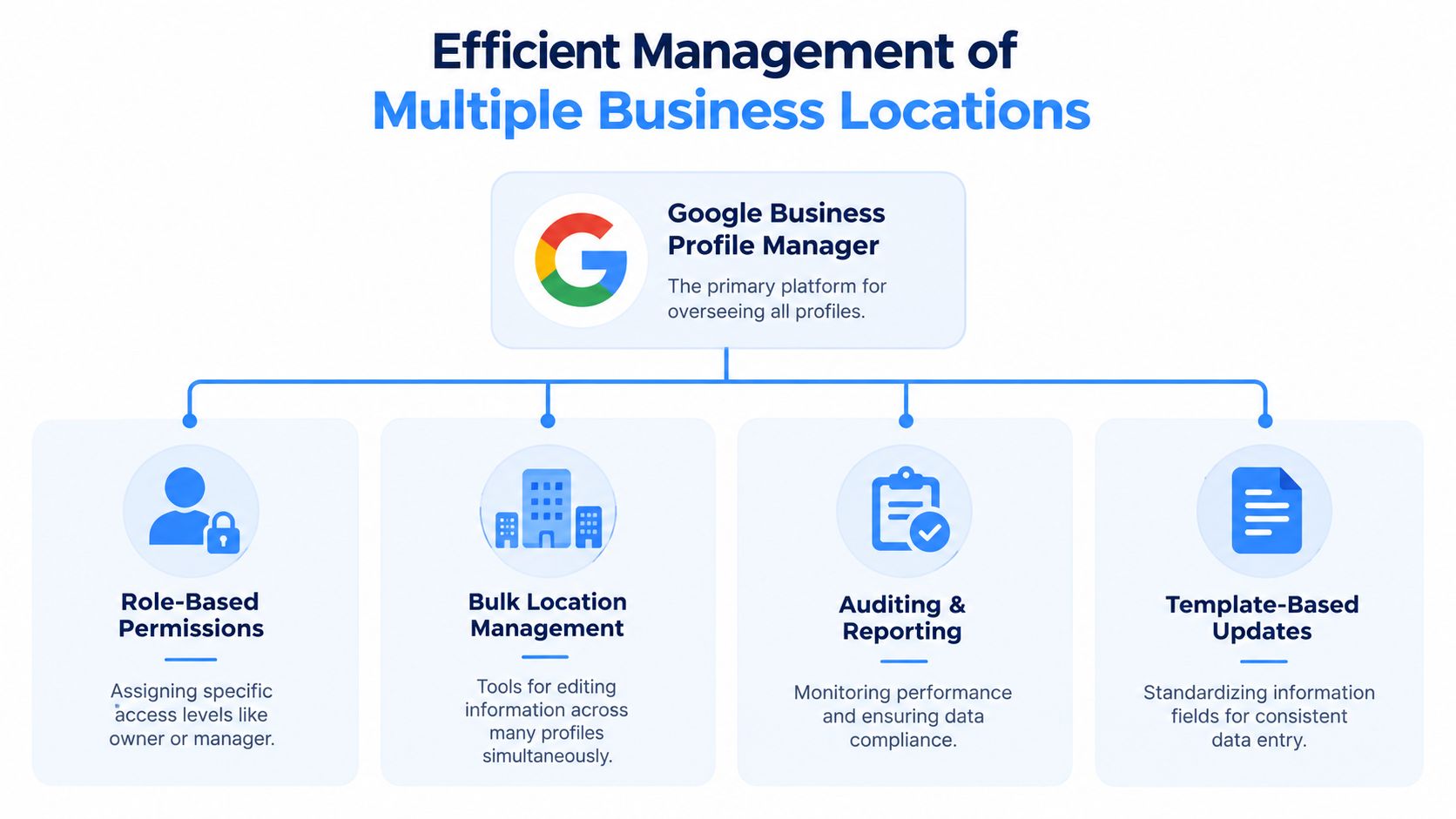
Google's current operating model makes Business Profile Manager, bulk updates, role-based access, and approval governance central to scale. Recent coverage of the platform explains why multi-location teams need standardized workflows as legacy management tools sunset and features continue to change, including this guide to Google Business Profile features in 2026.
Assign responsibility before making edits
The corporate team should control standards, templates, and high-risk changes. Regional managers can review service-area and campaign variations. Local managers can submit photos, hours changes, and operational updates for approval.
Use the minimum access needed for each role. Keep ownership with the business, remove former employees, and document which agency or staff member manages each location.
A workable governance model includes:
| Function | Recommended owner | Control |
|---|---|---|
| Core business information | Corporate team | Approved master data |
| Hours and temporary closures | Local manager | Evidence and timestamp |
| Categories and services | SEO lead | Scheduled audit |
| Photos and posts | Local or regional team | Brand and accuracy review |
| Reviews and Q&A | Assigned responder | Response standards |
| Reporting | Marketing leadership | Consistent dashboard |
Create a repeatable location workflow
Maintain a master spreadsheet with the approved business name, address, phone, website URL, primary category, secondary categories, service areas, hours, and location-specific landing page. Before a bulk edit, validate the source data and record the approval. After the update, spot-check profiles in Search and Maps.
A weekly SOP should include:
- Confirm regular and special hours.
- Review pending edits and verification issues.
- Check category and service consistency.
- Review new photos and customer contributions.
- Respond to reviews and questions.
- Compare profile actions by location.
- Escalate suspended or edited profiles.
Bulk editing saves time, but it also spreads mistakes quickly. Never push a universal update without checking whether a location has different hours, services, phone routing, or regulatory requirements.
For service brands expanding into new cities, use this multi-location local SEO resource to connect location governance with city-level search targeting.
Automating Engagement with AI-Driven Tools
A complete profile can still become stale. Service businesses often don't have constant walk-in activity, yet Google's local results use relevance, distance, and popularity. Category-based discovery is especially important, with recent industry reporting stating that 86% of Google Business Profile impressions come from category-based searches, as summarized by Birdeye's State of Google Business Profiles report.
That creates a practical challenge for HVAC contractors, roofers, pest control companies, chiropractors, and dental practices. They need regular, useful activity even when the business isn't publishing consumer-facing updates every day.
Use AI for production, not truth
AI can draft posts from a service calendar, turn common customer questions into Q&A drafts, suggest review-response language, and organize content around service and city combinations. It shouldn't invent offers, credentials, service availability, locations, or customer outcomes.
Build a controlled workflow:
- Collect source facts: Approved services, hours, service areas, promotions, policies, and FAQs.
- Generate drafts: Ask an AI tool to create concise posts and responses for a specific service and audience.
- Review for accuracy: A human confirms every claim, date, location, and call to action.
- Publish natively: Use Google's available scheduling and management features where appropriate.
- Measure actions: Compare calls, website visits, direction requests, and qualified leads.
- Refresh the prompt library: Add real customer questions and approved answers.
AI optimization also affects how businesses are understood by language models. Consistent service descriptions, location pages, review themes, FAQs, and profile data help systems connect a business with queries such as “who repairs commercial AC near me” or “which dentist accepts new patients in my area.” This requires entity consistency, not vague content volume.
Teams testing different AI workflows may also compare general-purpose tools with a better ChatGPT alternative. Whatever tool you use, keep approval rules in place. Automation should increase publishing consistency while preserving factual control, brand voice, and customer privacy.
Transactional Marketing's AI content engine can plan industry-specific content silos, target high-intent terms, and support conversion-focused publishing. Use automation to keep the profile active, but make every update answer a real customer question or create a clear reason to call.
Outsourcing Profiles and Ongoing Success Checklist
Many owners shouldn't manage Google Business Profile operations alone. The work includes verification, categories, service areas, reviews, photos, posts, Q&A, reporting, access control, and issue resolution. The right agency or virtual assistant can handle execution, but the business owner must retain control of standards and outcomes.
Start with screening questions:
- Experience: Which service industries and location types have you managed?
- Access: Will the business retain ownership while the provider receives manager access?
- Process: How do you approve profile edits, posts, review responses, and hours changes?
- Reporting: Can you show map visibility, calls, website clicks, direction requests, and lead outcomes?
- Compliance: How do you handle suspended listings, duplicate profiles, inaccurate edits, and policy concerns?
- Content quality: Who verifies AI-generated copy before publication?
- Communication: Who handles urgent changes, such as closures or emergency availability?
Avoid providers that promise a guaranteed position for every search. Proximity is a major local factor, and Google's systems evaluate relevance, distance, and prominence. A responsible provider should explain what it controls, what it monitors, and how it connects profile actions to actual business results.
Use a written service-level agreement
Your agreement should identify who owns the profiles, who approves changes, how quickly urgent updates are handled, and what the monthly reporting includes. Require a change log for categories, phone numbers, URLs, hours, service areas, and ownership permissions.
Keep this operating checklist:
- Weekly: Review hours, posts, reviews, Q&A, photos, calls, and website actions.
- Monthly: Audit categories, service descriptions, URLs, NAP consistency, and location assignments.
- Quarterly: Review service-area strategy, landing-page alignment, permissions, duplicate listings, and reporting quality.
- After every operational change: Update the profile, website, tracking records, and internal master data.
- At every review response: Address the customer's actual experience without copying generic language.
- Before every bulk edit: Confirm the data, obtain approval, and inspect the updated profiles.
The strongest outsourcing arrangement remains transparent. You should know what changed, why it changed, which searches matter, and whether those searches produced calls, appointments, estimates, jobs, or patients.
Transactional LLC provides Google Business Profile setup, Google Maps optimization, local SEO, web management, and AI-driven content systems for service businesses targeting high-intent searches in specific cities. Visit Transactional LLC to discuss a strategy for reaching transactional searches such as “roofer near me,” “dentist near me,” or “air conditioning repair near me.”