


Most owners read Google Business Profile Insights backward. They screenshot total views, celebrate exposure, and assume customers will follow. Meanwhile, a local competitor with fewer views may be capturing the calls, direction requests, and bookings from people searching “roofer near me,” “dentist near me,” or “air conditioning repair near me.”
That's the standard Transactional Marketing rejects. Google Business Profile Insights isn't a vanity scoreboard. It's a diagnostic panel for transactional search, where the searcher already has a need and is ready to contact a provider. Views tell you who noticed the listing. Actions tell you who moved closer to buying.
This distinction matters for SEO and AI optimization. Google Search, Google Maps, and AI-generated answers increasingly depend on accurate, structured business information that matches a person's intent. Your job isn't to be visible to everyone. It's to be the obvious local answer for the customer with money in hand.
Why Views Are the Least Important Number in Your Report
More profile views don't automatically mean more customers. A plumbing profile can attract plenty of casual researchers, branded searches, or people outside its service area while producing fewer calls than a smaller profile that appears for urgent, service-specific searches.
A person searching for a general business name may already know the company. A person searching “roofer near me” is evaluating providers and may contact whoever looks credible, available, and close enough to serve the job. That's why transactional search terms matter more than broad visibility. The searcher isn't merely gathering information. They're trying to complete an action.
Google Business Profile Insights helps you separate exposure from intent. The report shows discovery activity, but its real value appears when you connect that discovery to calls, direction requests, website visits, and other customer actions. Google Business Profile should support the path from search to contact, not just occupy a line on a marketing report.
Practical rule: Treat views as a question, not a success metric. Ask what those viewers did next.
A high view count with weak action volume points to a conversion problem. The profile may lack a clear service match, current reviews, useful photos, accurate hours, or a phone number that works when people need it. It may also rank for irrelevant searches, giving you exposure without commercial value.
A lower view count with consistent calls can indicate stronger targeting. A roofing company that appears for urgent roofing repair searches may need fewer impressions than one appearing for broad, low-intent terms. The same applies to dentists, HVAC contractors, electricians, pest control companies, chiropractors, and med spas.
Use the report to answer three practical questions:
- Who found the profile? Separate Search and Maps discovery.
- What did they do? Prioritize calls, directions, and website interactions.
- Which transactional searches are you capturing? Look for service and location language that indicates readiness to hire.
That approach changes the optimization decision. Instead of chasing more views, you improve the profile elements that turn local intent into contact.
What the Performance Report Shows
Google Business Profile performance data appears in a dedicated report across Google Search and Google Maps. Owners open the profile, select the performance area, and choose a date range to review trends. The report covers views, searches, and actions such as direction requests, phone calls, and menu clicks, as described in Google's Business Profile performance documentation.
Google renamed the Insights tab to Performance on February 20, 2023, but the underlying group of local-search signals remained broadly the same. The report typically supports up to about 18 months of data through the API and may lag real time by roughly 2 to 3 days, according to industry guidance on Google Business Profile Performance. That limited history and reporting delay make the data useful for trend decisions, not instant ROI proof.
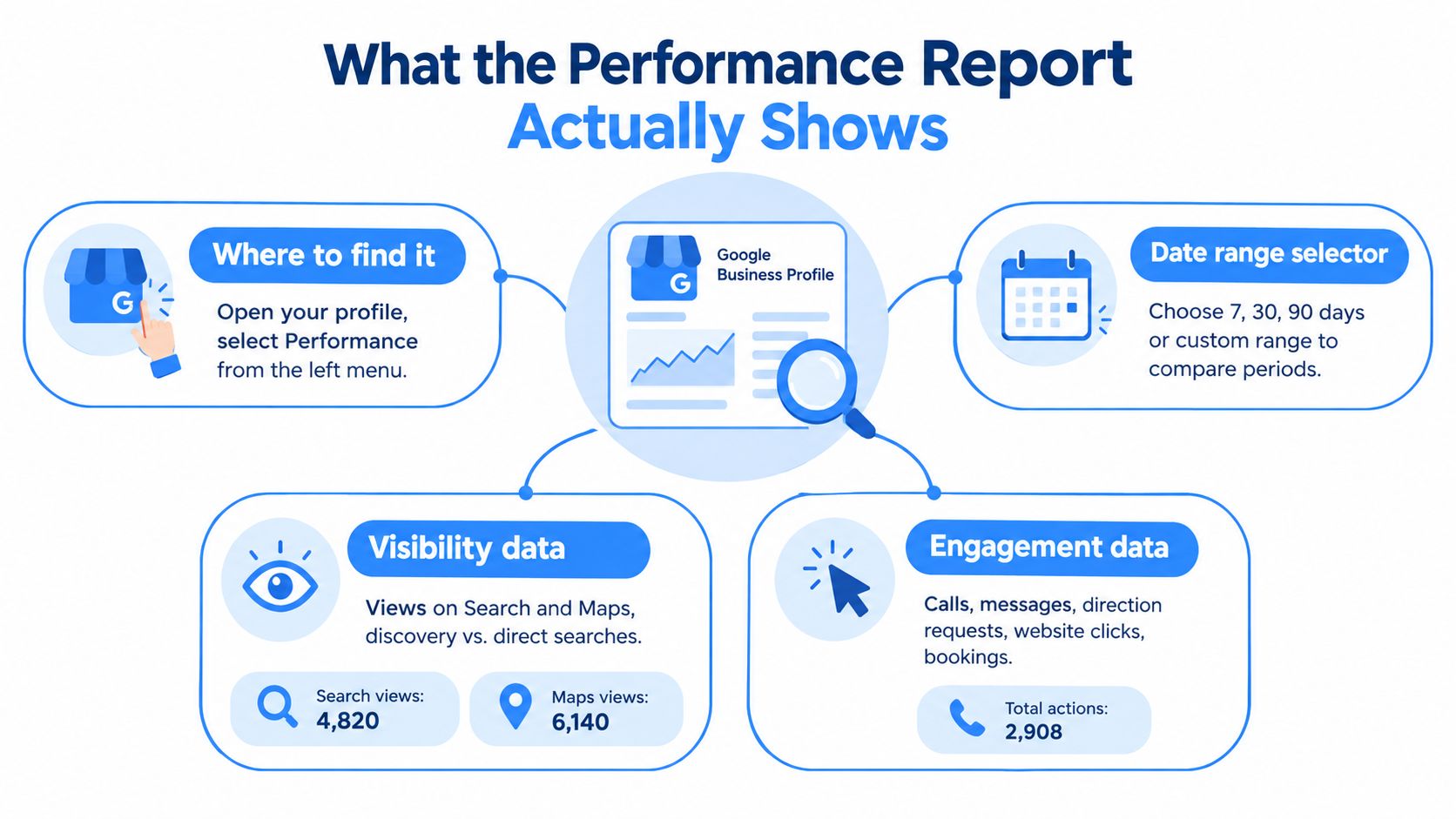
The report works like a receptionist's log. Views record who found the business. Actions record who asked for help. Discovery metrics show the route customers took to the profile. Action metrics show whether that visit created a path toward contact.
Discovery data
Discovery data identifies where customers found the profile, including Google Search and Google Maps. Search views represent discovery through Google Search. Maps views represent discovery through Google Maps. Keep these surfaces separate when assessing visibility tied to map-pack competition and nearby-provider searches.
Action data
Action data covers calls, direction requests, website clicks, and other available profile interactions. These signals sit beside discovery data, so you can compare exposure with behavior and prioritize changes linked to transactional intent.
For a practical reporting workflow, connect the native report to a Google Business Profile performance dashboard. Use the dashboard to compare date ranges, spot trends, and select the next profile change to test. Treat it as operational reporting, not live revenue data.
Reading Discovery Metrics for Search and Maps
Search views and Maps views answer different questions. Google says a Search view occurs when a customer finds the business through Google Search, while a Maps view occurs through Google Maps. The report also tracks actions such as direction requests and phone calls, with calls counted from clicks on the call button when a phone number is present on the profile, as explained in Google's Insights documentation.
For a local service company, Maps visibility deserves close attention. A profile that earns strong Maps discovery is more likely to be competing in the environment where people compare nearby providers, request directions, or call directly. Search visibility still matters, especially when customers research a service before contacting a provider, but it doesn't tell you by itself whether the profile is appearing in the local map results that drive immediate action.
Consider an HVAC company targeting “AC repair near me.” If Search views rise while Maps views remain weak, the company may be earning broader organic exposure without strong map-pack placement. If Maps views improve and calls follow, the profile is becoming more useful for urgent local demand. The correct response isn't to celebrate either number in isolation. Compare the two surfaces with the action data.
| Metric | What It Measures | What a Weak Number Suggests |
|---|---|---|
| Search views | Discovery through Google Search | The profile may not match enough relevant service searches |
| Maps views | Discovery through Google Maps | Local-pack visibility, proximity, or map relevance may be weak |
| Phone calls | Clicks on the profile's call button | The profile may lack contact clarity, trust, or a working phone number |
| Direction requests | Requests for routes to the business | Address, service-area configuration, or location intent may be unclear |
Read shifts over a consistent date range instead of reacting to a single day. A change in the Search-to-Maps balance can signal a change in local visibility, customer behavior, or profile relevance. It's a diagnostic clue, not a complete ranking report.
Search queries add context to the surface data. Review what search queries are and compare the phrases bringing people to the profile with the services you want to sell. If the profile attracts searches for the wrong service, more views won't solve the problem. You need tighter category, service, content, and landing-page alignment.
The Action Metrics That Predict Revenue
Calls, direction requests, website clicks, and booking interactions deserve more attention than raw exposure. They show that a person moved from viewing the listing to contacting, visiting, researching, or scheduling with the business.
That is the transactional lens. Search intent is transactional when someone wants to complete an action such as purchasing or signing up. Queries containing “buy” or “get” can signal that readiness, while local searches such as “roofer near me” and “dentist near me” follow the same commercial pattern, as outlined in Search Engine Land's guide to search intent.
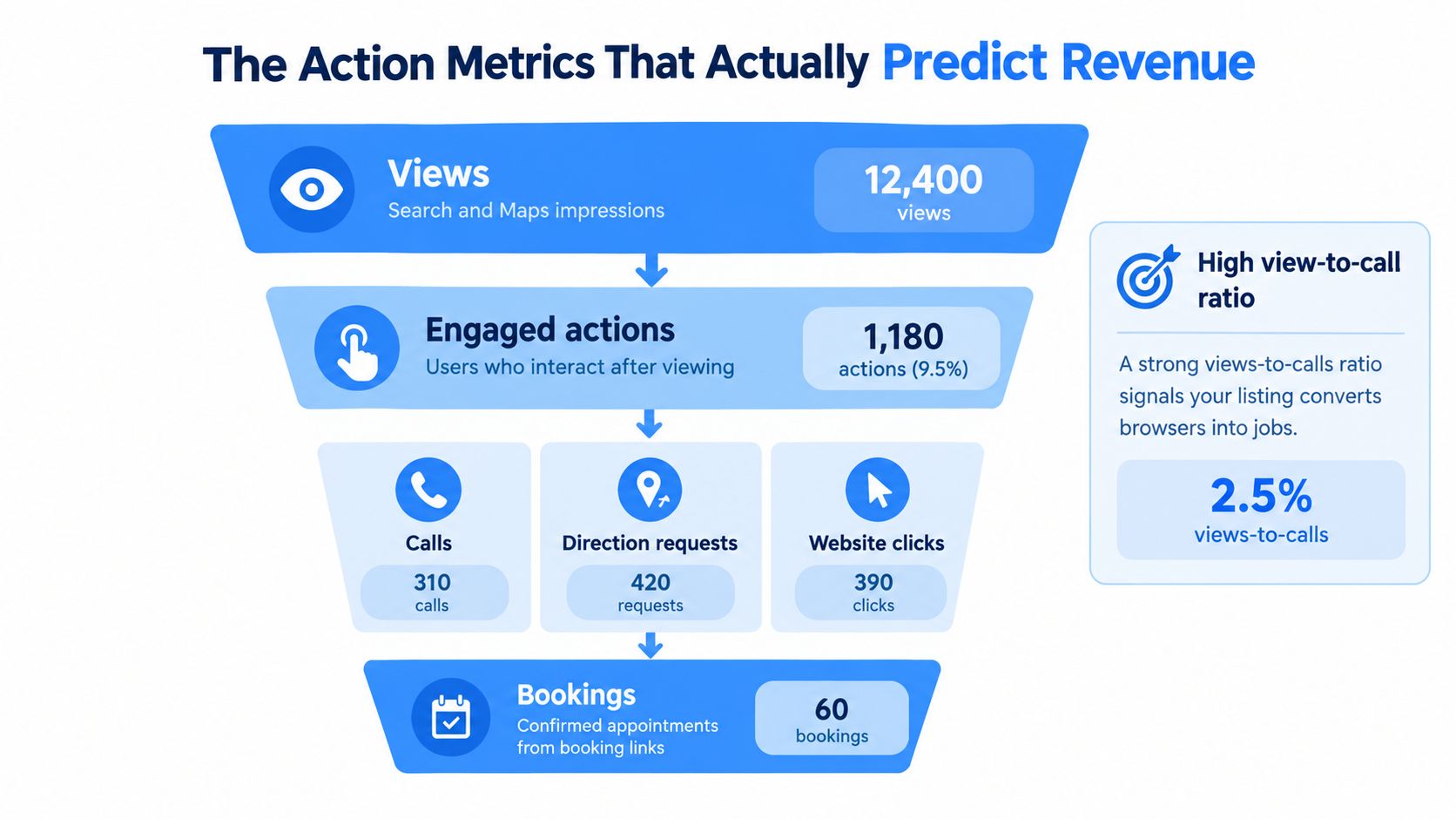
Judge the profile by the action most closely tied to how the business wins work. Emergency plumbers should prioritize calls. Dental practices should track calls and website clicks together. Showrooms should watch direction requests because they indicate visit intent.
Compare actions with exposure
Compare views and actions over the same period. Rising views with flat calls indicate attention without enough motivation to contact the business. Check the primary category, services, photos, reviews, hours, phone number, and the first details a mobile searcher sees.
Calls rising while views remain stable can indicate stronger relevance or better conversion. The profile is reaching a similar audience and producing more useful behavior. That is a stronger commercial result than gaining visibility without additional actions.
Read timing as an operating signal
Review action patterns by day and time when the report supports that detail. Calls clustering outside office hours calls for updated hours and better call handling. Direction requests concentrated in particular service windows require accurate location information and staff coverage.
GBP calls register when someone clicks the call button after a phone number has been added to the profile. A missing, incorrect, or poorly managed number can suppress reported actions while customers still try to reach the business. Pair the report with a proper call-tracking process to connect profile interactions with real conversations and booked work.
Do not give branded views too much credit. A search for the exact company name may confirm a decision already made. Give greater weight to non-branded, service-specific searches that produce calls, directions, website visits, or bookings.
The report also has limits. GBP history may cover only six months, and recent figures can lag by two or three days. Use consistent comparison periods, connect actions to call and booking records, and treat short-term changes as operating signals rather than proof of return on investment.
Connecting Insights to Map Rankings
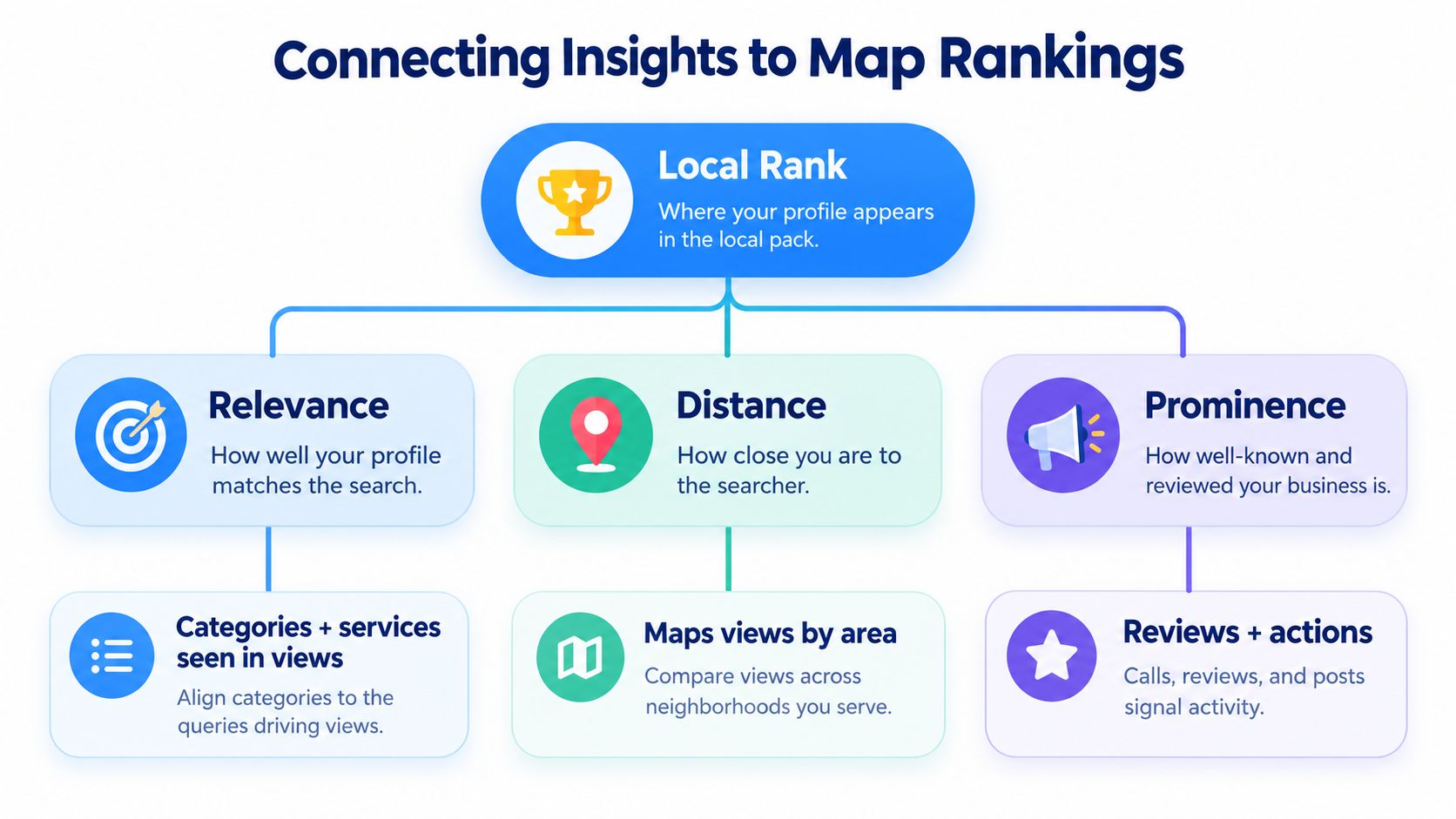
Google's local ranking guidance centers on relevance, distance, and prominence. Relevance describes how well the profile matches the search. Distance reflects the relationship between the business and the searcher or location in the query. Prominence reflects how well-known the business is, including signals such as links and reviews, according to Google's local ranking guidance.
Google can use its knowledge of the searcher's location even when the person doesn't include a location in the query. That means a business can't rely on adding “near me” to its own copy and expect to rank everywhere. Service area, physical proximity, profile accuracy, and local authority still constrain where the listing can compete.
Relevance
Search views tied to the wrong services suggest a relevance problem. If an electrician wants calls for panel upgrades but the profile mainly surfaces for generic electrical searches, refine the primary and secondary categories, service descriptions, website content, and location-specific pages.
Your profile should make the service match obvious. A customer searching for “air conditioning repair near me” shouldn't land on a profile that reads like a general contractor directory entry. Use accurate service language and make sure the website supports the same intent.
Distance
Maps views can reveal how strongly the business reaches nearby customers, but they don't replace a rank grid or location-based testing. A profile may perform well close to the address and weaken farther away. That's normal in local search, because distance affects what customers see.
For service-area businesses, map the places you serve and avoid pretending proximity where the business can't reliably operate. A weak direction-request pattern may be appropriate for a mobile contractor, while a storefront should investigate address clarity and map-pin accuracy.
Prominence
Customer actions, reviews, links, and ongoing profile activity support the broader prominence picture. Actions don't guarantee higher rankings, but weak engagement can show that the profile isn't winning the choice after appearing.
When the report is weak, identify the factor most likely limiting performance. Don't change everything at once. Improve relevance when the search match is wrong, address distance when the service area is unrealistic, and strengthen prominence when customers see the profile but choose another provider.
Turning Weak Metrics Into an Optimization Plan
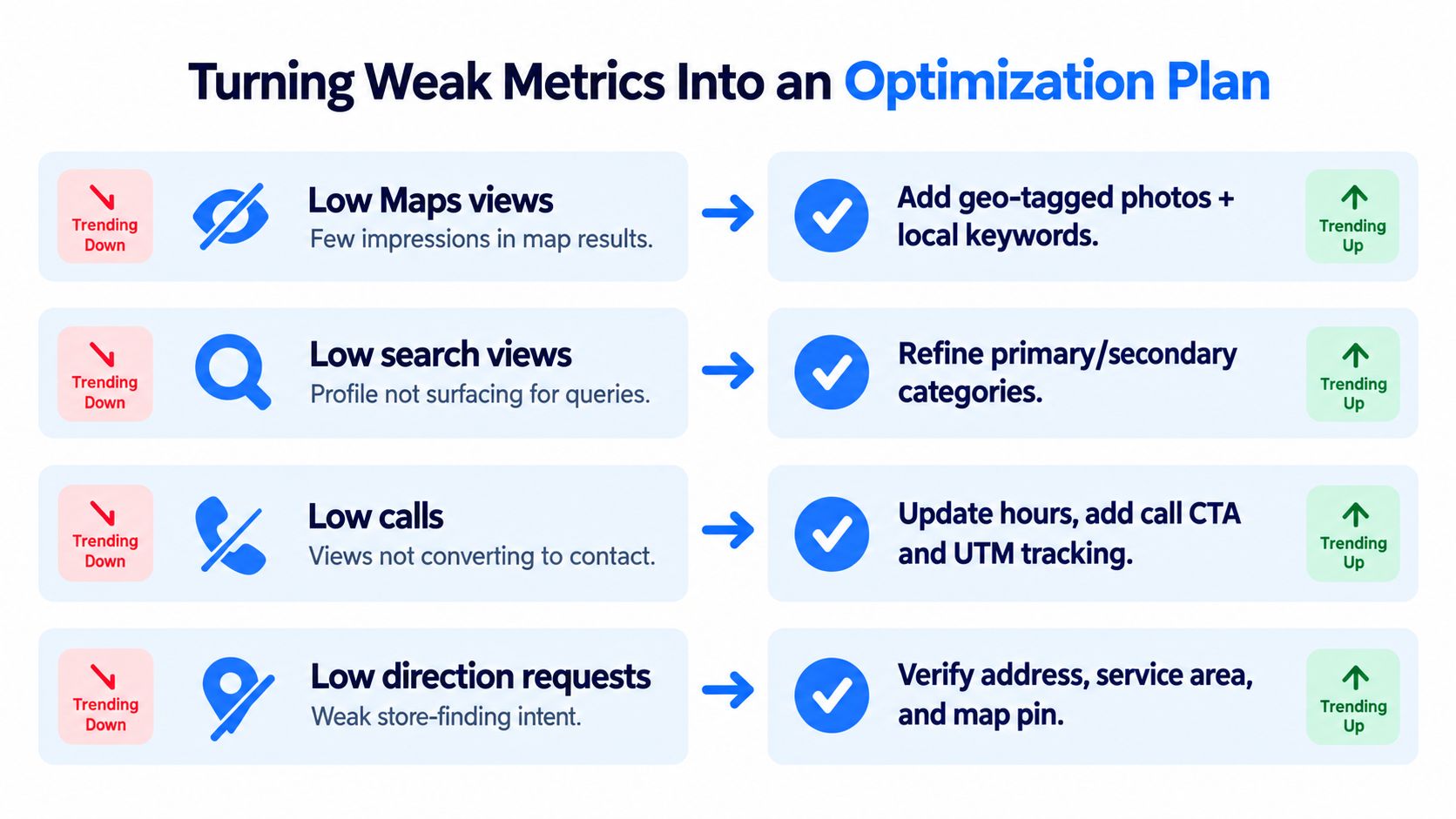
A weak metric is useful only when it leads to a specific change. Open the profile, identify the underperforming surface or action, and make the fix that addresses the likely cause. “Optimize the listing” is not a plan.
When Maps views are weak
Start with the primary category, secondary categories, service list, service-area settings, and map location. Confirm that the profile reflects the service customers search for, rather than the internal wording the business prefers.
Review local landing pages and supporting content as well. A roofing company targeting “roofer near me” needs a profile and website that clearly support roofing services in the cities it serves. Don't add irrelevant locations or services just to broaden exposure. That creates weaker relevance.
When Search views are weak
Check whether the profile matches the commercial terms you want to own. Refine categories and service descriptions, then compare them with the search queries reaching the profile.
Use customer language where it accurately describes the service. If people search for “furnace repair” and the profile only says “HVAC solutions,” the business has created an unnecessary mismatch.
When calls are weak
First verify the phone number, hours, call button, and response process. Then inspect trust and conversion elements, including recent reviews, current photos, clear services, and a description that answers the customer's immediate question.
The platform's recent direction emphasizes engagement quality over raw exposure. Recent reviews, active profile maintenance, and intent-led discovery matter more than collecting empty impressions, while native reporting may provide only about 6 months of history, making seasonality comparisons difficult for multi-location operators, as discussed in recent Google Business Profile analytics coverage.
When direction requests are weak
Verify the address, service-area settings, and map pin. Make sure the listed hours match reality and that customers can understand whether they should visit the location or request service at their property.
Transactional Marketing can fit into this workflow as one option for service businesses that need Google Business Profile setup, Google Maps optimization, local SEO content, and reporting around service-city visibility. The important standard is the same regardless of provider: each profile change should answer a specific performance problem.
Building a Monthly Insights Review Habit
A monthly review works for most owners when it ends with a specific decision. Open the profile's performance report, use the same date range each time, and compare the signals tied to customer action. Review views, searches, phone calls, direction requests, and menu clicks together, then record what changed and why.
Track these relationships:
- Views to calls: Did greater exposure produce more phone activity?
- Maps to Search: Is discovery moving toward the surface that supports local-pack visibility?
- Direction requests over time: Are nearby customers showing stronger intent to visit?
Google Business Profile Insights provides behavioral signals around the profile. Call tracking, booking records, and customer-management data show whether those signals led to a booked roofing job, dental appointment, or paid HVAC repair. Connect the datasets before claiming that a visibility increase produced revenue.
The reporting window also makes consistent archiving necessary. Native history can be limited in some reporting workflows, so export or record the same metrics after each review. A clear master KPIs and data visualization system preserves context that a single Google chart cannot show, including seasonal shifts and the effect of profile updates.
Monthly standard: Choose one meaningful change, record its implementation date, and check whether the related action metric moved at the next review.
AI-driven discovery adds a practical requirement: keep services, categories, hours, locations, and review context accurate and consistent. Search systems and language models use this structured information to identify local answers. Do not add vague AI-focused copy. Build clear service pages, location pages, and profile data that explain the business to search engines and potential customers.
The useful profile is not the one seen by everyone. It is the one found by someone searching for the exact service, in the right city, with enough intent to act. Your monthly report should verify that connection.
Transactional LLC helps service businesses improve Google Business Profile visibility, Google Maps placement, and SEO content for transactional searches such as “roofer near me,” “dentist near me,” and “AC repair near me.” Visit Transactional LLC to discuss a local search strategy connecting profile performance with calls, leads, and booked customers.