


You open Google Maps to check whether your roofing, HVAC, plumbing, dental, or pest control business is still appearing for a high-intent search such as “roofer near me” or “air conditioning repair near me.” The profile has vanished, the dashboard shows a suspension notice, or the listing remains visible but you can't edit it. Calls slow down at the exact moment customers are looking for someone ready to book.
A Google Business Profile suspended status is more than a routine SEO inconvenience. Google says a suspended profile can be removed from both Google Search and Google Maps, and it provides a formal appeal process for restrictions and suspensions. For a service business, reinstatement is the first step toward reclaiming transactional map visibility, including the top three local results that attract high-intent searchers.
The Moment Your Profile Disappears from Maps
A local contractor usually discovers the problem in one of two ways. The owner searches the business name and sees no Knowledge Panel, or a marketing manager logs into the Google Business Profile dashboard and finds the listing read-only with a red suspension notice. Sometimes the profile still appears publicly but cannot be managed. Other times, the pin disappears from both Search and Maps.
Google confirms that a suspended or disabled Business Profile can be removed from Google Search and Google Maps (Google's suspension troubleshooting guidance). That distinction matters because local service customers often use Maps to compare nearby providers, check reviews, and call the business without visiting a website.
The commercial impact is immediate. A homeowner searching for a roofer near me, a patient searching for a dentist near me, or a property manager searching for pest control near me has strong transactional intent. They're not casually researching an industry. They're looking for a provider who can respond, quote, and schedule work.
Operational rule: Treat a hard suspension as an emergency recovery issue first and an SEO issue second.
Every hour your profile stays unavailable, a competitor can occupy the discovery path that used to lead to your phone number, directions, reviews, and booking page. That doesn't mean every missed search becomes a lost customer, but it does mean your business loses control of an important local entry point.
Transactional Marketing focuses on that entry point because visibility for transactional terms is the point of local search marketing. The objective isn't to publish a generic service page. It's to help a business appear when a nearby customer searches for the exact service they're ready to purchase.
A suspended profile also interrupts the work behind map rankings. Reviews, categories, service areas, photos, posts, and business details all sit inside a platform Google governs. Reinstatement restores eligibility and management access, but the next task is rebuilding reliable visibility for the specific cities and services that generate booked jobs.
If you're unsure whether the issue is a suspension or a broader ranking problem, use this guide to why a business isn't showing up on Google Maps. Don't create a new listing because the original disappeared. A duplicate can create a second policy problem and make the review harder.
Identifying the Type and Likely Cause of Your Suspension
A listing can vanish from Maps while the owner assumes it is only a ranking drop. Check the public profile and the account that manages it before changing anything. A soft suspension usually leaves the profile visible on Search and Maps but blocks management or edits. A hard suspension removes the profile from public Search and Maps, so reinstatement requires an appeal.
Google identifies eligibility and compliance triggers such as keyword-stuffed business names, virtual offices, P.O. boxes, duplicate listings, unverifiable addresses, incorrect service-area settings, and rapid changes to core profile details in its guide to handling Business Profile suspensions.
Match the symptom to the policy category
Check the dashboard for a suspension banner. Then search the business name, phone number, and address while signed out of the owner account. A missing listing points toward a hard suspension. A visible listing with blocked edits suggests a soft suspension or account restriction.
Review the changes made immediately before the notice:
- Business identity: The name contains extra service keywords, city names, taglines, or promotional wording that does not appear in the business name.
- Address eligibility: The profile uses a P.O. box, virtual office, coworking address, or location customers cannot visit and Google cannot verify.
- Service-area configuration: A service-area business displays an address incorrectly, lists an implausible service area, or has multiple profiles representing one operation.
- Entity structure: Duplicate profiles or inconsistent names, phone numbers, addresses, and website details make it harder to connect the listing to one legitimate business.
The likely cause matters because an appeal that only says “the business is real” rarely resolves a profile-specific violation. Preserve screenshots of the dashboard status and current profile details first. Then correct the issue tied to the warning, recording what changed and why. Avoid broad edits that introduce new inconsistencies while Google is reviewing the listing.
Suspension types versus common policy triggers
| Suspension Type | Visible Symptoms | Most Common Policy Triggers |
|---|---|---|
| Soft suspension | Profile may remain visible, but edits or management are restricted | Business information concerns, account trust issues, guideline violations |
| Hard suspension | Profile disappears from Google Search and Google Maps | Eligibility failures, unverifiable address, duplicate listings, serious guideline concerns |
| Account restriction | Owner or manager account loses access to affected profiles | Account standing problems, access restrictions, or broader trust signals |
| Listing-level enforcement | One profile is affected while other managed locations may remain available | Profile-specific address, name, category, or duplicate-listing issues |
Google says enforcement may result from automated signals or review by a trained operator, as explained in its suspended and disabled profile FAQ. A legitimate business can therefore face a restriction after an ordinary profile change. The appeal must address the specific profile's eligibility and representation, not only the company's existence.
A Google Business Profile audit separates a visibility decline from a genuine enforcement event. That distinction keeps the recovery process focused. Reinstatement restores access to the transactional map presence, while accurate profile signals give the business a clearer path back to top-three map pack visibility for high-intent local searches.
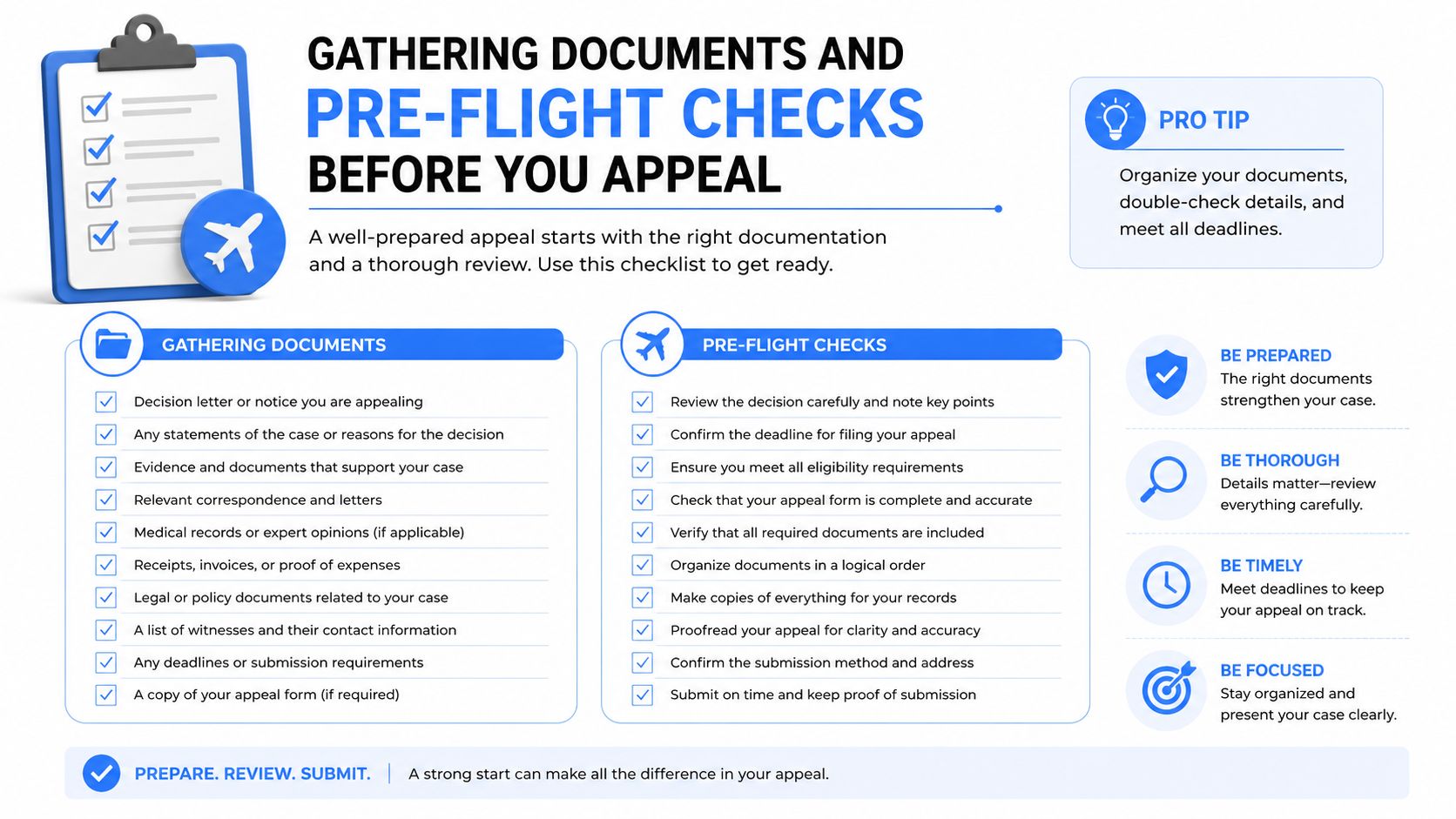
Gathering Documents and Pre-Flight Checks Before You Appeal
An appeal is strongest when the profile is clean before Google reviews it. Documentation can prove that the business exists, but it won't compensate for a business name stuffed with keywords, a duplicate service-area listing, or an address the business can't legitimately use.
Build an evidence folder
Prepare documents that connect the business identity to its eligible operating location or service-area setup. Useful evidence can include:
- Utility bills: Show the business name and address where applicable.
- Lease agreements: Confirm occupancy of an eligible staffed location.
- Signage photos: Capture the business name clearly on storefront signage.
- Business licences: Match the legal business identity to the profile.
- Insurance certificates: Support the connection between the operating business and its service.
- Official mail: Use government or institutional correspondence showing the relevant details.
A service-area business may not have a customer-facing storefront, so the evidence needs to explain how the business operates without implying that a virtual office is a physical location. If the company has branded vehicles, equipment, or a genuine staffed facility, those materials can help clarify the operating model.
Clean the profile before submission
Remove keyword additions from the business name. Select categories that describe the actual business rather than every service it offers. Delete duplicate service-area listings, remove virtual office references, and make the name, address, phone number, and website consistent across important business directories.
Use a reporting platform only for monitoring, not as a substitute for Google's appeal process. For example, Oviond GBP data source options can help organize profile performance data for reporting and review, while the reinstatement decision still belongs to Google.
Don't upload random screenshots or a large folder with no explanation. Give each document a clear filename and make sure the business name, address, and date are readable. The reviewer should be able to connect the evidence to the profile without guessing.
This Google Business Profile setup guide is useful when the audit reveals that the profile was configured incorrectly from the start. Fix the underlying representation before you request reinstatement.
Use the video below as a visual reference for the preparation process, but follow the current instructions in Google's official workflow when you submit.
Filing the Reinstatement Request Inside Google's Flow
Use the official Google Business Profile workflow, and start by confirming that you're signed into the Google Account that owns the listing. A manager account may not have the same authority as the primary owner, and submitting from the wrong account can send the case into an unproductive queue.
Google separates account restrictions from profile-level enforcement. Its appeal guidance states that a restricted account must be reinstated before a content appeal can proceed, and the final decision belongs to Google, not a third-party consultant (Google's official appeal process).
Select the correct path
For a guideline or eligibility suspension, use the Business Profile reinstatement request. If Google presents a verification or video workflow for the hard suspension, follow that route instead of submitting repeated generic forms. The interface can change, so use the option shown for the affected profile and account.
Before opening the form, have the following ready:
- The exact business name used in the world.
- The contact email connected to the owner account.
- The listing URL or profile identifier.
- A concise description of what happened.
- Evidence that addresses the suspected violation.
- A record of any corrections already made.
In the explanation field, state the facts in the order Google needs them. Explain what the business does, where it operates, whether it serves customers at an address or travels to them, what was corrected, and which documents support that explanation. Avoid emotional language, accusations, and claims that a competitor caused the suspension unless you have verifiable evidence.
Upload evidence that answers the question
Attach readable files that directly support eligibility. Utility documents can support an address, licences can support the entity, and storefront or branded vehicle photos can clarify the operating model. A service-area map can explain coverage, but it doesn't replace proof that the business is eligible.
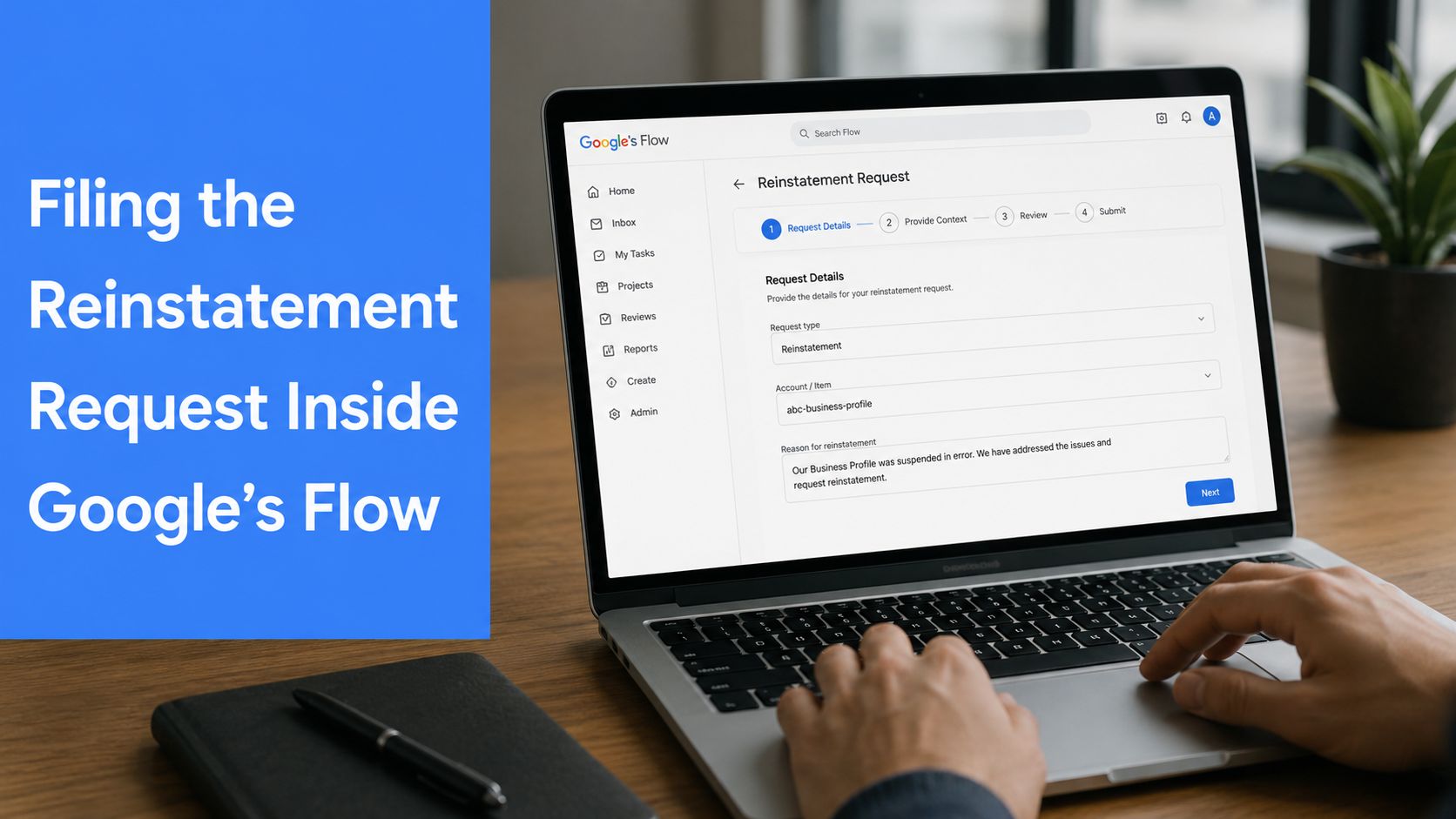
Check the upload requirements shown inside the form. Unsupported file types, unreadable images, and oversized files can prevent evidence from attaching correctly. Don't click submit until the attachments are visible in the request.
After submission, screenshot the confirmation page and save the case number. Set a reminder for 5 to 7 days after submission, then monitor the owner email and spam folder. Avoid filing several identical appeals during that period. Multiple submissions can fragment the case history instead of improving it.
Appeal Letter Templates That Actually Get Reinstated
A useful appeal letter doesn't sound like a complaint. It gives Google a clear explanation, acknowledges the likely problem, records the correction, and identifies the evidence attached. Keep it factual and concise.
Template A for guideline compliance
Subject: Reinstatement request for [Business Name]
Hello Google Business Profile Support,
I'm requesting reinstatement of the Business Profile for [Business Name], located at [eligible address or service-area description]. The profile is managed by [owner email], and the profile URL is [listing URL].
I reviewed the profile against Google's Business Profile guidelines and identified [specific issue, such as keyword use in the business name, a duplicate listing, or an inaccurate category]. I corrected the issue by [describe the exact correction] and removed [duplicate content, unsupported wording, or inaccurate location information].
[Explain the operating model in one or two factual sentences. Include whether customers visit the location or whether the business travels to customers.]
Attached are [list the documents], which show the connection between the business, its operations, and the information submitted in the profile. Please review the corrected profile and reinstate it if it now meets the eligibility requirements.
Thank you,
[Full name]
[Role]
[Phone number]
[Owner email]
Don't write that you “did nothing wrong” if the name, address, category, or duplicate structure needs correction. A reviewer needs evidence of control, not defensiveness.
Template B for address and service-area issues
Subject: Service-area business reinstatement request for [Business Name]
Hello Google Business Profile Support,
I'm requesting reinstatement of [Business Name], managed through [owner email], with profile URL [listing URL].
The business operates as a service-area business. Customers [do or do not] visit the business address. The business travels to customers in [describe the legitimate service area], and the profile has been configured to reflect that operating model.
I corrected the address and service-area information by [describe the changes]. I also reviewed the profile for duplicate listings, inaccurate categories, and business-name wording. The attached [licence, lease, utility document, insurance certificate, branded vehicle or storefront photos] supports the business identity and operating model.
Please review the corrected information and restore the profile to Search and Maps. I'm available to provide additional evidence if needed.
Thank you,
[Full name]
[Role]
[Phone number]
[Owner email]
Attach the letter as a PDF only when the relevant queue accepts attachments or paste it into the provided explanation field. Don't send the same letter through unrelated support channels without adding new evidence. The strongest submission is the one that matches the suspected policy issue precisely.
Realistic Timelines and Escalation Paths When You Get Stuck
Google doesn't promise a universal turnaround for every suspension. Some cases move after the first complete submission. Others require additional evidence, account-level review, or clarification of the business model. A vague appeal can sit without producing a useful resolution because the reviewer still lacks the information needed to approve it.
The verified case analysis covering 300 cases handled between 1 February 2025 and 31 July 2026 recorded 295 reinstatements and 5 non-reinstatements, a 98.3% reinstatement rate in that dataset (SearchScope suspension data). That result comes from one independent dataset, not a promise for every business. It does show why a documented correction and a focused appeal are more productive than repeatedly submitting the same explanation.
The same analysis found that business information and guideline compliance directly triggered 86 cases, or 28.7%, while address and service-area issues accounted for 57 cases, or 19.0%, and duplicate listings accounted for 36 cases, or 12.0%. Its audit also found underlying business information problems in 47.3% of cases, address or service-area issues in 27.3%, and toxic Google account trust issues in 14.3%. These overlapping figures matter because the visible trigger may not be the only problem a reviewer sees.
Escalate with a record, not frustration
Keep one case file containing the confirmation screenshot, case number, submitted documents, profile edits, and every reply. If the first response doesn't resolve the issue, use an orderly escalation path:
- Support follow-up: Reply through the Google Business Profile support route with the existing case ID.
- Community review: Post a concise description in the Google Business Profile Community and include the case number when appropriate.
- Professional outreach: Use credible Google small-business liaison channels on platforms such as X or LinkedIn without publishing sensitive documents.
- Ads support: Verified Google Ads advertisers may have access to support chat that can route account questions.
- Specialist assistance: A third-party troubleshooter may help organize the evidence, but cannot override Google's decision.
Escalation principle: Add clarity or evidence at each step. Repeating the same paragraph in five places rarely changes the outcome.
For additional help organizing business-owner questions around online operations, LegesGPT for business owners can be a useful resource. Use it for preparation and documentation, not as a substitute for Google's official review.
Preventing the Next Suspension and Protecting Your Map Pack Spot
Reinstatement restores access, but prevention protects the transactional search visibility that makes a profile valuable. Google's local pack commonly presents three business results, which is why service businesses compete for the top three when customers search for terms such as “dentist near me,” “roofer near me,” or “HVAC repair near me.”
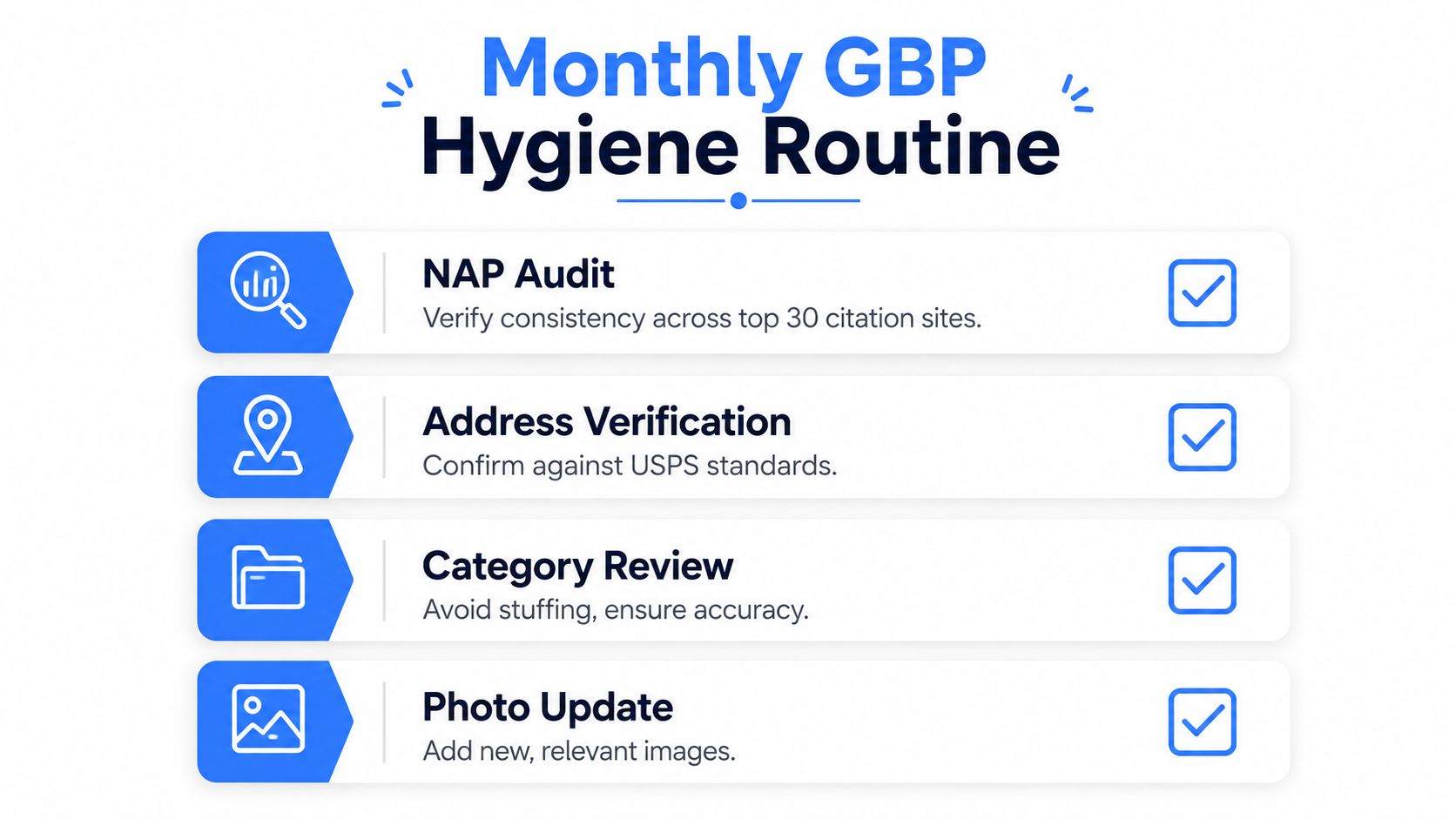
Start with a monthly hygiene routine. Review the business name, primary category, address, phone number, service area, website, ownership access, and duplicate profile status. Audit NAP consistency across your key citation sources, and verify that the address reflects the operating model rather than a virtual office or mailing location.
Keep the profile aligned with the website
Your website should reinforce the same entity information without forcing keywords into the profile name. Build service pages for the actual work performed, city pages for legitimate service areas, and pages that explain how customers contact or visit the business. Embed relevant maps where appropriate, and use accurate LocalBusiness schema that matches the visible business information.
Publish useful Google Updates on a regular schedule, add genuine photos, and respond to reviews professionally. Don't create artificial review bursts, alter the business name for ranking, or make drastic changes to the address, category, and phone details without a reason and a record.
After reinstatement, connect map visibility to organic and AI discovery. LLM-driven systems often draw from a business's website, directories, reviews, and profile data rather than relying on one isolated source. Consistency across those sources helps search systems understand the business, its services, locations, and customer experience.
Review the following items quarterly:
- Owner access: Confirm the correct primary owner and remove unnecessary access.
- Service radius: Check that the listed area still reflects where crews work.
- Photos: Replace outdated images with genuine, relevant business assets.
- Reviews: Respond to every review promptly and address service concerns directly.
- Categories: Confirm that the primary and secondary categories still describe the business.
A simple tracker can record the review date, profile owner, primary category, address status, service area, recent edits, duplicate-listing checks, review activity, and any rejected changes. Add risk notes for sudden review-pattern changes, category edits that fail, or address updates that trigger verification.
For broader account and operational protection, Digimune solutions for Australian businesses may help owners think about the security and continuity practices surrounding important online accounts. For the local visibility work itself, use this guide on how to optimize a Google Business Profile.
Transactional Marketing applies this prevention work to transactional search terms, not vague visibility goals. The focus is on helping the right service business appear in the right local market for searches that signal immediate buying intent, while keeping the underlying profile, website, and business data consistent enough to support Google Search, Maps, and AI-driven discovery.
Transactional LLC helps service businesses audit suspended profiles, prepare evidence, manage reinstatement requests, and rebuild visibility for high-intent searches such as “roofer near me,” “dentist near me,” and “air conditioning repair near me.” Visit Transactional LLC to discuss Google Maps optimization, industry-specific SEO, and an AI-focused content strategy for your service area.