


Your Google Business Profile is live, the business name looks right, the hours are in, and the phone number is correct. Then Google marks the profile as needing verification, or rejects the first attempt, and calls from Maps never start.
That's where most local businesses lose time. They treat Google Business Profile verification like setup admin when it's really the first operational checkpoint that decides whether the listing can become a lead source. If you care about transactional search terms like roofer near me, dentist near me, emergency plumber, or air conditioning repair near me, verification sits between you and the customers already searching with intent to buy.
That matters even more now because local SEO isn't only about classic rankings. AI-driven discovery and LLM-based answer surfaces keep leaning on clean business data, trusted entities, and current location signals. If your profile isn't fully verified and stable, you're not giving Google much reason to trust the listing in Maps, local pack results, or AI-shaped local answers. Transactional search terms are still the money terms, and verified local profiles are one of the strongest assets for winning them.
Why Verification Is the First Real Win for Your Listing
A new profile can look finished and still be operationally dead. The hours are published, the category is set, and the phone number is correct, but until Google verifies the business, the listing is still on probation.
That matters because verified profiles get access to performance reporting in Google Business Profile, which is when the listing starts behaving like something you can manage and improve instead of something you hope will rank (Google Business Profile performance data for verified listings).
The first real win is not the description, photos, or service list. It is getting the profile through verification cleanly, with the business details stable enough that Google keeps trusting the listing after approval.
What verification changes in practice
Verification is an account state, but operators feel it as an operations problem.
For a dental office, it is the point where appointment-driven searches can start turning into measurable calls. For an HVAC company running trucks out of a service-area setup, it is the point where Google stops treating the profile like an unproven claim and starts checking whether the business can consistently support its stated service area. For a med spa, it is where category choice, signage, and front-desk branding start carrying more weight. For a multi-location brand, it is where one weak store record can slow down trust across the rollout.
Google's Business Profile API documentation reflects that structure. Verification requests, methods, and status are handled as formal records, not casual setup steps (Google Business Profile API verification management).
Here is what changes once a profile is verified:
- You can measure actual demand. Calls, direction requests, and other profile interactions become visible in the account instead of staying hidden behind guesswork.
- Edits carry more consequence. Changing the address, primary category, or service area after approval can trigger another review, especially for service businesses and shared-office situations.
- Method choice starts to matter by business model. A staffed dental office may get through by email or postcard. A mobile locksmith or HVAC operator is more likely to face video proof. A brand with many storefronts has a different path than a solo operator with one truck.
- Trust becomes something you have to maintain. Verification is not permanent in the practical sense. Profiles can be asked to reverify after major edits, suspensions, duplicate merges, or ownership changes.
That is why I treat verification as the first controlled handoff in local SEO. If the profile passes with weak evidence, inconsistent branding, or an address setup that does not match the business model, the problems usually surface later as reverification requests, ranking drag, or outright suspensions.
Google also states that local results are shaped by relevance, distance, and prominence in its local ranking guidance (Google guidance on how local ranking works). Verification does not guarantee placement, but it gives the listing a valid starting point to compete for local intent.
If you want the baseline terms clear before getting into methods and fallbacks, this overview of what a Google Business Profile is covers the core setup.
Why this matters for transactional search
Transactional Marketing's model is built around high-intent searches. Roofer near me. Dentist near me. Emergency plumber. Air conditioning repair. Those searches produce calls when the listing is trusted, available, and matched to the business setup.
A verified profile gives Google a cleaner business entity to assess for those searches. It also gives your team a stable record to maintain over time, which matters more now that local discovery depends heavily on consistent business facts across Maps, Search, and AI-generated answers.
Get verification right once, and the rest of local SEO has something solid to build on. Get it wrong, and every later improvement sits on a shaky record.
The Five Verification Methods at a Glance
An HVAC owner sets up a new profile from his truck and gets asked for video. A dental office across town gets postcard. A med spa with a well-established domain may see email. The method is not random, and it is rarely a pure preference setting.
Google can offer several verification paths, but the available option depends on the business model, listing history, category, and how much trust Google already has in the business details. In day-to-day work, these usually collapse into five practical buckets: video, phone or SMS, email, postcard, and bulk verification. Live video call exists too, but it tends to show up as a fallback or support-led path rather than the default route operators plan around.
Google also makes clear in its verification API documentation that options such as postcard, phone call, SMS, and email are surfaced at the profile level, not universally across all listings (Google Business Profile verification options in the API). That is why two businesses in the same city can see completely different verification menus.
Google Business Profile Verification Methods Compared
| Method | Typical Timeline | Eligibility | Best Fit |
|---|---|---|---|
| Video verification | Usually reviewed after submission, sometimes fast, sometimes delayed for manual review | Common for new listings, service-area businesses, and profiles with limited trust signals | HVAC truck, plumber, locksmith, electrician, mobile repair |
| Phone or SMS | Often completed in minutes when offered | Limited to listings Google already trusts enough for direct code delivery | Established single-location business with a stable public phone presence |
| Often completed in minutes when offered | More common when the business domain and listing details already line up cleanly | Dental office, law firm, med spa, clinic with a matching domain | |
| Postcard | Slower than digital methods because delivery and code entry both have to clear | Usually tied to businesses with a fixed location and mail that reliably reaches staff | Retail storefront, dental office, salon, professional office |
| Bulk verification | Separate review path rather than a quick code method | Available to qualifying brands managing many locations | Multi-location healthcare group, franchise, regional home services brand |
What verification enables
Verification gives you access to the profile as an operating asset, not just a listing that exists in Google's index. You can manage edits with more control, respond to reviews, publish updates where available, and build against a record that Google is more willing to trust. It also sets the floor for everything that happens later. Reverification requests, suspensions, duplicate conflicts, and ranking instability usually trace back to how the business was verified and whether that method matched the world setup.
That is why I treat verification as a routing decision. Pick the wrong path for the business model and you lose time.
A dental office with exterior signage, reception coverage, and dependable mail handling can usually survive the slower postcard path if that is what Google offers. A med spa with a branded domain, appointment desk, and consistent web presence may have a cleaner email route. A home-based HVAC operator should expect video and prepare proof of tools, vehicle branding, work orders, and the ability to show the business operates in the service area. A multi-location brand should stop thinking one listing at a time and evaluate whether bulk verification is the better operational track.
The trade-off is speed versus scrutiny. Phone, SMS, and email are fast when they appear, but they are not available to every profile. Video gives Google more proof, which is why service businesses see it so often. Postcard is slower, but for true storefronts it can still be the least messy option if the address is clean and the front desk knows what to watch for.
If Google offers SMS, use a line your team controls consistently and can access during the full verification window. Some operators use tools for receiving and organizing one-time codes, including Gmail verification via SMS, when they need a practical reference for code-based workflows.
If the listing is still being built and Google has not assigned a method yet, this guide on how to set up Google My Business helps reduce the setup errors that later push a profile into a slower or riskier verification path.
Postcard and Email Verification Step by Step
Postcard and email are very different in speed, but the operational rule is the same. Don't create chaos while the request is active.
Postcard workflow that avoids preventable delays
If Google offers postcard, follow the sequence exactly.
- Request the postcard and stop editing core details. Don't change the business name, primary category, or address while the code is in flight.
- Confirm the address in the dashboard matches reality. If the suite, street formatting, or receptionist instructions are off, fix that before requesting the card.
- Wait through the normal delivery window. Mail is the slow path, and rushing to request another code too early often creates more problems than it solves.
- Enter the code on the same profile screen. Make sure the person entering it is in the correct account and correct listing.
- Wait for final review if Google applies one after submission.
The two mistakes I see most are simple. Owners edit the listing during the wait, or they request another PIN before the first request has fully played out.
When the postcard never arrives
Mail failure usually points to one of a few operational problems, not bad luck.
- Address quality issue: UPS Stores, virtual offices, and shared workspace setups often create verification trouble.
- Mail handling gap: The business receives mail, but nobody at the front desk knows to watch for a Google card.
- Profile inconsistency: The address in GBP doesn't cleanly match the way the business is represented elsewhere.
If postcard verification stalls, check the address type before blaming the mail. A technically deliverable address can still be a bad verification address.
If the card doesn't show up after a reasonable wait, verify the dashboard address again, then request a fresh postcard only after the earlier attempt has clearly failed. If repeated mail requests go nowhere and Google offers video, switch methods instead of burning another cycle.
Email verification done correctly
Email is faster, but it's not broadly available. It usually appears when Google already sees a trustworthy relationship between the business and the domain used in operations.
A clean email verification flow looks like this:
- Use the offered email exactly as shown. Don't assume a different inbox will work.
- Open the verification message promptly. Teams lose these because the message lands with office admins who don't realize it expires.
- Click from the same logged-in environment when possible. That reduces account confusion.
- Fall back to another available method if the email never lands.
Email tends to work best when the domain is already associated with the business through tools or account relationships Google can interpret as legitimate business control. If it isn't offered, don't try to force it by swapping contact fields around during the process.
One practical habit helps a lot here. Bookmark the exact dashboard page for the listing. Don't rely on searching the business name inside Google every time. Teams make fewer mistakes when everyone checks the same screen.
Video Verification for Service Businesses in 2026
Video verification is where most service businesses now win or lose time. Google's help guidance now emphasizes a mobile-first upload flow with a required unedited recording, and says reviews can take up to 5 business days (Google video verification help guidance). Public guidance still lags behind what operators see day to day, which is why owners get blindsided when a perfectly normal-looking listing gets routed into video.
What a passing video usually looks like
An HVAC technician records from the truck at the job location or business base. A dental office manager walks from the hallway to the treatment area and shows the office signage and access point. A med spa owner records the exterior sign, enters the suite, and shows branded materials or the booking station.
Google wants continuity and proof. The video should usually show:
- The location context: street sign, building number, or exterior markers
- Brand evidence: signage, printed materials, branded vehicle, uniforms, tools
- Operational proof: access to the space, opening a locked area, using equipment, showing the workspace
- Business match: what appears in the video should make sense for the category on the profile
For service-area businesses without a storefront, that proof often comes from vehicles, tools, work orders, branded gear, or the operator accessing business materials from the base of operations.
Why videos get rejected
Most denials are predictable. The owner thinks Google wants a marketing clip. Google wants business evidence.
Common rejection triggers include:
- Blurry or unreadable signage
- No clear exterior context
- A mismatch between the listed category and what the camera shows
- Edited, stitched, or interrupted footage
- Screens or devices that create account or time-zone confusion
- No proof the person recording controls the business location or operations
Clean footage beats polished footage. The best verification videos look ordinary, but they prove control of the business in one continuous take.
Another problem is category mismatch. If the profile says med spa but the video looks like a generic office with no treatment context, the review team may hold or deny it. Same issue for a plumber claiming a storefront but filming only inside a vehicle with no address context.
What to do after a denial
The first failed video isn't fatal. The second one is where the listing starts to get sticky.
If a first attempt gets denied, change the evidence, not just the camera angle. Add stronger exterior context. Show the business name more clearly. Include a clearer management action such as opening the office, opening the service bay, or showing access to business systems in the actual location.
If the second attempt also fails, prepare for fallback. For a third try, I'd tighten the recording around three things:
- Address reality
- Brand reality
- Operational control
If Google still won't accept the upload or keeps denying compliant footage, that's when a live verification call or support intervention becomes the practical path. This is especially common with home-based service businesses, shared medical suites, and businesses whose signage isn't highly visible from the street.
Bulk Verification and Live Video Call Paths
A 20-location dental group should not verify offices one by one. A single HVAC truck that keeps failing video upload should not wait on bulk. Verification works better when the path matches the business model.
Bulk verification is built for centralized operators. Live video calls are the pressure-release valve for legitimate businesses that keep getting stuck in self-serve review.
Bulk vs. Live Video Call Verification
| Criteria | Bulk Verification | Live Video Call |
|---|---|---|
| Primary use case | Multi-location brands | Single listings stuck after failed attempts |
| Eligibility | Businesses managing many locations under one organization | Usually surfaced after standard verification problems |
| Proof focus | Centralized control across locations | Real-time proof of the listed business |
| Best operator fit | Chains, agencies, regional service brands | One office or one service-area listing needing escalation |
| Main advantage | Scales verification across many listings | Lets a reviewer ask for missing proof on the spot |
When bulk verification makes sense
Bulk makes sense when one team controls the listings. That usually means shared branding, shared governance, and one operating structure for location data, access, and updates. If every office behaves like its own business, bulk gets harder fast.
Google's business profile help documentation on chain and bulk management is the better reference point here than the general verification guide.
The operators who benefit most are easy to spot:
- Multi-location dental groups with one admin team managing hours, providers, and categories
- Med spa brands where each clinic follows the same naming and compliance process
- Regional home service companies with multiple staffed branches, not just lead-gen pages mapped to cities
- Franchise or corporate-owned networks that need one approval path instead of location-by-location cleanup
For bulk, the work is operational, not creative.
- Standardize the location list: business name, address, phone, categories, and hours need to match real-world records
- Use one ownership structure: loose affiliates and partial brand use create review friction
- Tighten user access: too many managers, old agencies, or personal logins slow approvals and create conflicts
- Expect manual review: bulk saves time across the portfolio, but it rarely behaves like instant verification
I see the same mistake with multi-location brands over and over. They push every branch through whatever method appears first, then try to clean up ownership, naming, and duplicate profiles later. That order costs time. For a dental group or med spa network, clean governance before submission usually beats speed on the first few locations.
For businesses using operational systems to manage listings, Google's workflow can also be managed through an API process that starts by listing locations, checking whether a location needs verification, fetching available options, and initiating verification only after confirming the merchant details are correct. Completion is confirmed when the system reports voice-of-merchant status (Google Business Profile API workflow summary). That matters far more to a multi-location team than to one plumber with a single service-area profile.
Transactional LLC also works in this lane for service businesses that need coordinated Google Maps management, industry-specific local SEO, and AI-driven content tied to service-city targeting. That kind of workflow matters when verification is one task inside a larger local acquisition system.
When to escalate to a live video call
Live video calls are usually the right move after repeated self-serve failure with real evidence on hand. I use them most for businesses that are legitimate but awkward to verify on camera: a home-based locksmith, an HVAC company with trucks instead of a storefront, a medical practice inside a shared suite, or a branded office with poor street signage.
The advantage is simple. A reviewer can ask for the missing proof in real time, and the business can show it immediately.
Have these ready before the call:
- Business documents that match the listing
- Exterior and interior proof when applicable
- Live access to the location, vehicle, tools, or office systems
- A phone with strong signal and a charged battery
The proof needs to fit the business model. A truck-based HVAC company should be ready to show branded vehicles, tools, dispatch software, and access to the listed phone line. A dental office should be ready to show exterior building context, suite signage, operator access, and treatment-space branding. A med spa in a shared building usually needs stronger suite-level proof than a standard medical office.
One more trade-off matters here. Live calls can solve a stuck listing quickly, but they do not fix bad setup. If the profile category is wrong, the address format is inconsistent, or the business name on the listing does not match the world branding, the call tends to expose the mismatch instead of rescuing it.
For one troubled location, live review is often faster than another upload cycle. For a multi-location brand, bulk verification is usually the cleaner path.
What Happens After Verification and When It Can Break
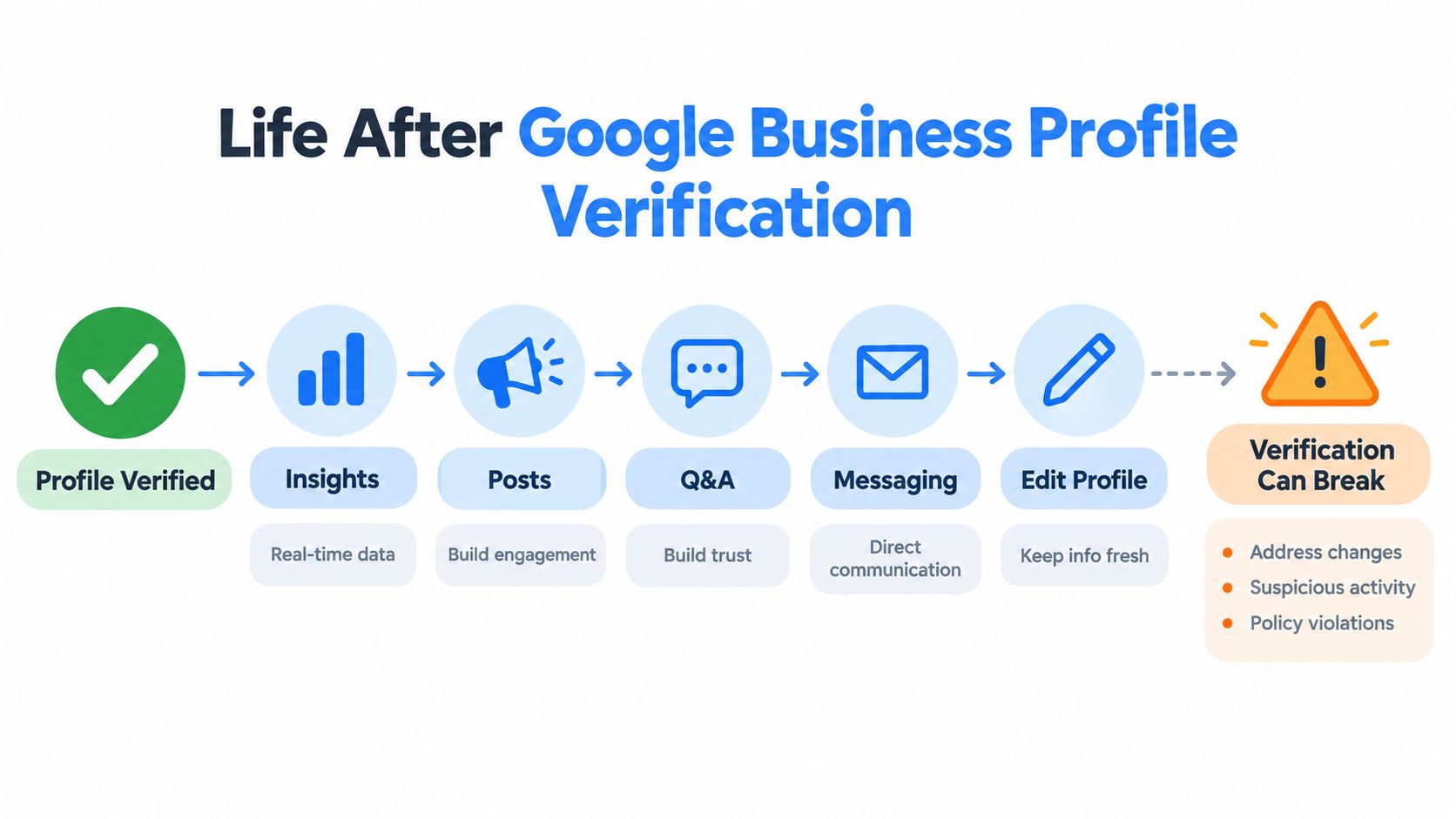
A lot of owners think the hard part ends when the checkmark appears. It doesn't. Verification is better understood as an account state that can hold, lapse, or get challenged later.
Once the profile is verified, the listing becomes much more useful operationally because the team can start managing performance, publishing updates, and keeping the profile current. But the same profile can be pushed back into review if the business changes something significant or if Google's systems detect risk.
What opens up after the profile is verified
The profile can now function like an active local channel rather than a static record. Teams can work from the listing, monitor profile activity, and keep business information aligned with real operations.
This short video gives a quick visual look at how profile management works after the verification hurdle is cleared.
What commonly triggers re-verification
The usual triggers are operational, not mysterious.
- Address edits: especially if the move changes the location profile in a meaningful way
- Ownership disputes: another party claims or challenges control
- Policy reviews: category, storefront, or guideline concerns surface later
- Spam signals: duplicate behavior, odd edits, or inconsistent business data raise flags
Some business models have a tougher time here. Service-area businesses, shared suites, and businesses without a conventional storefront often face more method variation and more scrutiny based on current guidance around location type and verification pathways (Google verification differences by business model and location type).
If your listing suddenly enters review again, don't guess. Check whether the issue looks like a suspension, because the recovery path is different from a normal verification retry. This overview of a Google Business Profile suspension is useful when the listing loses visibility instead of asking for fresh proof.
The safest operating cadence
A verified listing stays healthier when someone owns it.
I recommend a simple quarterly audit:
- Address and suite accuracy
- Hours and holiday hours
- Authorized managers
- Category and service alignment
That rhythm matters because re-verification usually arrives at the worst possible time, when leads are already active and the front desk is counting on Maps calls.
Turning a Verified Profile Into Local Calls
An HVAC company gets verified on Tuesday. By Friday, the owner is asking why the phone is still quiet.
That gap is normal. Verification gives the profile permission to compete. Calls usually start after the listing is tuned to the searches that signal buying intent, then maintained in a way that matches how the business operates.
For service businesses, that work looks different by model. A truck-based HVAC company needs service categories, service areas, photos from real jobs, and review language that matches emergency and maintenance demand. A dental office needs appointment-driven categories, treatment pages that line up with the profile, and front-desk answers reflected in Q&A. A med spa has to be more careful with service naming, imagery, and policy-sensitive edits. A multi-location brand needs location-level discipline, because one weak office can drag down lead quality for the whole group.
What changes after verification
Once the profile is live, Google can start testing it against local intent. The practical job is to improve fit for the searches that turn into booked jobs, consults, and new patients.
Three signals matter in day-to-day operations:
- Relevance: primary category, secondary categories, services, business description, and website pages all need to describe the same offer set
- Distance: storefront and service-area settings need to match the delivery model, not the version that sounds broader on paper
- Prominence: reviews, recent activity, strong photos, and brand mentions help the profile earn trust over time
The failure point I see most often is simple. The profile gets verified, then nobody owns it operationally. Categories drift, hours stay wrong, photos get stale, and reviews pile up without responses. The listing stays visible for brand searches but underperforms for higher-intent local terms.
Post-verification work that actually moves calls
| Activity | What it improves | Likely effect on calls |
|---|---|---|
| Category and service cleanup | Relevance for core searches | Better match for hire-ready queries |
| New photos from the field or office | Trust and click-through | More searchers call without visiting the site |
| Review responses using real service language | Credibility and topical alignment | Less hesitation before contact |
| Q&A built from actual customer questions | Conversion clarity | Fewer low-fit calls, better-qualified leads |
| Seasonal posts tied to active demand | Timeliness and offer visibility | More action during peak periods |
A newly verified profile needs a short operating cadence. Not busywork. Useful updates.
For an HVAC company, that usually means adding install and repair photos each week during active season, tightening categories, and answering review themes around response time and financing. For a dental office, it often means updating treatment-related photos, checking appointment and holiday hours, and aligning the profile with the services that produce the best case mix. For a med spa, I pay close attention to compliance-safe imagery and service wording before making aggressive optimization edits. For a multi-location brand, I compare each location's categories, hours, review velocity, and landing page alignment so one office is not freelancing the setup.
One hard truth. Verification is not the finish line. It is the point where the listing starts needing process.
If you want the profile to rank for exact service-and-city searches, Maps work has to connect to the site, the location pages, and the rest of the local search setup. This guide on how to optimize a Google Business Profile for local rankings covers that next layer in more detail.
Transactional LLC builds those systems for service businesses that need more than a claimed listing. The work usually includes profile configuration, category strategy, location-page alignment, and local content built around the terms that produce calls instead of empty impressions.