


93.2% of surveyed consumers said Google Maps was their preferred navigation app in Social Places' 2024 Digital Marketing & Customer Experience Survey Report. For a local service business, that makes Maps more than a place to display an address. It's a place where potential customers compare providers and decide whom to contact.
Learning how to generate leads from Google Maps means managing eligibility, search relevance and conversion together. A high position won't rescue an unanswered phone, and aggressive location tactics can put the profile itself at risk. The useful outcome isn't another impression. It's a qualified inquiry you can connect to a booked job.
The Six-Phase Workflow From Map View to Booked Job
76% of people who conducted a local search on a smartphone visited a business within 24 hours, according to a figure attributed to Google and reported in Boostigo's 2024 local marketing statistics. That's a strong reason to make the next action obvious when someone discovers your business.
Don't build the workflow around people who already know your name. Build it around customers comparing unfamiliar providers for a service they need now.
Use this operating sequence:
- Verify eligibility.
- Normalize entity data.
- Map service-intent queries to destinations.
- Instrument attribution.
- Publish evidence.
- Review performance on a fixed cadence.
Six phases of the Google Maps lead workflow
| Phase | What you do | Done when |
|---|---|---|
| 1. Verify eligibility | Claim and verify one profile per real location | Profile is verified and matches the operating location |
| 2. Normalize entity data | Match name, address and phone across the website and directories | No conflicting records remain |
| 3. Map queries to destinations | Assign each core service and city query to one page | Every core service has a target URL |
| 4. Instrument attribution | Add tracking numbers, UTM links and CRM source tags | Every call and form shows its source |
| 5. Publish evidence | Add photos, services, posts and review responses | Each core service has proof of work |
| 6. Review on a cadence | Check calls, bookings and cost per lead every two to four weeks | Cost per qualified lead is calculated from your own data |
The customer's path can include several different actions, not necessarily every step shown below.
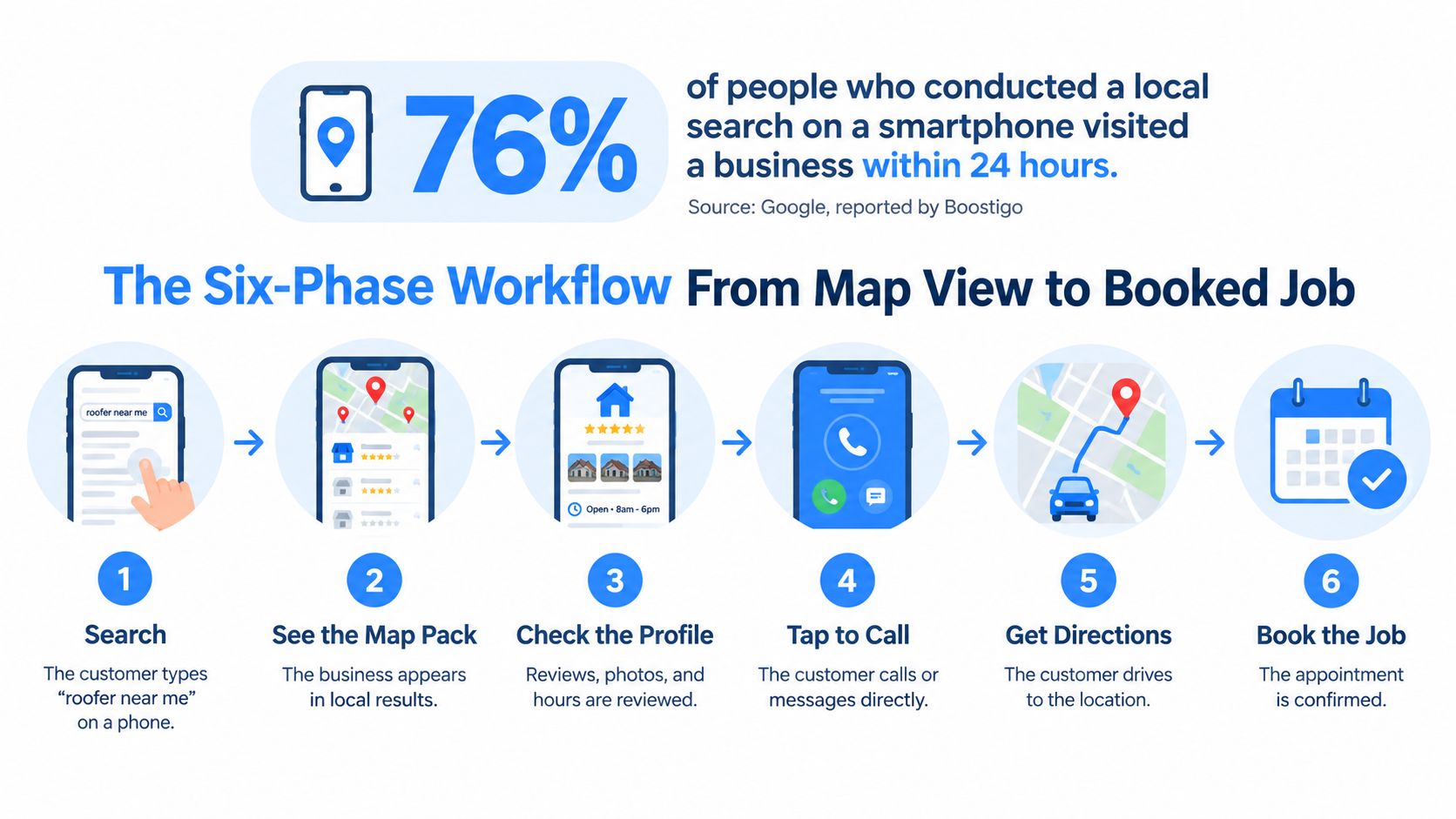
A direction request indicates intent, not a completed sale. Find where your current numbers stall, whether that's discovery, contact or booking, and start the work there.
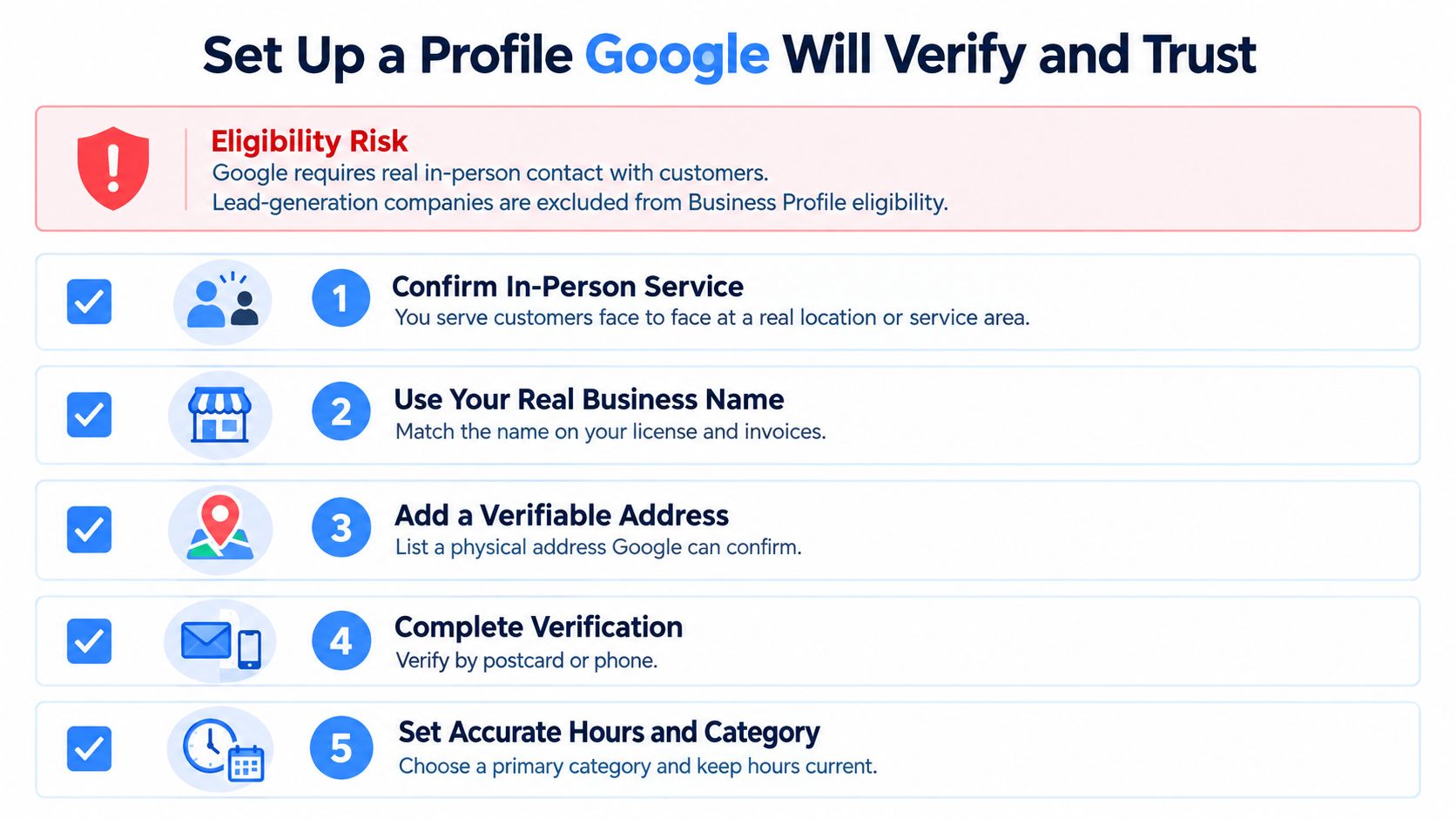
Set Up a Profile Google Will Verify and Trust
Eligibility comes before optimization. Google's business eligibility guidance requires in-person contact with customers and excludes lead-generation companies from Business Profile eligibility. Managing an eligible contractor's profile isn't the same as creating a listing for a business that merely sells inquiries.
Use this checklist to review the operating details before changing categories or publishing content.
Establish the real business first
Google's business representation guidelines warn against duplicate profiles, inaccurate locations, keyword-stuffed names and unnecessary categories. Set the profile up in this order:
- Claim the legitimate location. Verify the business using the method Google offers. Don't create duplicate listings or rent virtual-office addresses to manufacture coverage in neighboring towns.
- Use the established business name. Match the name customers encounter on signage, invoices and the website. Adding service keywords or city names that aren't part of that name creates avoidable compliance risk.
- Choose the correct operating model. A storefront receives customers at its location. A service-area business generally uses its central office with a designated service area and should hide its address if customers aren't served there.
- Choose categories narrowly. Select the primary category that best describes the core business, then add only secondary categories that fit. A longer category list isn't a substitute for accurate positioning.
- Reconcile contact information. Match the business's phone, hours and address across its website and directory records. Document any tracking-number configuration so later edits don't introduce conflicting information.
- Describe the actual services. Add plain descriptions of the work customers can book. Don't advertise emergency availability unless someone can handle those inquiries.
- Upload operational evidence. Use photographs of vehicles, crews, equipment, completed work and the office where appropriate. Avoid stock imagery that gives customers no useful evidence about the business.
Resolve verification problems without multiplying them
Keep registration documents, signage photographs and location evidence organized. A Google Business Profile verification checklist helps the person managing the listing identify missing information before submitting changes.
The video below provides another setup reference.
If the profile is suspended, correct the underlying issue and use the appropriate appeal process. Opening replacement profiles can compound the original problem rather than restore dependable visibility.
Target Transactional Searches Like Air Conditioning Repair Near Me
Transactional searches indicate that someone is looking for a provider, not just learning about a subject. A person typing air conditioning repair near me has a specific need and may be ready to spend. The query doesn't guarantee a purchase, but it deserves a direct route to service.
That's the targeting principle behind Transactional Marketing: focus on the terms customers use when they're choosing whom to hire. For an HVAC business, that means separating repair, replacement and maintenance intent instead of sending every visitor to a generic homepage.
Query types, landing pages and priority for service businesses
| Query type | Example search | Page to build | Priority |
|---|---|---|---|
| Service plus near me | air conditioning repair near me | Service page with service area and phone button | Highest |
| Emergency or open now | emergency plumber open now | Same-day booking page with live hours | Highest |
| Service plus city | roof repair in a named city | City-specific service page with local proof | High |
| Symptom-led question | AC not cooling | Problem and solution page with booking link | Medium |
| Branded search | company name | Homepage and Business Profile | Low for lead growth |
Those examples represent separate businesses and separate content plans, not topics to combine on one landing page. Use local keyword research to assign each relevant query to a destination before writing.
For an HVAC repair page, the content and photography should reflect the actual service.

Give each page a clear job
Say an air conditioning contractor offers emergency repairs in its home city. Build a repair page naming that city and the genuine service area, explaining availability, and placing a mobile call button beside the service information. Match its hours to the profile.
For customers deciding what service they need, Engle Services' resource lets them explore home cooling solutions. Your own page should similarly help visitors distinguish repair needs from replacement questions without burying the booking action.
Google's AI-search guidance says AI Overviews and AI Mode may use query fan-out, issuing related searches to gather supporting information, and identifies Business Profiles as a way to support local visibility. For AI optimization, including discovery through large language model-based search experiences, publish clear service answers rather than a page stuffed with unrelated trades and city names.
Ranking Signals That Move You Into the Map Pack
Google identifies relevance, distance and prominence as the main factors in local rankings. Relevance concerns the match between the query and the business, distance concerns location, and prominence concerns how well-known the business is.
Google also explains that a farther business can outrank a closer one when it's a better match. Proximity matters, but it isn't the only consideration, and adding service areas doesn't relocate your business.
Start with what you control
The most controllable work happens on your profile and website. Give each service page a descriptive title, a useful explanation of the work, realistic service coverage and a clear contact action.
Use these practical levers in order:
- On-page relevance. Make the page useful for the actual service query. Explain what the business repairs, what it doesn't handle, and how customers arrange service.
- Citation accuracy. Reconcile the name, address and phone in established directories. Correct old records and remove duplicates where you control them.
- Earned local links. Seek legitimate references from suppliers, trade groups, local associations and complementary businesses. Choose relationships that make sense to a customer, not directories created solely to sell links.
A resource such as The SEO Agent's SEO Agent can be considered alongside manual audits when evaluating SEO workflows. Whatever tool you use, require recommendations to identify a specific page, profile field or conflicting record, rather than accepting a score without an actionable explanation.
Practical rule: Don't buy another citation package until you know whether the existing business information is correct.
Treat coverage as a geographic question
A useful Google Maps ranking factors review should distinguish improvements you can make from constraints you can't remove. You can strengthen service relevance and earn recognition; you can't make an office physically closer to every customer.
For a top-three visibility target, use a geographic rank grid with the same query, coordinates and settings each time. A manual search from the owner's office tells you little about visibility across the whole service area.
Transactional Marketing's Maps work should be evaluated against that geographic target and actual inquiries, not a universal placement guarantee. A local result that looks strong beside the office may still leave important neighborhoods uncovered.
Review Requests and Replies That Stay Within Google's Rules
A review program only helps generate leads when customers can trust it and inquiries are handled well. Selective requests can distort feedback, while ignored complaints and unanswered calls can undermine the value of new reviews.
Google prohibits incentives and manipulation, including offering benefits for changing or removing negative feedback, under its review guidance. Such violations can lead to reviews being removed or restrictions on the profile. Protect the listing by making each request neutral and open to every customer.
Build an honest request-and-response process
- Ask after completed work. Send a neutral request with a direct review link. Invite the customer to describe the experience in their own words.
- Keep the invitation open. Don't send only satisfied customers to public reviews. Avoid suggesting wording, a particular sentiment or a target rating.
- Set a reply window. Assign someone to monitor feedback and respond within your internal service standard. A specific, factual acknowledgment is more useful than a copied promotional paragraph.
- Handle disputes privately. Invite the customer to contact the office. Keep account details, personal circumstances and arguments about responsibility out of public replies.
- Report actual violations. Flag content that breaks platform policies. A disagreement with a customer is not grounds for removal.
Google's local ranking guidance treats review quantity and quality as part of prominence, so authentic feedback supports both reputation and visibility, but that doesn't justify manipulating the process.
A review request should ask what happened, not tell the customer what to say.
Measure whether feedback supports conversion
Track request delivery and completion alongside qualified-call and booked-job rates. If review activity rises but bookings do not, inspect the service promise, phone handling and landing page before increasing requests. The review count is not the outcome; the goal is to connect customer feedback and profile activity to qualified inquiries and completed jobs.
Use review response templates as starting points, not automatic replies. A response to a delayed arrival should address the scheduling concern. For an unresolved repair, invite the customer to discuss a path to resolution without exposing private details.
Customer feedback can also show what your service pages need to explain. If customers repeatedly mention uncertainty about repair timing, add a clear explanation of the scheduling process to the relevant page. Keep the wording faithful to the concern, and don't turn customer comments into invented testimonials.
Conversion Content, Call Tracking and Heat Map Checks
Google reported more than 2 billion monthly direct connections for over 19 million U.S. businesses in 2024, including calls, direction requests, messages, bookings and reviews, in its Business Profile best-practices playbook. That scale makes attribution important: an interaction isn't automatically a lead, and a lead isn't automatically revenue.
Metrics that separate visibility from booked jobs
| Metric | Source | What it tells you | Warning sign |
|---|---|---|---|
| Profile impressions from discovery searches | Business Profile performance, where available | Non-branded demand in your area | Impressions rise while calls stay flat |
| Calls answered and qualified | Tracked phone numbers | Real demand after the click | Many missed calls after hours |
| Direction requests | Business Profile | Intent to visit a customer-facing location | Requests appear inconsistent with the location served |
| Website actions from the profile | Analytics with UTM tags | Booking and form activity | Mobile pages load slowly |
| Map rank by grid point | Geographic heat map check | Ranking across the whole service area | Top rank only near the office |
| Booked jobs and revenue | CRM | Completed transactions | Calls logged but no jobs recorded |
Business Profile reporting fields can change. Don't assume it exposes every search classification or the geographic origin of every direction request; validate geographic concerns against inquiries and customer records.
Answer the last question before contact
Publish the information customers need to decide whether to call: emergency availability, estimate policy, appointment lead time, financing and service-area limits. Include accepted insurance only where relevant to the business, rather than copying a generic service-page template.
Use a call button on mobile service pages, a short booking form on city pages and directions for customer-facing premises. Don't send visitors to a hidden service-area office.
For web inquiries, evaluate options such as Expressify AI's AI live chat for service businesses against a staffed inbox or callback form. Check whether the system can capture the service need and location without inventing availability or prices.
Connect the interaction to the outcome
Assign a location-specific tracking number, configure it consistently and test the routing. Add UTM tags to profile website links, preserve attribution through forms, and pass the source into the CRM.
Use Search Console for website query information and analytics for on-site actions. Compare rank-grid results with qualified inquiries by service area, rather than treating colored squares as revenue.
Attribution check: Place a test call and submit a test form before trusting the dashboard.
Recover missed calls through an appropriate callback or text process. Bookings may occur days after the initial inquiry, so compare lead cohorts after allowing time for scheduling rather than judging calls and jobs from unrelated date ranges.
Confirm Your Tracking Before You Scale Spend
Don't increase budget or expand into new service cities until verification, attribution and lead quality are dependable. Set a baseline from your own inquiries and booked work, not an agency's claimed universal Maps conversion rate.
Calculate cost per qualified lead by dividing attributable marketing cost by qualified leads. Separately calculate qualified leads divided by tracked profile actions, using consistent definitions and removing obvious duplicate contacts.
Run a 30-day operating check
- Week 1. Verify the profile and correct conflicting business records.
- Week 2. Test phone routing, form attribution and CRM source tags.
- Week 3. Run the geographic rank grid and compare matching points with the previous period.
- Week 4. Review qualified calls, bookings and acquisition costs, then select a controlled change.
30-day Google Maps lead check and the action when it fails
| Check | Target | If it misses |
|---|---|---|
| Profile verified and complete | Verified with every applicable field filled | Fix categories, hours and service list first |
| Tracked number on each listing | One number per location | Pause scaling until call sources are reliable |
| Calls answered within a set time | Within your documented response standard | Add after-hours answering or missed-call text |
| Rank across the service area | Top three in core grid points as a working target | Add useful service-city pages for weak zones |
| Cost per qualified lead | Set from your own cohort baseline | Change one variable before changing budget |
Choose the fix that matches the failure. Weak visibility may justify a better service page; missed calls require operational attention, not more traffic.
Run the verification check this week and record the result in the same measurement template you'll use afterward. Keep definitions stable so later decisions rest on comparable numbers.
Transactional LLC offers contract-free local SEO, Google Maps optimization and AI-focused content planning, with reporting that connects visibility to calls and inquiries. Visit Transactional LLC to discuss your service area, review your tracking setup and build a plan around the transactional searches your customers use.