


In 2025, 81% of U.S. consumers said they used Google to find reviews, according to BrightLocal's survey of 1,026 U.S. adults. Your Google listing isn't just a place to publish a phone number. It's somewhere prospective customers decide whether your business looks legitimate enough to call.
If you're learning how to set up GMB, start with ownership and eligibility, not keywords. Google My Business is now called Google Business Profile, and a defensible setup gives your local SEO, Google Maps optimization, and AI-search content a reliable business identity to support.
For an air-conditioning repair business, the commercial objective is specific: appear when someone searches air conditioning repair near me, then make contacting you straightforward. That's a transactional search, a strong indication that the searcher wants a provider rather than a general explanation. It isn't a guarantee of a booking, but it's the intent worth targeting.
Eligibility, Ownership, and Setup Decisions
In 2025, 84% of consumers surveyed by Rio SEO said they searched for local businesses online daily, in a study of more than 1,000 U.S. consumers, according to the 2025 Local Search Consumer Behavior Study. That frequency makes accuracy important. A business profile should represent an operation you can prove exists, not a location you hope will generate leads.
Before opening the setup form, decide whether customers visit you, you visit them, or both. An air-conditioning company dispatching technicians from a home office has a different address configuration from a staffed location that welcomes customers.
Use this eligibility checklist before gathering your profile details.
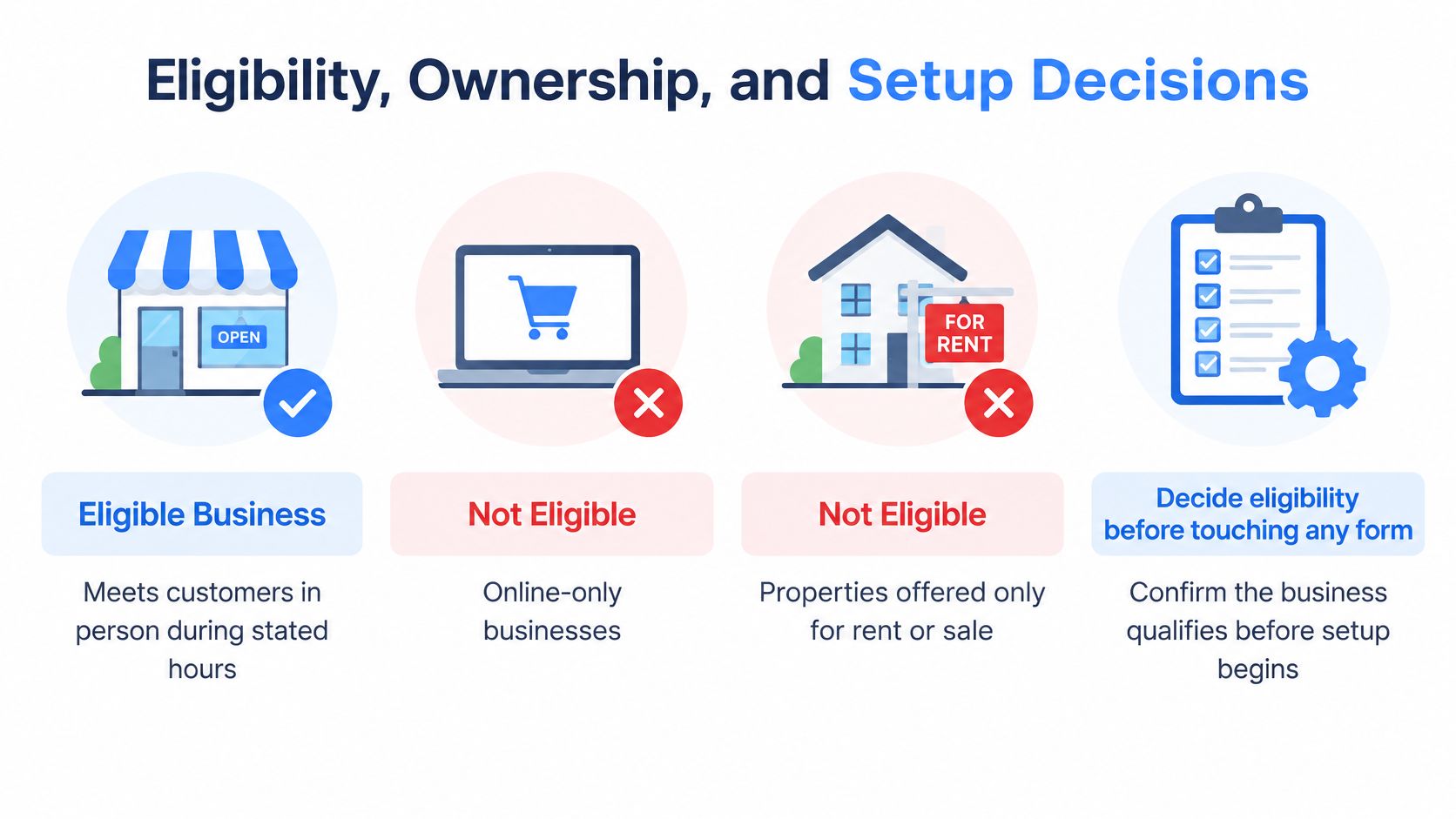
Choose an address model you can defend
Your business must meet customers in person during its stated operating hours. An online-only operation doesn't qualify, and neither does a property offered solely for rent or sale.
A storefront should be a real, staffed location where customers can visit during the published hours. A service-area business travels to customers and should hide its address when it doesn't receive customers there. Hiding a residential address doesn't remove the need to provide Google with accurate information during verification.
Under Google's business representation guidelines, service-area businesses should generally use a profile for their central operating location, avoid virtual offices and P.O. boxes, and keep overall coverage within roughly two hours of driving time.
Don't confuse a mailing address with an eligible office. Renting a prestigious address doesn't establish that your staff works there or receives customers there.
Practical rule: Choose the location configuration you can demonstrate with your staff, equipment, signage, and actual working arrangements.
Gather the materials before anyone starts entering fields:
- Business identity: Use the name customers see on your vehicle, signage, estimates, and invoices.
- Contact details: Prepare a direct business phone number and the website page for the actual location.
- Operating evidence: Keep registration documents, address records, and photographs of equipment available.
- Account access: Use a Google account controlled by the company, with recovery information the owner can retrieve.
New operators should settle these business fundamentals before treating a listing as a marketing shortcut. For a separate example of operational planning, R.E. and Sons Landscaping's business guidance for aspiring landscape contractors is a useful resource. The relevant lesson is to establish the operation before advertising its reach.
Keep ownership with the business
Make the business owner the primary owner. Give staff and marketing partners individual access rather than sharing the owner's password, and retain recovery codes under company control.
Google's ownership guidance limits management and verification to the owner or an authorized representative. An agency should help manage your business asset, not become the only party able to recover it.
Maintain an approval file containing the business name, category, address decision, authorized users, and verification status. Record why major changes were made so a future employee doesn't undo a legitimate configuration or submit conflicting information.
If the terminology is unfamiliar, our explanation of what Google My Business is clarifies the profile's role. Treat it as an operational record that also supports customer acquisition, not as disposable advertising copy.
Create the Profile in Eight Steps
Work through the initial submission with your approved business information in front of you. The objective isn't to fill every box with search terms. It's to establish a clear identity that Google can verify and customers can recognize.
The visual provides a setup overview; use the numbered workflow below for the decisions that require particular care.
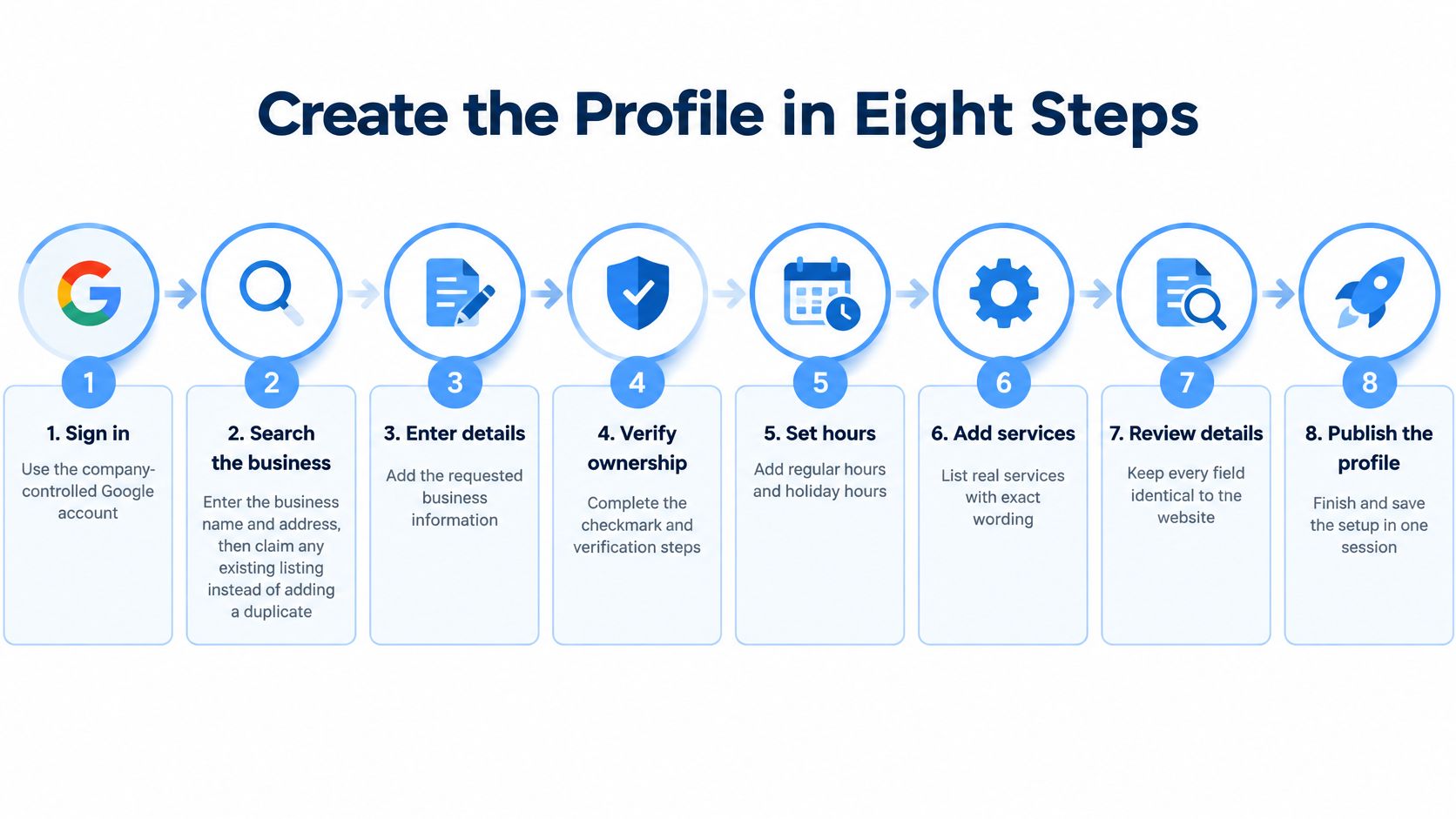
Enter the business identity and contact details
Sign in with the company-controlled Google account.
Confirm that the owner can access its recovery email and phone. Don't build the profile under a technician's personal account just because that person is available to complete the form.Search before creating anything.
Look for the business name and address in Google Search and Google Maps. If a listing already exists, claim it or follow the ownership-request process instead of creating a competing version. An unfamiliar owner is an access problem to resolve, not a reason to start over.Enter the actual business name.
Match the name customers encounter on your business materials. Don't append service keywords, city names, promotional claims, or a legal suffix unless they belong to that public-facing name. Keep transactional keywords for the appropriate service content.Select the most specific accurate primary category.
For a company primarily repairing air-conditioning systems, an available category such as Air conditioning repair service is more descriptive than a broad contractor label. Choose according to the core business, not a category you hope will attract unrelated jobs.Apply the approved location model.
Enter the eligible staffed address for a storefront, or configure a service-area business without displaying a customer-inaccessible address. Google's profile setup guidance permits up to 20 service areas, but those areas must reflect places your business serves. Don't create separate profiles merely to target additional cities.Add the phone number and relevant website page.
Use a number your team answers and a page that describes the correct location and services. Test both on a mobile phone. A working link to an irrelevant branch page still gives customers the wrong journey.
Submit without introducing conflicting changes
Submit the profile for verification.
Follow the verification options Google presents. Save the submission details and assign a named person to complete any evidence request. Don't assume a saved form means the profile is verified.Keep core identity fields stable during review.
Avoid experimenting with the name, address, or category while Google is checking the business. If you discover a genuine mistake, document it and follow the correction prompts rather than repeatedly submitting different versions.
A strong category explains what the business does. A keyword-stuffed business name tries to turn the identity field into an advertisement.
Review the submission against your source documents before handing it to anyone else. Check spelling, suite information where applicable, phone digits, and the destination website page. Small inconsistencies are easier to prevent than to explain during a verification problem.
This video offers an additional walkthrough of the setup interface.
Finish the initial submission in a focused session, but don't rush verification to satisfy an internal launch date. The evidence must match the business you've entered, even when that means correcting your supporting materials before proceeding.
Verification Methods and Wait Times
Verification methods and typical timing
| Path | What to prepare | Timing Google states |
|---|---|---|
| Video | One continuous clip of the location or vehicle, signage if any, tools, and proof of control | Recommended when offered; review up to 5 business days |
| Phone | Answer or code on the business number already on the profile | Offered only for some business types, regions, and hours |
| Text | Code sent to a business mobile or SMS-capable number | Offered only when Google selects it |
| Code sent to an address Google associates with the business | Not available for every profile |
According to Google's verification guidance, the available methods reflect business type, public information, region, and operating hours; review can take up to five business days, and new-business rankings may take up to one month to appear in search results. These are processing expectations, not a promise of a particular ranking.
Google determines the methods available to your profile. For phone, text, or email, use the business contact destination shown in the verification flow, retrieve the code promptly, and enter it only in the appropriate Google interface.
Record evidence that connects the operation to the location
When video is offered, prepare the route before recording. Google's video verification guidance emphasizes evidence of the location, business operations, and the operator's authority to manage the business.
For an air-conditioning repair company, a useful recording sequence is:
- Establish the location: Start outside at the actual operating location or service vehicle, showing recognizable surroundings where requested.
- Show the business identity: Include permanent signage where applicable and branding that matches the submitted name.
- Demonstrate the work: Show relevant tools, equipment, supplies, or the organized service vehicle.
- Prove control: Demonstrate access to a staff-only space, open the vehicle, or show other evidence requested in the verification flow.
Record a continuous clip without cuts. A polished promotional video isn't a substitute for evidence. Your objective is to connect the location, operation, and authorized person clearly.
Resolve rejection without creating another listing
A claimed storefront without matching signage needs attention. So does an address that differs from your documents, an office your team doesn't occupy, or footage that never establishes control of the operation.
If verification fails, read the stated issue before recording again. Refilm the missing evidence at the same legitimate location, or use another method if Google offers one. Don't create a replacement profile to bypass the review.
Our Google Business Profile verification guide provides a focused reference for preparing the evidence and handling the process. Keep the date, method, result, and any requested corrections in your business approval file.
Successful verification enables management capabilities such as editing core information and interacting with customers. It also makes performance reporting available, which is where you can begin evaluating customer actions rather than treating profile submission as the finish line.
Fields That Match a Transactional Query
What setup can influence in local ranking
| Factor | What Google measures | What to set during setup |
|---|---|---|
| Relevance | How well the profile matches the query | Most specific primary category, real services, and consistent name |
| Distance | Distance from the searcher or the place in the query | True staffed address, or a service area limited to real coverage |
| Prominence | How well known the business is | Review quantity and rating, plus links and articles; not extra city names |
Google's local ranking guidance identifies relevance, distance, and prominence as its principal local ranking factors. Setup can improve the clarity of your services and location, but adding cities doesn't move your business closer to every searcher.
That distinction matters when targeting air conditioning repair near me. A finished profile should make the service obvious and the next action easy. It cannot guarantee a top-three Maps position because every field is complete.
Use the visual as a consistency check, with one important qualification: a hidden residential address should remain hidden from customers rather than being published merely to match the website.
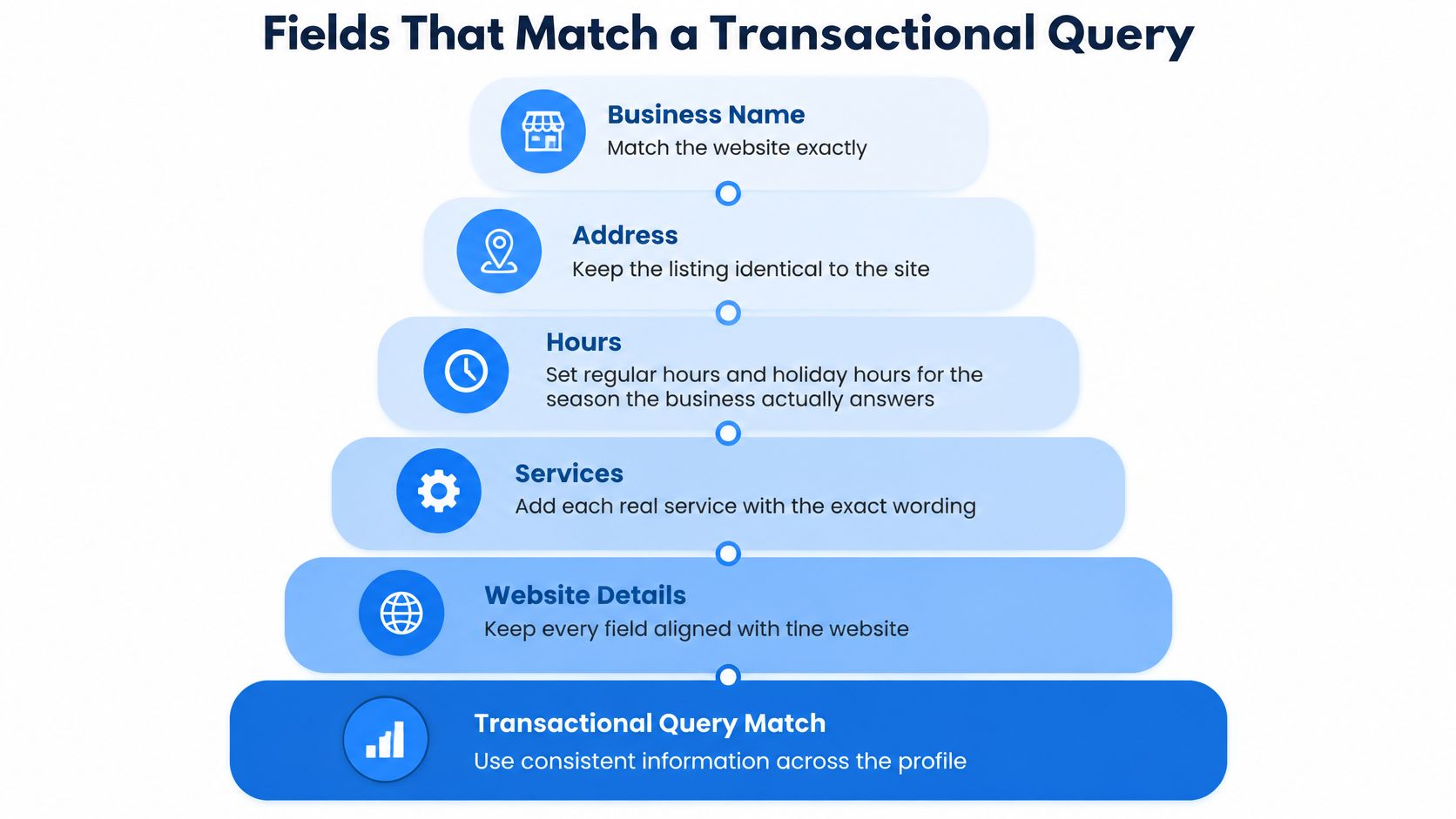
Complete fields in customer decision order
Set regular hours and holiday hours according to when the business operates and handles customer inquiries. Don't advertise emergency availability unless someone can respond to emergency requests.
Add each genuine service with a short, useful description. Emergency AC repair, refrigerant-leak diagnosis, and thermostat repair communicate different needs, provided your team performs them. A repeated list of cities doesn't explain what a customer can book.
Then complete the conversion details:
- Phone and website: Test the call connection and send visitors to a relevant, working page.
- Appointment URL: Include it only when customers can complete the booking action.
- Original photos: Show the team, branded vehicle, real equipment, completed work, and storefront where applicable.
- Applicable attributes: Select accurate payment, accessibility, and service options where Google offers them.
- Current post: Publish a useful service update that identifies the work and genuine service area.
Use the language customers understand, but don't force a near-me phrase into every description. Our Google My Business profile optimization guide expands on maintaining the fields after setup.
Connect local SEO with AI-search clarity
AI optimization should begin with clear, consistent business information, not claims that a profile edit guarantees an LLM recommendation. State the same core services, identity, and coverage on your website so an AI-search system has specific information to interpret if it encounters those pages.
Build content around your industry and actual customer questions. An air-conditioning repair page should explain diagnostic work, service availability, coverage, and booking rather than mixing unrelated trades into a general marketing page.
Location-specific usefulness also matters. In a separate trade, Richmond Tree Experts GA's resource on Marietta permits for removing trees illustrates how a business can address a concrete local question. For an air-conditioning company, create equally relevant material about its own service process and local operating conditions, without inventing regulatory requirements.
Precise service information helps customers judge fit. It also gives search systems clearer material than a vague contractor description.
Before closing the dashboard, verify the hours, services, phone, website, photos, attributes, and first post against the website. Consistency means agreement on the facts, not copying awkward keyword-heavy text into every field.
Measure the Baseline and Decide on Help
Record a baseline as soon as reporting becomes available, before making another round of optimization changes. Without a dated starting point, you can't distinguish a better profile from seasonal demand or a change in how your team handles calls.
Google's performance documentation explains the available profile interaction reporting and states that search-query data updates at the beginning of each month and can take up to five days to appear. Compare complete reporting periods rather than judging a change from an incomplete month.
Track actions and lead quality together
Create a spreadsheet with a reporting date and the same metric definitions each time. Our guide to Google Business Profile insights can help you interpret the reporting without confusing visibility with revenue.
| Baseline item | What to record | How to use it |
|---|---|---|
| Verification | Completion date and current status | Establish when managed reporting began |
| Profile views | Available Search and Maps visibility | Monitor exposure without treating views as leads |
| Search queries | Service and discovery terms shown | Check whether visibility matches the intended work |
| Calls | Reported call actions | Compare with answered calls and qualified inquiries |
| Website clicks | Visits initiated from the profile | Check whether the destination supports booking |
| Direction requests | Requests shown in reporting | Evaluate usefulness for customer-facing locations |
Keep a separate inquiry log for the calls your team answers. Record the requested service, customer location, whether the job fits, and whether it becomes a booking. A call action doesn't establish that someone reached your dispatcher or purchased a repair.
Judge the setup against operational standards as well as growth:
- Accurate operation: The profile reflects current hours, contact details, and coverage.
- Clean identity: No unresolved duplicate listings or ownership disputes remain.
- Complete service coverage: Customers can identify the work your team performs.
- Qualified demand: Relevant inquiries and booked work improve over comparable periods.
Keep management accountable
Retain the primary-owner role and assign responsibility for reviewing edits, updating seasonal hours, and checking performance. Avoid changing multiple core fields because a quiet week feels uncomfortable.
Transactional Marketing targets transactional search terms because the objective is to reach people actively looking to hire, not merely accumulate informational traffic. Evaluate progress by the services and cities that produce appropriate inquiries, while keeping website SEO, Maps visibility, and AI-search discovery distinct in reporting.
If setup or reporting is stuck, Transactional Marketing helps clients establish a missing listing and provides regular profile-performance reports, including insights into customer actions.
Transactional LLC offers a free Google Maps audit, Google Business Profile setup support, and ongoing optimization to help connect your business with relevant local searches. Visit Transactional LLC to request the audit and identify what needs attention in your profile, service targeting, and path from search to customer inquiry.