

A lot of local service businesses lose customers before the phone ever rings. The problem isn't always your offer, your reviews, or your pricing. Sometimes it's the moment a ready-to-buy visitor lands on your site and sees a trust issue.
If your business depends on searches like “plumber near me,” “emergency dentist near me,” or “AC repair near me,” your website has one job. It needs to make people feel safe enough to call, book, or submit a form. That's where HTTPS stops being a technical checkbox and becomes a revenue issue.
Is Your Website Scaring Away Ready-to-Buy Customers
A homeowner searches “emergency roofer near me” after finding a leak. They click your site because they need help now. Then the browser shows a Not Secure warning.
That visitor doesn't stop and think about certificates, protocols, or browsers. They think your company looks risky. Then they hit back and call the next business.
Trust breaks right before conversion
For a local service business, money is frequently lost. Transactional searches bring in people who are ready to act. They're not browsing for fun. They want to call a plumber, request a quote, schedule a dental visit, or book service today.
If your website looks unsafe, you're creating friction at the exact point where a buyer should convert.
Practical rule: If your site asks for a name, phone number, address, insurance info, or payment details, a secure site is not optional.
A lot of owners treat HTTPS like back-end housekeeping. That's a mistake. It affects whether customers trust your business enough to fill out the form, click your call button, or stay on the page long enough to choose you.
Your site has to support transactional intent
Local SEO is about turning searchers into booked jobs and patients. That means every click from Google needs a clean path to action. A secure website helps remove doubt, and doubt kills conversions.
If you're already working on better calls to action, stronger service pages, or cleaner contact forms, HTTPS belongs in the same conversation. It directly supports the conversion work covered in this guide on improving website conversion rate.
Here's the simple test:
- Search your business name: Click through from search results and check whether the browser shows a lock icon.
- Open your contact form: Make sure the page loads securely and doesn't trigger any browser warnings.
- Check service pages on mobile: That's where many local buyers make fast decisions.
If any part of that experience feels off, fix it before you spend another dollar on SEO, Google Ads, or Maps optimization. Sending paid or organic traffic to an untrusted site is wasteful.
What HTTPS Is and Why It Matters for Transactional Searches
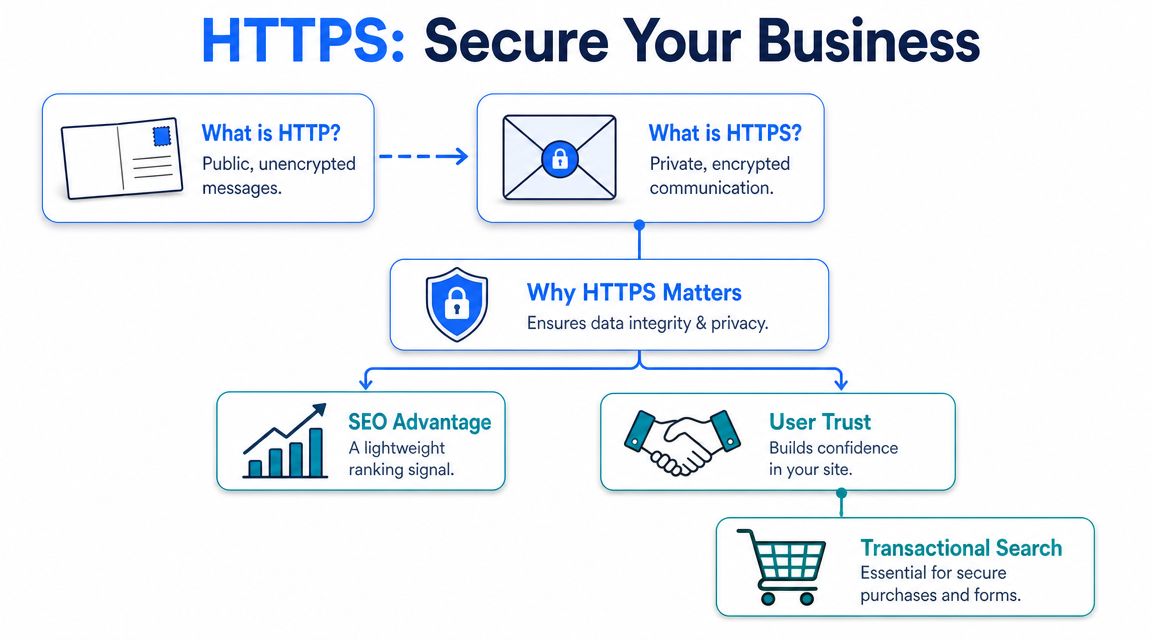
HTTP sends information like a postcard. Anyone handling it along the way can potentially read it. HTTPS sends information like a sealed envelope. The message is protected while it moves between the visitor's browser and your website.
For a local business, that matters every time someone submits a form, requests a quote, or shares contact details.
The sealed envelope matters more than owners think
When someone searches for a transactional term, they're close to hiring. They may be comparing only a few companies. At that stage, trust signals matter because people are deciding who gets their phone number and who gets ignored.
HTTPS tells both users and search engines that your site meets a basic standard of legitimacy and security. If you want a plain-English primer before dealing with setup details, this overview on understanding SSL certificates is useful.
Google already made this part of SEO
Google announced in 2014 that HTTPS would be used as a ranking signal, and many SEO references still describe it as a lightweight signal that initially affected fewer than 1% of global queries. Over time, HTTPS became the expected baseline for modern sites because it encrypts browser-to-server traffic, which improves trust, security, and crawl reliability. This matters at scale because Google processes over 8.5 billion searches per day, so even a small ranking signal can influence massive traffic volumes, as explained in Ranked.ai's write-up on the role of HTTPS in your SEO strategy.
That doesn't mean HTTPS alone will push you to the top for “electrician near me.” It won't. But it does mean you're making your site easier to trust, easier to measure, and easier for Google to process correctly.
Why this matters for local buyers
The owner of a plumbing company or dental practice usually asks the wrong question. They ask, “Will HTTPS rank me higher?” The better question is, “Will an insecure site cost me customers who were ready to contact me?”
Yes, it can.
Use this quick comparison:
| Site type | What the visitor feels | What it does to transactional traffic |
|---|---|---|
| HTTP site | Hesitation, doubt, low trust | More abandoned visits and fewer form submissions |
| HTTPS site | Professional, safer, current | Better chance of calls, quote requests, and bookings |
A secure site won't close every sale. It does remove one obvious reason for a buyer to leave.
If you want to win local transactional searches, HTTPS is the floor. Not the ceiling. But you still need the floor.
The SEO and User Experience Benefits of a Secure Site
HTTPS helps in two ways that matter to service businesses. It gives you a small SEO edge, and it removes friction from the visitor experience.
Those two things matter more than owners realize when the fight is for high-intent clicks.

Small ranking gains still matter in local search
A commonly cited case study reported that after switching to HTTPS, Cloudtec saw a 7% increase in website ranking, along with improved page visibility, according to this review of using SSL for SEO. That same source notes the mechanics behind a proper migration: use 301 redirects, update internal links, and set the HTTPS version as canonical so search engines pass signals to the secure URLs.
That source also highlights why small improvements can matter so much. Organic results account for 94% of clicks, and the top three Google results receive 68.7% of clicks. In local service markets, a modest movement upward can change who gets the phone call.
Browser warnings hurt conversions
Owners obsess over rankings and ignore the page experience after the click. That's backward.
If your browser warns people away, your rankings become less valuable. HTTPS removes the Not Secure label that can poison a first impression. For businesses collecting estimates, appointment requests, and lead forms, that's not a cosmetic detail. It affects whether people trust you enough to act.
It also supports faster, cleaner performance
HTTPS supports HTTP/2 deployments, which can improve user experience through faster loading. It also helps preserve cleaner referral data after migration, which gives marketers a more accurate view of where organic traffic came from.
That means you're not just securing the site. You're making it easier to analyze what's working.
- Cleaner analytics: You can track organic performance more accurately after migration.
- Better user confidence: Visitors are less likely to bail when the site looks professional and secure.
- Stronger technical base: Secure delivery supports modern web performance standards.
For businesses that want a deeper security review beyond the certificate itself, Affordable Pentesting web security services can help identify broader website vulnerabilities.
Your mobile experience matters here too, because many local buyers click from a phone and decide fast. If your site is slow or clunky after the secure migration, fix that next with a stronger focus on mobile-optimized sites.
A Migration Checklist for Local Service Businesses
Most HTTPS migrations fail for boring reasons. The certificate gets installed, but the rest of the site stays messy. Old URLs remain live. Internal links still point to HTTP. Directory listings keep the wrong version. Then rankings wobble and the owner assumes HTTPS hurt SEO.
HTTPS didn't hurt the site. A sloppy migration did.
What must happen before launch
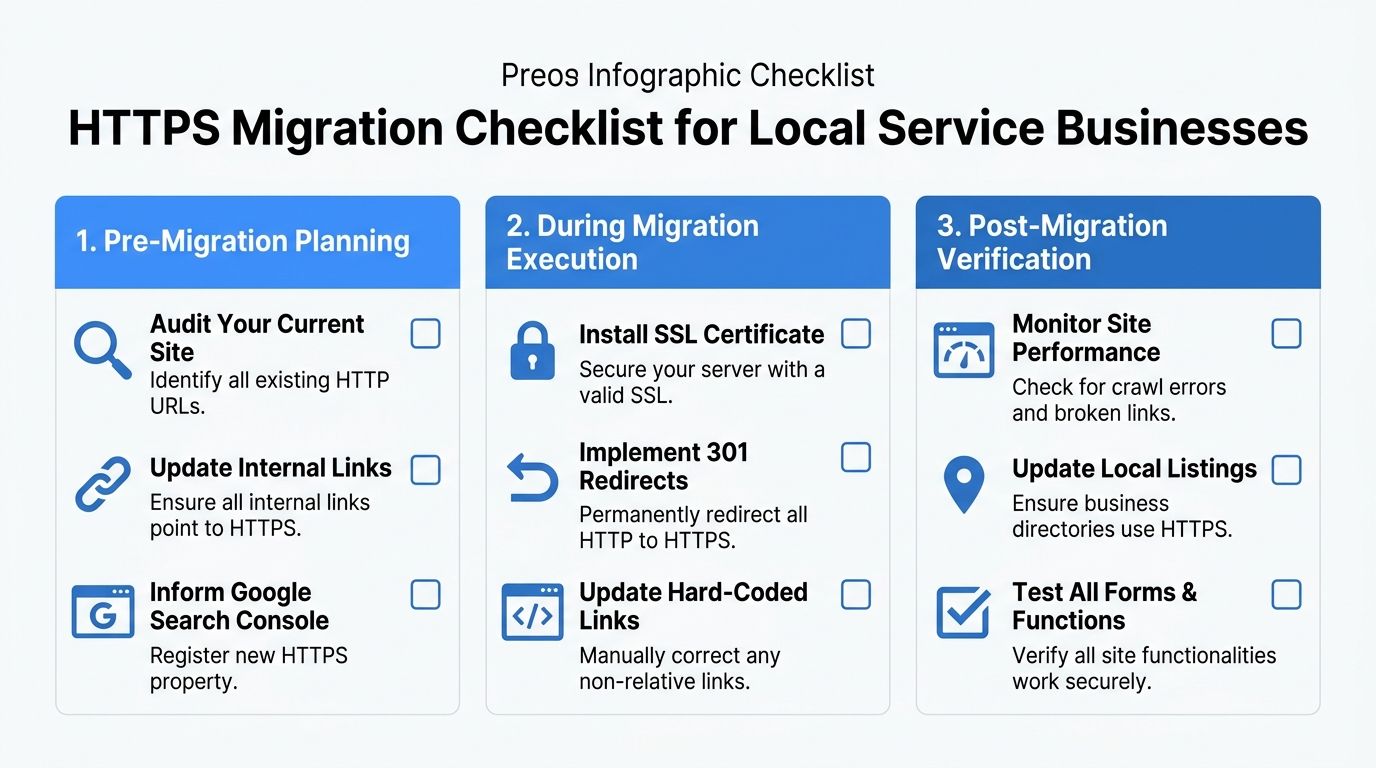
For technical SEO, a primary danger is duplication and crawl dilution during migration. If both HTTP and HTTPS versions stay accessible, search engines can crawl multiple URL variants unless you enforce one canonical version with 301 redirects, consistent internal links, and HSTS, as BrightEdge explains in its guide to HTTP vs HTTPS for SEO.
Start with an audit. You need to know which pages, images, scripts, forms, and internal links still use HTTP before you switch traffic over.
Here's the pre-launch checklist:
Get a valid SSL certificate
Use your hosting provider, CDN, or site platform to install a certificate that covers your live domain correctly.Crawl your site for HTTP URLs
Check service pages, contact pages, blog posts, image files, scripts, and form actions.Choose one canonical version
Pick the secure version as the only version you want indexed.Prepare redirect mapping
Every HTTP page should point to its HTTPS equivalent with a permanent redirect.
What to do during the migration
At this stage, most business owners need a developer, not guesswork. The move has to be complete.
- Force HTTPS with 301 redirects: Don't leave old pages accessible in both versions.
- Update internal links: Menus, footer links, body links, buttons, and hard-coded links all need the secure version.
- Update canonical tags: They must point to HTTPS, not the old pages.
- Refresh your XML sitemap: It should list only secure URLs.
- Check forms and tracking tools: Quote requests, appointment forms, chat widgets, and analytics must still work after the switch.
If one page loads securely but a form, image, or script still pulls from HTTP, the migration isn't finished.
Local SEO tasks owners often forget
This part matters a lot for service businesses chasing calls from Google Maps and local organic search.
You need to update the website URL in your Google Business Profile so Google associates the right secure URL with your listing. Then update the same URL anywhere your business appears in local directories, chamber listings, niche directories, and citation sources.
That keeps your brand signals consistent across the web.
A practical resource for owners thinking beyond the website itself is this guide to effective marketing for small businesses, especially if you're trying to clean up both visibility and lead flow at the same time.
Post-launch verification
Once the migration is live, check these items immediately:
| Check | What you want to see |
|---|---|
| Browser test | Lock icon appears on all key pages |
| Manual page test | HTTP versions redirect to HTTPS |
| Sitemap review | Only HTTPS URLs are listed |
| Internal navigation | Menus and buttons all stay on HTTPS |
| Google Business Profile | Website field uses the secure URL |
| Search Console | Secure property is verified and monitored |
If you're dealing with duplicate URLs, broken canonicals, or protocol mismatches, this is part of a broader set of technical SEO issues that need to be cleaned up before aggressive local SEO campaigns start.
Avoiding Common HTTPS Pitfalls That Hurt Rankings
HTTPS is not some magic growth lever. It's a foundational requirement. If you botch the migration, you can absolutely lose momentum for the terms that pay your bills.
That's why this topic needs blunt advice. A secure site helps. A broken secure site creates a different problem.

Don't leave two versions of the site live
One of the biggest mistakes is letting both HTTP and HTTPS versions stay accessible. That splits authority, creates duplicate versions of the same pages, and confuses crawlers.
If someone can visit both versions without being redirected, fix that first.
Mixed content quietly wrecks trust
Mixed content means the page loads on HTTPS, but some element on it still loads over HTTP. Usually it's an image, script, font, or embedded file.
The result is ugly. The lock icon may disappear, the page may trigger warnings, and the site still feels broken to users.
Canonical mistakes waste your migration
A lot of websites switch to HTTPS and forget to update canonical tags. That tells search engines the old HTTP page is still the preferred version.
You can't expect clean ranking signals if your own site sends the wrong instruction.
Watch for these common errors:
- Wrong canonicals: Secure pages still reference HTTP as canonical.
- Broken redirect chains: Old URLs hop through multiple versions before landing.
- Hard-coded HTTP links: Blog posts, buttons, and navigation still point to the insecure version.
- Unupdated assets: Images or scripts still call insecure files.
- Directory inconsistency: Your business listings point users to the wrong protocol.
Most businesses shouldn't expect visible ranking gains from HTTPS alone. They should expect problems if the migration is incomplete.
That's the part too many articles skip. Marie Haynes points out that HTTPS is often treated as either a ranking lever or a hygiene requirement, when the key question is when it meaningfully affects business outcomes. Her article on HTTPS and SEO gets at that gap directly.
For local service businesses, the answer is simple. HTTPS matters enough when it protects trust, removes friction, and prevents technical errors from undermining your campaign for transactional terms.
Monitoring Your Success and Securing More Customers
Once your site is fully secure, don't guess about the outcome. Monitor it.
Google treats HTTPS as a lightweight ranking signal, so moving from HTTP to HTTPS can provide a small SEO lift, but it isn't a dominant ranking factor compared with content relevance and other technical signals. Industry reporting on Google's guidance also notes that HTTPS is not used for indexation decisions, which means a secure protocol alone won't make a weak or poorly crawlable page rank, as summarized in this review of the impact of HTTP vs HTTPS in SEO.
What to watch after the migration
Check the secure version in Google Search Console and look for indexing issues, crawl errors, and page coverage problems. If you haven't set that up properly, use this guide on how to set up Google Search Console.
Then track the things that matter to a service business:
- Keyword visibility for transactional terms: Terms like “roofer near me” or “emergency HVAC repair.”
- Landing page health: Make sure your money pages are indexed and canonicalized correctly.
- Lead actions: Calls, form fills, appointment requests, and direction clicks.
- Google Business Profile connection: Confirm your Maps listing points to the secure site.
Secure first, then go after buyer intent
HTTPS is your admission ticket. It's not the whole show.
Once the site is secure and technically clean, you can push harder on the work that drives local revenue. That means building pages around high-intent service terms, tightening internal linking, improving Google Business Profile signals, and targeting the exact searches people use when they're ready to spend money. Transactional LLC is one option for that kind of work. It focuses on local SEO, Google Maps optimization, and content built around transactional search terms for service businesses.
That's the right sequence. Secure the website first. Then rank the pages that bring in calls.
If your site still shows trust issues, mixed protocols, or messy redirects, fix that now before you chase harder keywords. Transactional LLC helps local service businesses clean up technical SEO, strengthen Google Maps visibility, and target the transactional search terms that lead to booked jobs, new patients, and more calls from the right cities.