

You check your phone before the first job of the day, and there it is. A fresh one-star Facebook review. Maybe it's vague. Maybe it's flat-out false. Maybe it came from someone you never serviced. Either way, your stomach drops because you know prospects look at that page before they call.
That reaction is justified. Facebook reviews still shape trust, and trust affects whether a homeowner clicks, calls, or keeps scrolling to the next roofer, dentist, or pest control company. In local search, that matters because the searches that pay the bills are transactional. Terms like “roofer near me,” “AC repair near me,” and “dentist near me” come from people ready to book.
If you're trying to figure out remove reviews facebook, the first thing to know is simple. You usually can't delete an individual review yourself. The second thing is more important. You still have options, and those options affect more than Facebook. They influence your reputation signals across the web, your Google Maps credibility, and how AI-driven search tools interpret your brand.
That Sinking Feeling A Bad Facebook Review
A bad Facebook review can change the tone of your whole morning. One minute you are lining up estimates or dispatching techs. The next, you are staring at a one-star post that will be seen by the exact people you want to win. Homeowners comparing bids. Patients checking credibility. Property managers looking for a vendor they can trust.
That reaction is reasonable because Facebook reviews still influence buying decisions. They also shape how your business is interpreted across search, maps, and AI-generated answers that pull reputation signals from multiple sources. A prospect may discover you on Google Maps, search your name, land on your Facebook Page, and decide in ten seconds whether to call. AI systems make a similar judgment at scale. If your reputation profile looks messy, inconsistent, or unmanaged, that can weaken trust before a lead ever reaches your site.
Why this matters beyond Facebook
Your Facebook Page often shows up for branded searches, and it frequently becomes part of the final trust check for high-intent service searches. That matters most for the searches tied to revenue. Someone looking for a roofer, HVAC company, dentist, or exterminator is not doing casual research. They are trying to hire.
I have seen this pattern repeatedly with local service businesses. A company can rank well, run solid ads, and still lose calls because its review footprint creates hesitation at the last moment. Facebook is part of that footprint. So are Google Business Profile, third-party directories, and the social signals that AI-driven search tools use to summarize a brand.
Practical rule: Treat Facebook reviews as part of your search visibility and conversion path, not as a side task for social media.
Where owners lose ground
The first mistake is reacting in public before confirming what happened. The second is ignoring the review and hoping it gets buried. The third is assuming every bad review should be handled the same way.
A better approach is to sort the review into the right bucket first:
- Policy violation: fake, abusive, spam, off-topic, or clearly posted by someone who was never a customer
- Legitimate complaint: a real customer is unhappy and describing an actual experience
- Coordinated attack: several suspicious reviews appear in a short window, often with similar language or no service history
That distinction matters because each type creates a different business problem. A fake review is bad data and should be challenged. A real complaint is a service recovery issue that now affects search trust. A coordinated attack is both a platform problem and a reputation risk that can distort how prospects, Google Maps users, and AI search systems evaluate your business.
The goal is not to win an argument. The goal is to protect the trust signals that help you capture high-value local searches.
Your Three Strategic Choices for Facebook Reviews
Most business owners really have three choices when a bad Facebook review appears. Report it. Respond to it. Or disable reviews entirely. Those options don't carry equal risk, and they don't produce the same result for local visibility.
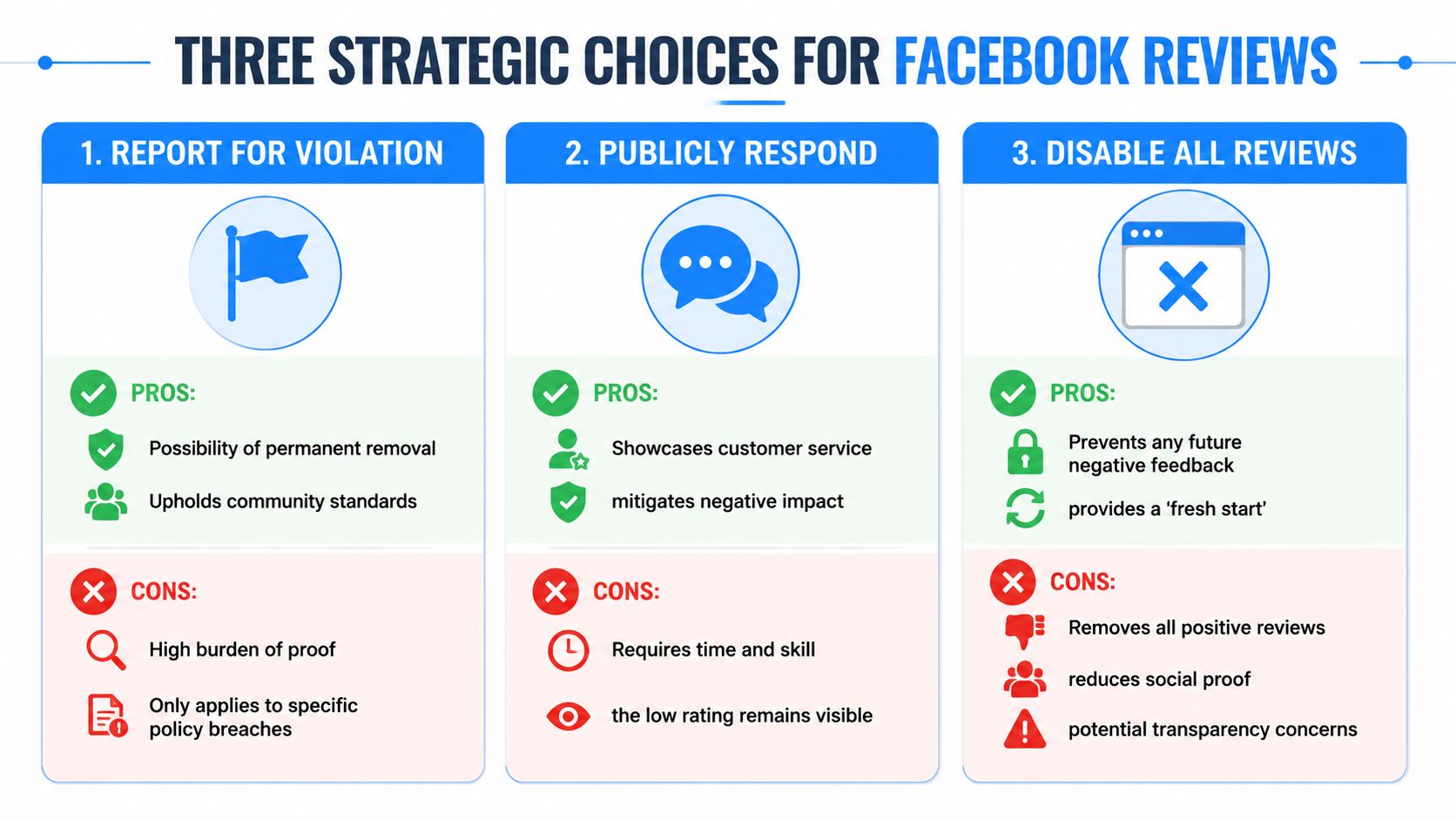
A quick comparison
| Choice | Best use case | Main upside | Main downside |
|---|---|---|---|
| Report | The review appears fake, abusive, spammy, or unrelated | You may get it removed | You need evidence and the result is uncertain |
| Respond | The review is likely to stay visible | You show professionalism to future customers | The rating still remains |
| Disable reviews | Severe abuse or a temporary reputation crisis | Stops new Facebook reviews from appearing | Removes all social proof, including positive reviews |
Option one works when the review breaks rules
If a reviewer was never a customer, is posting harassment, or is clearly pushing spam, reporting is the right first move. It's a cleanup task. You're trying to remove bad data from a public trust channel.
This option supports local SEO because false negatives muddy the reputation picture around your business. If your online footprint is part of how prospects and AI tools evaluate trust, bad inputs should be challenged.
Option two is usually the most practical
Most negative reviews don't get removed just because they feel unfair. If the review reflects a real dispute, Facebook often leaves it up. In those cases, a calm public response can do more for your conversion rate than an angry removal attempt ever will.
A thoughtful reply tells the next prospect, “We answer problems. We don't hide from them.”
That matters when someone is deciding between two companies with similar service pages and similar map listings.
Option three should feel uncomfortable
Turning reviews off can seem attractive when you're fed up. It's also the fastest way to erase your positive proof along with the bad. From a search and trust standpoint, that creates a gap. Prospects notice missing reviews. So do systems that rely on consistent business signals across platforms.
Here's the practical way to choose:
- Use report when you can point to a rule violation
- Use respond when the complaint is visible and you need to protect trust
- Use disable only when the page is under obvious abuse and you need a temporary shield
The hidden SEO trade-off
Facebook reviews don't exist in a vacuum. Your prospects bounce between your website, Google Business Profile, Facebook Page, and third-party directories. AI search tools do something similar at scale. They synthesize patterns. A neglected review section can weaken the authority you're trying to build elsewhere.
That's why remove reviews facebook isn't really about vanity. It's about preserving enough trust to keep winning transactional searches, especially in crowded local markets.
How to Report a Review That Violates Facebook Policy
If a review is fake, abusive, unrelated to your business, or obvious spam, report it. Don't overthink that part. But go in with realistic expectations. Facebook doesn't remove reviews just because they're harsh.

The benchmark worth knowing comes from Harp Interactive's breakdown of Facebook review removal steps. The success rate for removing a reported review hovers between 10-30%, with the highest success at 25-30% for provably fake or spam reviews. Vague reports without evidence have a failure rate of over 80%.
That tells you exactly how to approach this. Don't file emotional reports. File documented ones.
What Facebook is more likely to act on
Start by separating removable reviews from frustrating but valid ones.
More likely to be removed
- Spam or fake engagement where the account appears unrelated or mass-posted
- Harassment or abuse that targets you or your staff
- False identity or conflict behavior if the review looks like competitor sabotage
- Unrelated content that doesn't describe an actual experience with your business
Less likely to be removed
- Opinion-based complaints about wait time, pricing, or customer service
- Negative but plausible experiences even if you disagree with the details
- Short one-star recommendations with little explanation but no policy breach
The actual reporting steps
Use a clean, repeatable process:
- Go to your Facebook Page.
- Open the Reviews or Recommendations tab.
- Find the review you want to challenge.
- Click the three dots next to the review.
- Choose Find support or report recommendation or the closest report option shown.
- Select the reason that most accurately fits the violation.
- Submit the report.
That's the mechanical part. The part that changes outcomes is your documentation.
Build the case before you click submit
Before reporting, gather anything that supports your claim:
- Customer records: check whether this person appears in your CRM, invoicing tool, or scheduling software
- Screenshots: save the review, the reviewer profile, and anything suspicious on their account
- Timeline notes: document dates, especially if the review appeared right after a dispute or competitor activity
- Context from staff: ask your office manager or dispatcher whether anyone recognizes the name
Field note: If you can't explain why the review violates policy in one or two clear sentences, your report is probably too weak.
A concise explanation works better than a rant. State the issue plainly. Example: “We have no record of this individual as a customer, and the review contains accusations unrelated to any service transaction.”
Choose the right category
Owners hurt their odds by picking sloppy report categories. Match the report to the problem.
| Review problem | Better reporting angle |
|---|---|
| Reviewer never used your service | False information or unrelated to Page |
| Obvious competitor hit | Spam or false information |
| Personal attacks on staff | Harassment |
| Promotional junk or bot posting | Spam |
If your broader reputation work also includes Google, it helps to align your documentation habits across platforms. This guide on how to dispute a Google review properly is useful because the same discipline applies. Save evidence first, then act.
What not to do
Don't ask your team to mass-report the review from multiple accounts. Don't argue inside the report form. And don't assume no response means the review was “approved” as true. It usually means Facebook didn't see enough policy basis to remove it.
When the review stays up, move quickly to the next play. That's the public response.
The Art of the Response When a Review Stays
A bad Facebook review can sit on your page for weeks while you're trying to book jobs, answer calls, and keep the schedule full. That is usually the moment owners feel stuck. You are not. Once removal is off the table, the public reply becomes the part you still control, and prospects pay close attention to it.

On Facebook, your response does more than calm one unhappy person. It helps the next prospect decide whether your business feels safe to call. That matters for local SEO too. High-intent searchers often check your Google Business Profile, your website, and your Facebook page in the same decision cycle. If they find an ugly review with no reply, trust drops fast.
I tell clients to stop writing to the reviewer and start writing to the undecided buyer. That buyer may have searched “emergency plumber near me” or “best roofer in [city].” They are comparing three businesses, and your response helps determine whether you get the lead.
What a strong response needs to accomplish
A useful reply does three things at once:
- Recognizes the complaint without confirming details you have not verified
- Shows professional control so the thread does not make your business look chaotic
- Creates an off-platform path to resolution through phone, email, or direct message
That process should not live only on Facebook. A documented review strategy for local businesses helps your team respond the same way across Google, Facebook, and industry directories, which strengthens trust signals across the full search journey.
Your real audience is the person reading the exchange before deciding whether to contact you.
A response framework that holds up
Use a simple structure and keep it tight.
- Greet the reviewer by name
- Acknowledge the concern in plain language
- State that your team is willing to review the issue
- Invite direct contact through a specific channel
- Close without arguing facts in public
That last point matters. I have seen owners post invoices, screenshots, technician notes, and scheduling records to prove the reviewer wrong. It feels satisfying for five minutes and looks reckless for months.
Examples you can adapt
For an HVAC complaint about a service visit
Hi [Name], we're sorry to hear you were unhappy with your service experience. We take concerns like this seriously and would like to review what happened. Please send us a direct message or call our office so we can look into your appointment and work toward a resolution.
For a dental review about wait times
Hi [Name], thank you for the feedback. We understand delays can be frustrating, and we're sorry your visit didn't meet expectations. Please contact our office directly so we can review your appointment and address your concerns.
Here's a quick explainer on handling tough public feedback well:
For a pest control complaint that sounds exaggerated
Hi [Name], we're sorry to read this. We want every customer to feel taken care of, and we'd appreciate the chance to review the service details with you directly. Please message us with your service address and preferred contact information so our team can follow up.
Responses that make things worse
Weak replies usually fail in predictable ways:
- Defensive: “That's not what happened.”
- Dismissive: “Call us.”
- Aggressive: “You're lying and we have proof.”
Each version damages trust for a different reason. Defensive replies make the business look thin-skinned. Dismissive replies suggest you do not care. Aggressive replies make prospects wonder how you will treat them if something goes wrong.
Response test: If a first-time prospect would hesitate after reading your reply, rewrite it.
Why this matters for AI optimization and local visibility
Facebook reviews are not isolated reputation debris. They feed the broader trust picture around your brand. Search engines, map results, and AI-generated business summaries all work from patterns across the web, including reviews, citations, and public brand mentions. A business that answers criticism with clarity and restraint looks more credible than one with abandoned complaints and public arguments.
A response will not erase a bad review, and it will not fix weak rankings by itself. But it can protect the click, protect the call, and protect conversion rate from the traffic you already worked to earn. For service businesses chasing transactional searches, that is the difference between showing up and getting chosen.
Disabling All Reviews The Nuclear Option
There are situations where turning off Facebook reviews makes sense. They're rare. Most of the time, this move creates more problems than it solves.
Disabling reviews removes the entire Recommendations section from your page. That means the fake one-star review disappears, but so do the genuine positive comments you spent years earning. For a local service business, that's a steep price because prospects often use Facebook as a quick legitimacy check.
When it might be justified
This is a last-resort move for situations like these:
- Coordinated review attacks from non-customers
- Temporary PR fallout where the page is getting flooded with irrelevant comments
- Operational chaos when you can't moderate responses responsibly for a short period
If you are dealing with a handful of tough reviews, do not reach for this option first.
The trade-off most owners miss
Removing all reviews creates a trust vacuum. A page with no visible customer feedback can look neglected or evasive. That's especially risky when someone is comparing your Facebook Page with your Google Business Profile, website testimonials, and directory listings.
For local SEO, consistency matters. A complete absence of reviews on one major platform doesn't help your credibility story. It also weakens the broader trust environment around the brand, which is the opposite of what you want when trying to rank for high-intent searches.
Turning reviews off solves the noise problem, but it often creates a credibility problem.
How to disable reviews if you must
If you decide the situation is severe enough, the usual path is inside your Page settings under Templates and Tabs or the equivalent layout area, then turning off the Reviews or Recommendations tab.
If your team needs a refresher on Facebook business setup and page structure, this walkthrough on setting up a Facebook page for business growth can help you locate the right controls and clean up the page afterward.
A better long-term answer
Most businesses don't need fewer reviews. They need a stronger process for handling them. That means catching issues early, responding fast, asking happy customers for feedback consistently, and keeping every major profile active enough that one bad review doesn't define the brand.
If you ever disable reviews, treat it as temporary damage containment, not as your permanent reputation strategy.
A Proactive Strategy for a Bulletproof Reputation
The strongest approach to remove reviews facebook issues is to make any single bad review less powerful. That comes from volume, consistency, and trust across every place a prospect can verify your business.
A proactive system looks simple in practice. Ask real customers for feedback after successful jobs. Respond quickly when complaints show up. Keep your Google Business Profile, website, and social pages aligned. If you want a useful companion resource on optimizing business profiles for local leads, that guide is worth reading alongside your review strategy.
For businesses focused on transactional search terms, this matters even more. Someone searching “emergency electrician near me” or “best orthodontist near me” isn't researching for fun. They're close to taking action. A sturdy reputation layer helps convert that intent into a call, form fill, or appointment.
The businesses that win local SEO and AI optimization over time usually aren't the ones with zero negative feedback. They're the ones with enough strong, current, credible signals that a stray bad review doesn't control the narrative. Building that base starts with a repeatable system for getting more reviews from real customers.
If your business needs help turning reputation management into better rankings, stronger Google Maps visibility, and more leads from transactional searches, talk with Transactional LLC. They help service businesses build the kind of local SEO and AI-ready presence that turns online trust into booked jobs and new patients.