


It's late, the house is getting warmer, and the air conditioner has stopped. The homeowner isn't browsing for fun. She's searching air conditioning repair near me, money ready, looking for a company she can call right now.
That's the moment structured data for SEO has to serve. If Google can read your business name, service, hours, and phone number without guessing, your page is easier to interpret when that ready-to-spend search happens.
What Structured Data Changes in Search
A homeowner with a dead unit at night doesn't want a clever headline. She wants to know who you are, whether you fix air conditioners, whether you serve her town, and how to reach you. Your visible page should answer those questions for her, and your markup should repeat the same facts in a format software can parse.

Think of structured data as a shipping label on a parcel. The parcel doesn't change, but a clear label helps the carrier sort it faster and send it to the right place. On a web page, the label is a set of named facts about entities, such as a business, a service, a place, or a review.
A Shared Vocabulary, Not a Trick
Google, Bing, and Yahoo announced Schema.org in 2011, and a large-scale study published by the Association for Computing Machinery analyzed a sample of 10 billion pages and found that 31.3% of pages contained Schema.org markup, up from 22% the previous year, with each marked-up page referencing six entities on average, according to Google Research's summary of four years of Schema.org. That history matters for one reason. You're not inventing labels, you're using a shared vocabulary search engines already understand.
Markup helps Google interpret your business identity, your services, and the places you serve. It can also make a page eligible for enhanced displays in search results, such as extra details shown alongside the listing.
What it doesn't do is just as important. Valid markup doesn't guarantee a higher ranking, and eligibility doesn't guarantee Google will show an enhanced display. If your page is thin, your hours are wrong, or callers can't reach you, a neat data block won't fix that.
Practical rule: If a fact isn't true and visible on the page, it doesn't belong in the markup.
Before you touch any code, write down three facts and check them against the page itself. You'll build everything else from this short list.
- Legal business name: Exactly as customers and listings know it
- Service offered: The specific job this page sells, not every job you do
- Area covered: The towns you travel to for that service
Schema Types to Prioritize for Service Businesses
There are hundreds of schema types, and you don't need most of them. Start with the types that describe who you are and what you sell, then add types that sharpen trust and location detail, then add types that help people find their way. That order keeps you from decorating pages while the foundation is missing.
| Schema type | Describes | Best page | Priority |
|---|---|---|---|
| LocalBusiness | One physical branch, name, address, phone, hours | Home and location pages | Tier 1 |
| Organization | The parent company, logo, social profiles, contact | Site-wide, usually the home page | Tier 1 |
| Service | One service offered, its area and its provider | Each service page | Tier 1 |
| Review | Third-party ratings visible on the page | Pages showing customer reviews | Tier 2 |
| OpeningHoursSpecification | Hours per day, including holiday exceptions | Location pages | Tier 2 |
| GeoCoordinates | Latitude and longitude of the branch | Location pages | Tier 2 |
| BreadcrumbList | Path from the home page to the current page | Service and city pages | Tier 3 |
| FAQPage | Questions and answers visible on the page | Pages with a visible FAQ | Tier 3 |
Tier 1 Builds the Foundation
LocalBusiness describes one real branch, and Organization describes the parent company behind it. Service describes one offer on one page, such as drain cleaning or AC repair, and connects that offer back to the business that provides it. A helpful way to see the Service idea in plain terms is a service page that groups related jobs clearly, such as help with mosquitoes and bed bugs for a pest control company, where each named service can be described on its own page rather than lumped into one vague claim.
Transactional uses structured data, content, and collaboration to add local relevance to a client's website, because the markup and the visible copy have to tell the same local story. If the page says you serve a town but the data stays silent, or the data claims a service the page never mentions, you've created a contradiction.
Tier 2 and Tier 3 Need Visible Proof
Review, OpeningHoursSpecification, and GeoCoordinates add precision, but only when visitors can see the same ratings, hours, and location on the page. The review rule is strict, mark up only third-party reviews that appear on the page, never testimonials you wrote about yourself. BreadcrumbList mirrors the path from your home page to the current page, while FAQPage should be treated as a clarity tool because FAQ rich results are limited to a narrow set of sites, so don't expect a special display.
You also don't need a special markup type for AI search. Google's documentation for AI search features states that websites do not need special AI-only files, "AI text files," or new Schema.org markup to appear in those features, and it recommends ensuring structured data matches the visible text. A separate AI type or hidden claims in markup create no eligibility by themselves.
Use one selection test for every type you're considering. Name the visible element on the page that the type describes. If you can't point to it, leave that type out.
Modeling Locations, Service Areas and Branches
One definition prevents most local schema mistakes. Schema.org's LocalBusiness definition describes a particular physical business or branch of an organization, and Google's guidance distinguishes those Schema.org definitions from Google Search feature requirements. A city you want work from isn't a branch, and markup shouldn't manufacture one.
Case One, One Location Serving Many Towns
Say a plumbing company has one physical shop in Dallas and drives to Fort Worth for jobs. The Dallas location gets one LocalBusiness entity with the actual street address, phone, and hours that appear on its location page. Fort Worth belongs in visible copy and in areaServed on the Service entity, not in an invented Fort Worth address.
Copying the Dallas entity onto every city page adds nothing new. Worse, it can conflict with what each page says about travel area, arrival windows, or pricing.
Case Two, Several Branches on One Website
Real branches get real entities. Each branch needs its own LocalBusiness, its own URL, and its own contact details, even if all branches share one website and one phone system. You can connect each branch back to the parent Organization with a shared identifier, so Google can tell the branches belong to the same company without confusing them for the same place.
A locations page that separates each site cleanly, like the listing at A-1 Driving School locations, shows the structure visitors expect, one entry per real place. Your markup should mirror that structure instead of blending addresses, hours, and managers into one undifferentiated block. Our own guidance on multi-location local SEO follows the same rule, each place stands on its own page and its own facts.
Case Three, Practitioners and Service Pages
A dentist, technician, or instructor page should reference the branch where that person works. It shouldn't create a new business for each employee. Service pages describe the service and point to the providing branch, rather than repeating the entire business entity word for word.
A service area is a promise to travel. A branch is a place that exists. Don't label one as the other.
Finish with consistency checks a person can verify quickly. Use the same business name spelling, the same address format, and the same phone number across every entity and page. Give each entity a canonical URL, the one address you'd want a customer to land on for that branch or service.
How to Write Your First JSON-LD Block
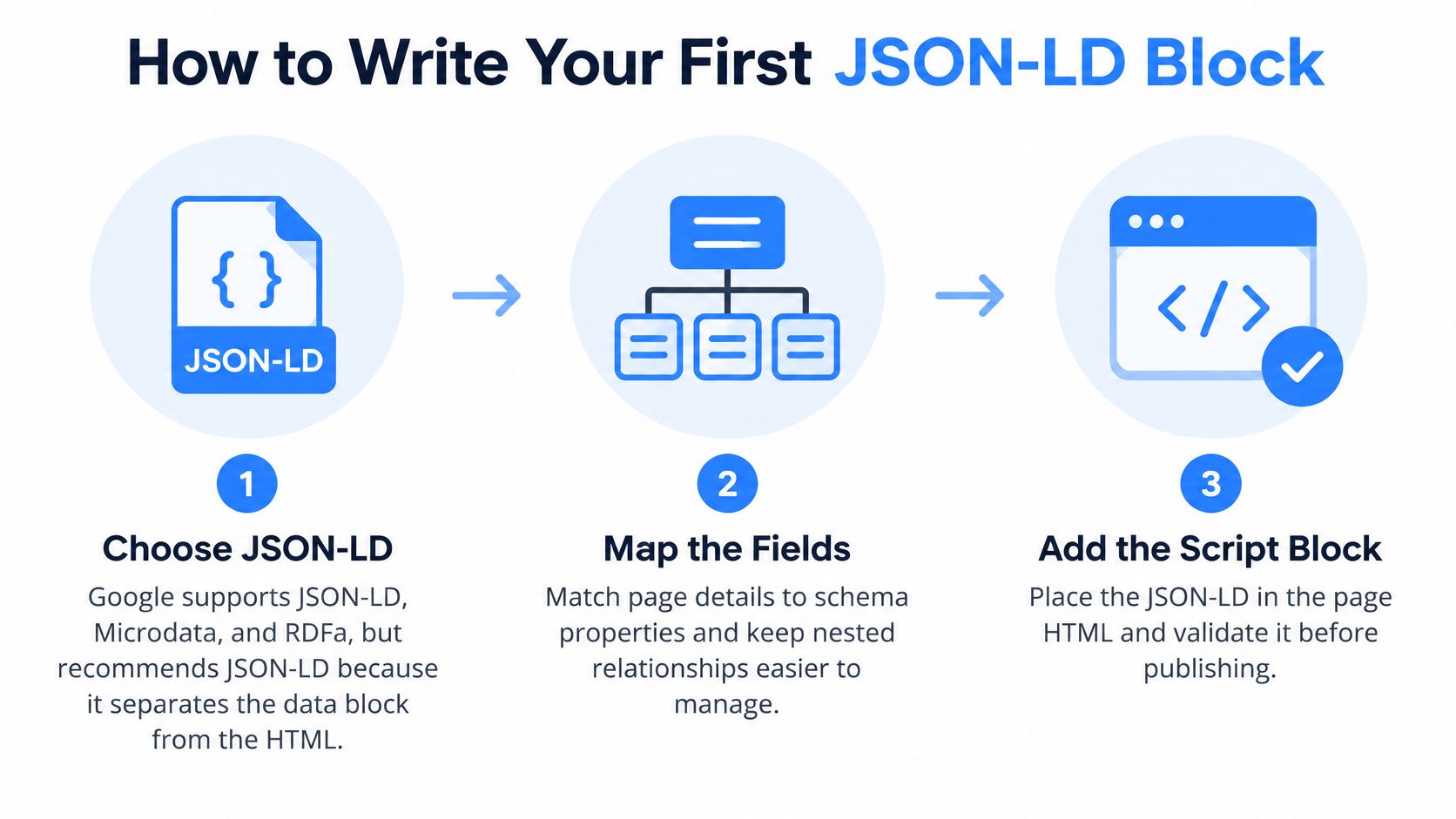
You'll write your markup as JSON-LD, a small data block that sits inside a script element on the page. Google's structured data policies note that Google supports JSON-LD, Microdata, and RDFa, but explicitly recommends JSON-LD because it separates machine-readable entities from visible page markup and makes nested relationships easier to express. In plain terms, you can update the data without picking through tags spread across your HTML.
The three-part overview below sums up the build before you work through it.
Build It in Seven Steps
Collect the visible facts first. Write down the legal name, street address, phone number, opening hours, and service list exactly as the page shows them. The common slip is starting from memory or an old listing, so read the live page and check what NAP stands for if name, address, and phone consistency is new to you.
Wrap the data in the right script element. The block uses the type application/ld+json, which tells browsers this is data, not a program to run. Browsers ignore it, and search crawlers read it.
Set the context and type. Set @context to https://schema.org and @type to LocalBusiness, or to the most specific subtype that fits, such as a dental or HVAC business type where one exists. Picking a fancier type than your business doesn't help.
Add the core identity fields. Include name, url, telephone, a full address with street, city, region, postal code, and country, plus geo coordinates for the branch. The frequent error is a phone number in the markup that differs from the footer by one digit or one extension.
Add openingHoursSpecification as structured values. Break hours into days and opening and closing times that match the hours printed on the page. Don't paste free text like "open late weekdays," because software can't sort or compare a phrase like that.
Connect the parent company. Because LocalBusiness sits under Organization in the vocabulary, you can add Organization properties such as logo and sameAs links to your official profiles. This helps Google connect the branch to the wider company without merging the two into one blurry entity.
Generate the block from one source of truth. Pull name, address, phone, and hours from the same record that feeds your Google Business Profile and your website footer. When hours change for a holiday, one update should flow everywhere, instead of three staff members editing three places by hand.
The short walkthrough below shows the same block taking shape on a real page, which helps if you've never seen JSON punctuation before.
A starter skeleton needs only placeholders you'll replace with your checked facts. It opens with the script type, then @context and @type, then name, url, and telephone, then a nested address, geo coordinates, and opening hours. Keep every comma and bracket in place, because one missing comma makes the whole block unreadable.
Do a final read before you publish. Every value in the block should appear on the page a customer can see. If a value can't be found there, either add it to the page or remove it from the block.
How to Test and Deploy Markup Without Errors
Testing isn't one click at the end. It's a short workflow that catches syntax mistakes, missing fields, and mismatches between your data and your page before Google has to sort them out.
Run the Six-Step Workflow
Test each template in the Rich Results Test. Paste a live URL or a code snippet, and confirm Google can read the entities you intended. Test the home page, one location page, and one service page, not just the easiest page.
Check the Schema Markup Validator. This tool flags property errors and vocabulary problems the Rich Results Test may skip because it focuses on Google features. Fix spelling and nesting errors here.
Compare the rendered page with the markup. Open the page as a customer would and confirm each property appears there, including hours and phone formatting. This step catches the quiet mismatches automated tools miss.
Deploy to a staging URL. Confirm the block is present in the page source and that nothing blocks Googlebot from reading it. Staging keeps a broken bracket off your live service pages.
Inspect the published URL in Search Console. Use URL Inspection to confirm the page is indexed, the markup is detected, and then request indexing if needed. One inspection per template is a sensible minimum.
Log every change. Record the date, the pages touched, and what changed, so later results can be tied to a specific deployment. This habit also helps separate markup faults from wider technical SEO issues when traffic moves.
Understand the two kinds of complaints the tools raise. Errors block rich result eligibility, usually because a required property is missing or malformed. Warnings mean an optional property is absent, so they're improvements to consider, not emergencies.
Check Before You Launch
- One entity per branch: No duplicated LocalBusiness blocks competing on one site
- Same phone format everywhere: Page, footer, markup, and profile agree
- Matching hours: Printed hours and structured hours say the same thing
- No unverifiable claims: Nothing in markup that the page can't prove
- Valid JSON: Brackets and commas checked by a validator
- Canonical URLs: Every entity points to its one preferred page
Deployment isn't the finish line, because Google retires features. Google's June 2025 announcement on simplifying search results announced the phase-out of Book Actions, Course Info, Claim Review, Estimated Salary, Learning Video, Special Announcement, and Vehicle Listing results. Schedule a quarterly review to check documentation changes, remove markup kept only for retired features, and lean on stable entity markup such as LocalBusiness and Service.
How to Measure Whether Markup Is Working
Don't declare victory because a validator turned green. Measure the pages the way you'd measure any other change, with a baseline, a comparison, and enough time for Google to recrawl and report.
Use a Baseline and a Control Group
Google's introduction to structured data recommends selecting pages without structured data that already have several months of Search Console data, adding valid markup, confirming discovery with the URL Inspection tool, and comparing performance for several months in the Performance report by URL. Follow that order, and leave a comparable group of pages unchanged as a control, so a seasonal rush doesn't get mistaken for a markup win. If you haven't set the tool up yet, our guide on how to set up Google Search Console covers the account and verification steps.
The dashboard view below is where those before and after comparisons happen.

| Metric | Where to find it | What good looks like |
|---|---|---|
| Impressions | Performance report, Pages tab, filtered by URL | Rising on marked-up pages, faster than the control group |
| Clicks and CTR | Performance report, Pages tab | Clicks grow with impressions and CTR holds or rises |
| Search appearance | Performance report, Search appearance filter | Rich result impressions appear after deployment |
| Index status | URL Inspection tool | Page indexed and markup detected |
| Service-city queries | Performance report, Queries tab | Searches such as air conditioning repair near me gain impressions |
| Calls and direction requests | Google Business Profile insights | Calls rise alongside page growth |
Read the pattern, not a single number. Impressions rising on marked-up pages while the control group stays flat suggest the markup is helping Google match those pages to more searches. Flat impressions with rising clicks point instead to a change in how the listing looks or who finds it relevant, so check search appearance before you credit the data block.
Filter the Queries tab for service and city combinations, and for near me searches. Those are the transactional searches where the searcher is ready to spend, so impression growth there matters more than growth on a general advice page. Pair that with Google Business Profile insights for calls and direction requests, because a ringing phone is the outcome the page exists to create.
Valid markup with no rich result isn't failure. Eligibility and display are two different decisions, and Google makes the second one.
Define success in local service terms before you start. More impressions for service-city queries, steady or rising clicks, and more calls from the profile mean the entity layer is doing its job.
Common Structured Data Problems and Fixes
When something looks wrong, diagnose in a fixed order so you don't chase symptoms. First check URL Inspection for indexing and detected markup. Then rerun the Rich Results Test for errors, and only then compare the visible text against every value in the block.
| Symptom | Likely cause | Fix |
|---|---|---|
| Rich result never appears | Valid markup, but display is not guaranteed | Wait for recrawl, confirm in URL Inspection, check content policies |
| Required property missing error | Feature needs a property the page omits | Add the property with a visible matching value |
| Optional property warning | Recommended field not supplied | Add it only if the page shows the value |
| Impressions drop after a change | Deprecated type removed or value changed | Compare with the change log and revert one change |
| Duplicate entities across city pages | Same LocalBusiness copied to many URLs | Keep one entity per branch with a canonical URL |
| Phone or hours mismatch | Markup and page drawn from different sources | Update the source of truth and redeploy |
The missing rich result causes the most frustration. Your markup can be perfectly valid and still never display, because eligibility isn't a promise of display. Allow recrawl time, confirm detection, and review content policies before you rewrite anything.
A required property error is different, because it blocks eligibility outright. Add the missing property, but add its matching value to the visible page too. A warning about an optional property needs restraint, fix it only when the page clearly shows that value.
Sudden impression drops after a deployment usually trace back to something you changed. Compare dates against your change log, look for a removed deprecated type or an edited value, and revert one change at a time. Duplicate entities and phone mismatches get the same treatment, consolidate to one entity per branch and correct the source record rather than patching single pages.
Change one thing per deployment. If you alter five fields across twenty pages at once, you'll never know which change caused the result you see next month.
Roll Out Structured Data in Priority Order
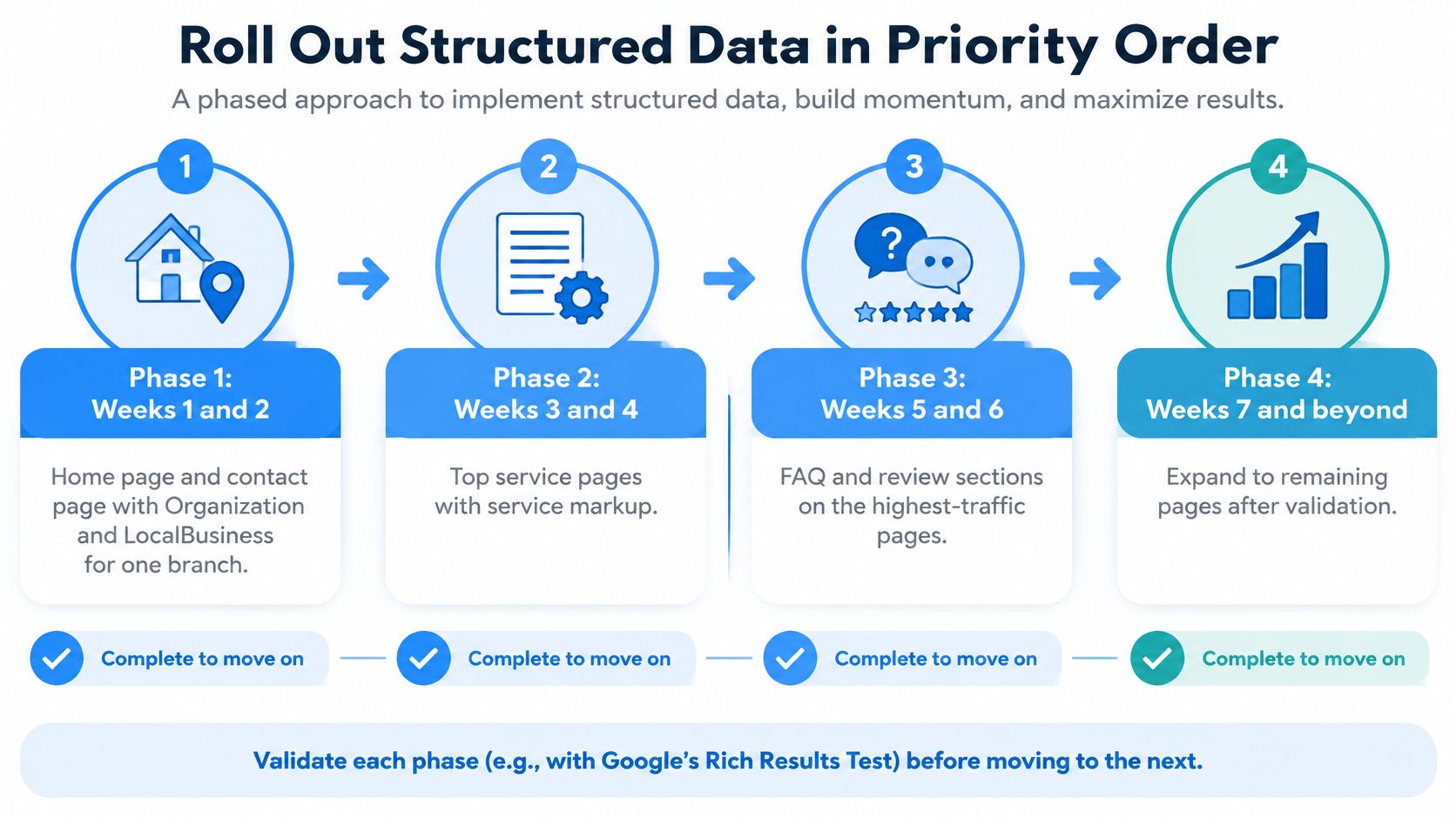
A phased rollout beats a site-wide launch because each phase can be checked and measured before the next one starts. Eight weeks is enough for most local service sites, and one branch is enough to prove the process.
The roadmap below shows the four phases in order, with a check at the end of each one.
The Four Phases
Phase 1, weeks one and two, covers the home page and contact page. Add Organization and LocalBusiness for one branch, then check both pages in the Rich Results Test and URL Inspection. Before this phase ships, record the Search Console baseline for that branch's pages.
Phase 2, weeks three and four, moves to your top service pages. Add Service and BreadcrumbList, and read each page to confirm the markup matches the visible copy about what's included, where you travel, and how booking works. Pages that sell the jobs you want most go first.
Phase 3, weeks five and six, covers location and city pages. Add GeoCoordinates, OpeningHoursSpecification, and areaServed, and apply the branch rules strictly, real entities for real places and service areas described accurately. Multi-location sites usually find their worst inconsistencies at this stage.
Phase 4, weeks seven and eight, handles the finishing types. Add Review only on pages showing third-party reviews, and FAQPage only where questions and answers are visible to readers. If a page has neither, it needs neither.
Each phase ends with the same gate. The templates validate, the values match the pages, the change log is updated, and the baseline comparison is still readable. If a phase fails that check, fix it before expanding, because the same template error multiplied across forty pages is forty repairs.
Start this month with one concrete move. Pick one branch, mark up its home, contact, and main service pages, record the baseline, and put a review date on the calendar one quarter out.
Owners who'd rather not run that program alone across several branches can work with Transactional LLC, which provides local SEO, Google Maps optimization, and transparent reporting for businesses, and aims for near me search terms and highly transactional search terms that convert visitors into customers, such as dentist near me or roofer near me. Ongoing SEO Maintenance provides continuous updates and strategy refinements to keep up with Google algorithm changes and competitors, which suits a markup layer that needs quarterly attention. Treat that as an option, not a requirement, because the steps above stand on their own.
If your service pages are hard for Google to read, they're harder for ready-to-spend customers to find, and Transactional LLC can build and maintain the structured data, local content, and Google Maps presence that target transactional searches in your service area. Visit Transactional LLC to see how that work turns searches like air conditioning repair near me into booked jobs.