


A local service lead can disappear before a salesperson finishes lunch. Teams that respond within 5 minutes are about 9 times more effective than teams that wait 24 or more hours, yet only about 7% of teams respond within 5 minutes, according to a 2026 analysis of AI lead follow-up and CRM automation. That gap matters most when someone searches “air conditioning repair near me,” “roofer near me,” “dentist near me,” or another transactional term and is ready to spend money now.
Follow up automation closes that operational gap. It acknowledges the inquiry immediately, routes the opportunity to the right person, pauses when the customer replies, and changes channels when email alone isn't enough. For HVAC, dental, and pest control companies, the winning system isn't a generic drip campaign. It's a fast, context-aware workflow connected to local search, Google Maps, the CRM, booking software, and human staff.
Why Speed Defines Follow Up Automation Success
Transactional local-search leads arrive with a narrow window for action. Someone searching for emergency HVAC repair, a same-day dental appointment, or a pest inspection is often choosing a provider now, not collecting information for later. Informational-looking local queries can carry the same intent when the searcher is ready to call, book, or request a quote.
The first company to respond can shape the conversation around availability, urgency, and the next step. A slower company may still deliver excellent service, but the customer may have booked elsewhere before anyone checks the inbox.
The measurable response-time gap
The verified benchmark is clear enough to guide operations. Only about 7% of teams respond within 5 minutes, while teams that do so are about 9 times more effective than teams waiting at least 24 hours, as reported in ValueStream AI's 2026 small-business follow-up analysis. The same comparison applies across local service operations, even though the exact booking outcome depends on service type, lead quality, staffing, and availability.
| Response Time | HVAC Conversion | Dental Conversion | Pest Control Conversion |
|---|---|---|---|
| Within 5 minutes | Strongest opportunity to engage while intent is active | Strongest opportunity to secure a convenient appointment | Strongest opportunity to book an inspection before comparison shopping expands |
| After 30 minutes | Interest may have cooled, especially for urgent repairs | The prospect may have contacted another practice | The prospect may choose a competitor offering faster scheduling |
| After 24 or more hours | High risk of losing the inquiry | Follow-up becomes reactivation rather than immediate conversion | The lead may no longer be actively evaluating providers |
Use the benchmark as an operating target, not a promise of guaranteed bookings. A sub-5-minute workflow should acknowledge the inquiry, capture its context, and assign a human response before the lead starts contacting other providers.
Practical rule: Automate the acknowledgement immediately, then assign a human action for high-value leads.
Manual follow-up breaks during normal working conditions. A receptionist may be helping a patient, a dispatcher may be coordinating a technician, and an owner may be driving between pest-control appointments. Overnight forms can sit untouched, missed calls may receive no text, and Google Business Profile messages may remain outside the sales process.
A well-designed business workflow automation system removes those delays without making every interaction robotic. It records the source, alerts the assigned employee, and supplies the details needed for a useful reply. The first message can confirm receipt, identify the requested service, and present the next available action. Human staff then handle diagnosis, treatment questions, insurance, pricing, or scheduling.
After-hours coverage is a revenue control
After-hours inquiries need their own rules. An HVAC form submitted overnight may require immediate confirmation plus an emergency-service instruction. A dental inquiry may need a booking link showing available appointments rather than a vague promise that someone will call later. A pest-control request may need a short text asking whether the issue is active, recurring, or connected to a recent inspection.
Set a hard stop for every automated path. When a lead replies, books, requests a later callback, or declines further contact, the workflow should pause or branch. Continuing to send generic messages after a customer has answered damages trust and can create unnecessary compliance risk.
Phone-heavy local businesses also need a visible next action. A clear phone number on your website supports direct contact, while call tracking and CRM routing keep the conversation attached to the correct lead record. That connection lets managers see whether fast responses produce completed calls, booked appointments, or only more unqualified inquiries.
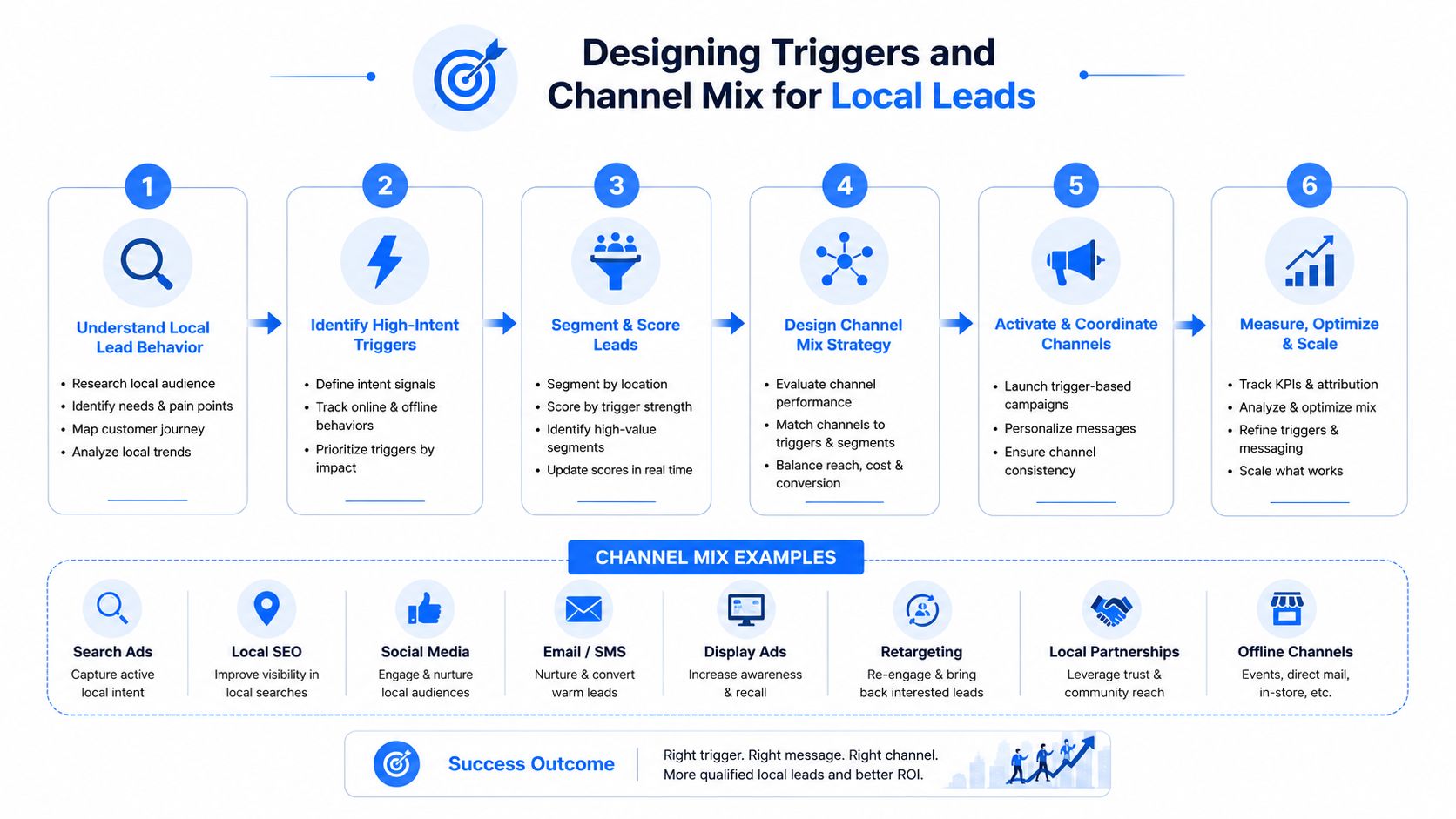
Designing Triggers and Channel Mix for Local Leads
Effective follow up automation starts with the trigger, not the message template. Before writing a sequence, document every way a local prospect can contact the business, then connect each entry point to a defined action.
Map every entry point
Create a source inventory that includes:
- Google Business Profile messages: Treat direct messages as high-intent inquiries and route them to an immediate acknowledgement.
- Website forms: Capture service type, location, preferred timing, and consent status before launching SMS or email.
- Tracked phone numbers: Create a missed-call workflow and notify the assigned employee when a call isn't answered.
- Booking widgets: Confirm the appointment, record the source, and schedule reminders or preparation instructions.
- Chat and social inquiries: Preserve the conversation context instead of forcing the customer to repeat the request.
The source should become a CRM field, not just a note in an inbox. “Google Maps, emergency HVAC,” “organic dental service page,” and “pest inspection booking widget” are more useful labels than a generic “website lead.”
Match the channel to intent
Use the urgency signal to decide what happens first.
An emergency HVAC request typically deserves an immediate SMS acknowledgement, a call task, and an escalation alert if nobody accepts the task. A dental cleaning inquiry can begin with an email containing appointment options, followed by SMS if the patient has provided mobile consent. A pest-control lead may respond well to a short text that confirms the property type and inspection need, followed by an email explaining what the visit includes.
The sequence shouldn't send every channel at once. That creates noise and makes the business appear desperate. Instead, assign each channel a job:
- SMS confirms receipt and creates immediacy.
- Email provides details, links, and expectations.
- Phone connects a human to a high-value or urgent inquiry.
- Voice messaging supports a later touch when a call isn't answered, where legally permitted and properly consented.
Build conditional logic
A useful workflow has branches based on what the prospect does. If the person replies, stop promotional automation and notify the team. If they click a booking link but don't complete the appointment, send a concise reminder. If they request a later callback, store that timing and suppress messages until the agreed window.
Segment by service, geography, urgency, and source. A “routine dental consultation” sequence shouldn't share copy with “tooth pain appointment,” and a recurring pest-control customer shouldn't receive the same introductory message as a first-time inspection lead. The structure of an effective advertisement also applies here, because each automated touch needs a clear audience, relevant offer, credible reason to act, and one obvious next step.
Keep the first response short. The automation's job is to confirm that the inquiry reached the business and move the lead toward a human conversation or booking. It isn't the place for a long company history.
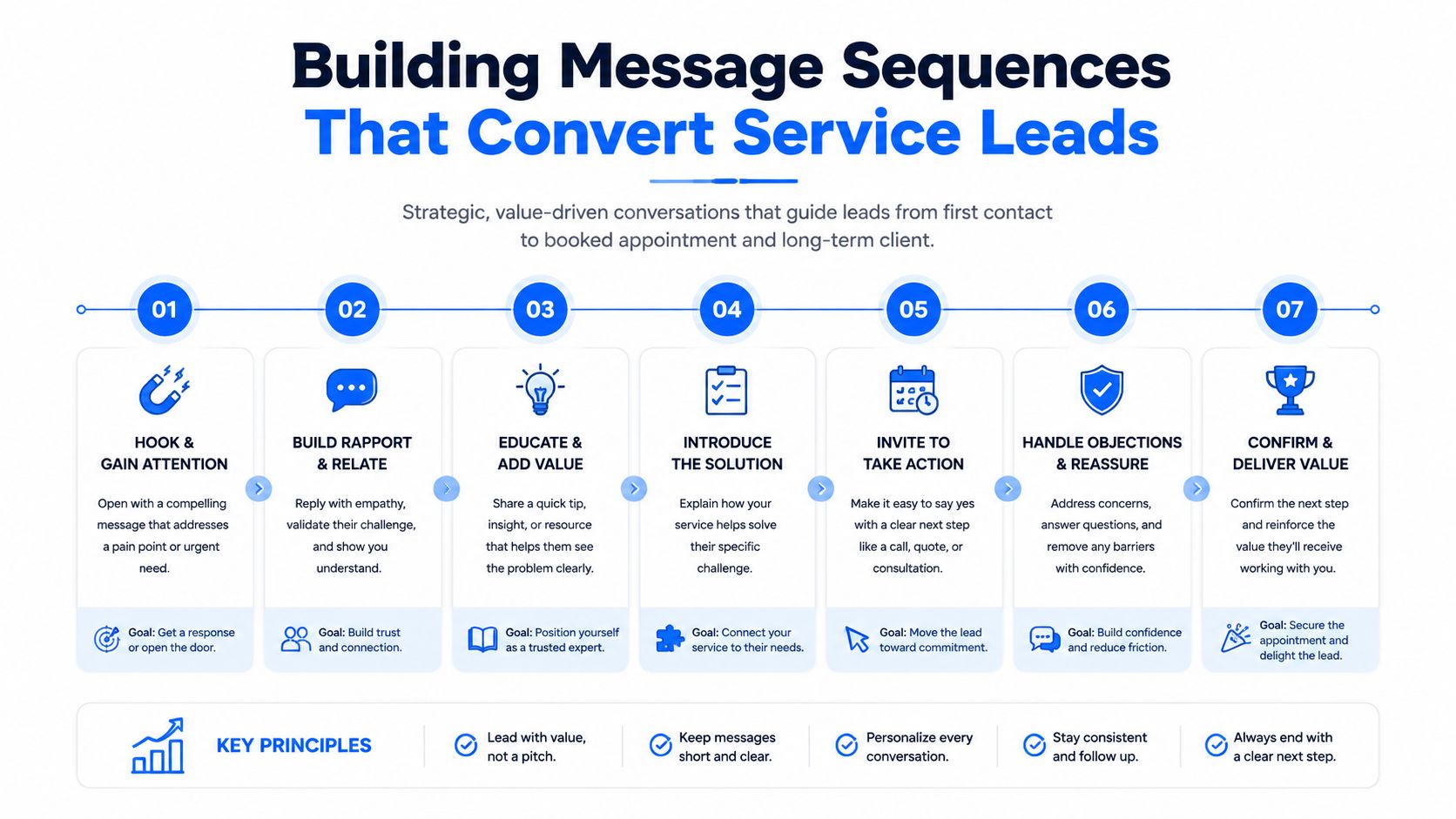
Building Message Sequences That Convert Service Leads
Generic email drips underperform in local services because the customer's context changes the correct response. The right message for an air-conditioning breakdown isn't the right message for a new dental patient, even if both people filled out a form.
The first hour should establish three things: the business received the request, the team understands the service need, and the customer has a simple next action. The exact workflow should reflect consent, business hours, staffing, and urgency.
HVAC emergency repair
Trigger: A website form, call-tracking event, or Google Business Profile message identifies an urgent cooling or heating issue.
Immediately, SMS:
Hi [First Name], this is [Company]. We received your request for [Service Type] in [City]. Is the system completely down, or is it running without cooling? Reply here and we'll help with the next step.
Within the first response window, call task: Assign the lead to the dispatcher or technician coordinator. Include the service address, requested system type, source, and any urgency language from the form.
Shortly afterward, email:
Subject: We received your [Service Type] request
Hi [First Name], we've received your request for [Service Type]. You can reply to this email or call [Phone Number] so we can confirm the issue and discuss the next available appointment. If there's a safety concern, follow your usual emergency procedures and let us know when we speak.
The automation should pause as soon as the customer replies or a staff member logs a live conversation. Don't promise a technician ETA unless the dispatch system has supplied one.
Dental new-patient inquiry
Trigger: A prospective patient submits a form, requests an appointment, or asks about a service such as an exam, cleaning, implants, or orthodontics.
Immediate email:
Subject: Your appointment request for [Service Type]
Hi [First Name], thanks for contacting [Practice]. You can choose an available time here: [Booking Link]. If you have insurance questions, reply with your provider name and we'll tell you what information we need to verify benefits.
Later SMS, only with appropriate consent:
Hi [First Name], this is [Practice]. We sent appointment options for your [Service Type] request. You can book here: [Booking Link]. Reply STOP to opt out.
The booking link should display actual availability, not send the patient into a form that someone may review later. If the patient starts but doesn't finish booking, the workflow can send one helpful reminder that answers the likely obstacle, such as insurance verification, appointment length, or what to bring.
Pest-control inspection inquiry
Trigger: A homeowner requests an inspection or describes an active pest issue.
Immediate SMS:
Hi [First Name], this is [Company]. We received your inspection request for [Property Type] in [City]. Is the issue happening inside, outside, or both? Reply with the best day for a visit, or use [Booking Link].
Follow-up email: Explain what the inspection covers, whether someone should be present, and what information the technician may need. Avoid exaggerated claims or fear-based language.
Later channel change: If the lead doesn't respond, use a different useful touch rather than repeating the same sentence. A short call task can ask about availability, while a later email can clarify the inspection process. Message quality matters more than volume, and persuasive writing techniques can help teams make the CTA specific without making it aggressive.
Escalation and fallback rules
A local sequence should define when a human calls, when automation stops, and what happens after silence. Don't let a workflow keep sending messages indefinitely. Two follow-ups may be enough for a high-intent inquiry before the system moves the lead to a slower nurture path, particularly because benchmark data shows diminishing returns after the second follow-up in one 2026 summary, with reply rates rising from 4.1% for a single-email sequence to 6.64% with one follow-up and 6.94% with two, then declining after additional touches, as reported by Reachly's automated follow-up benchmark summary.
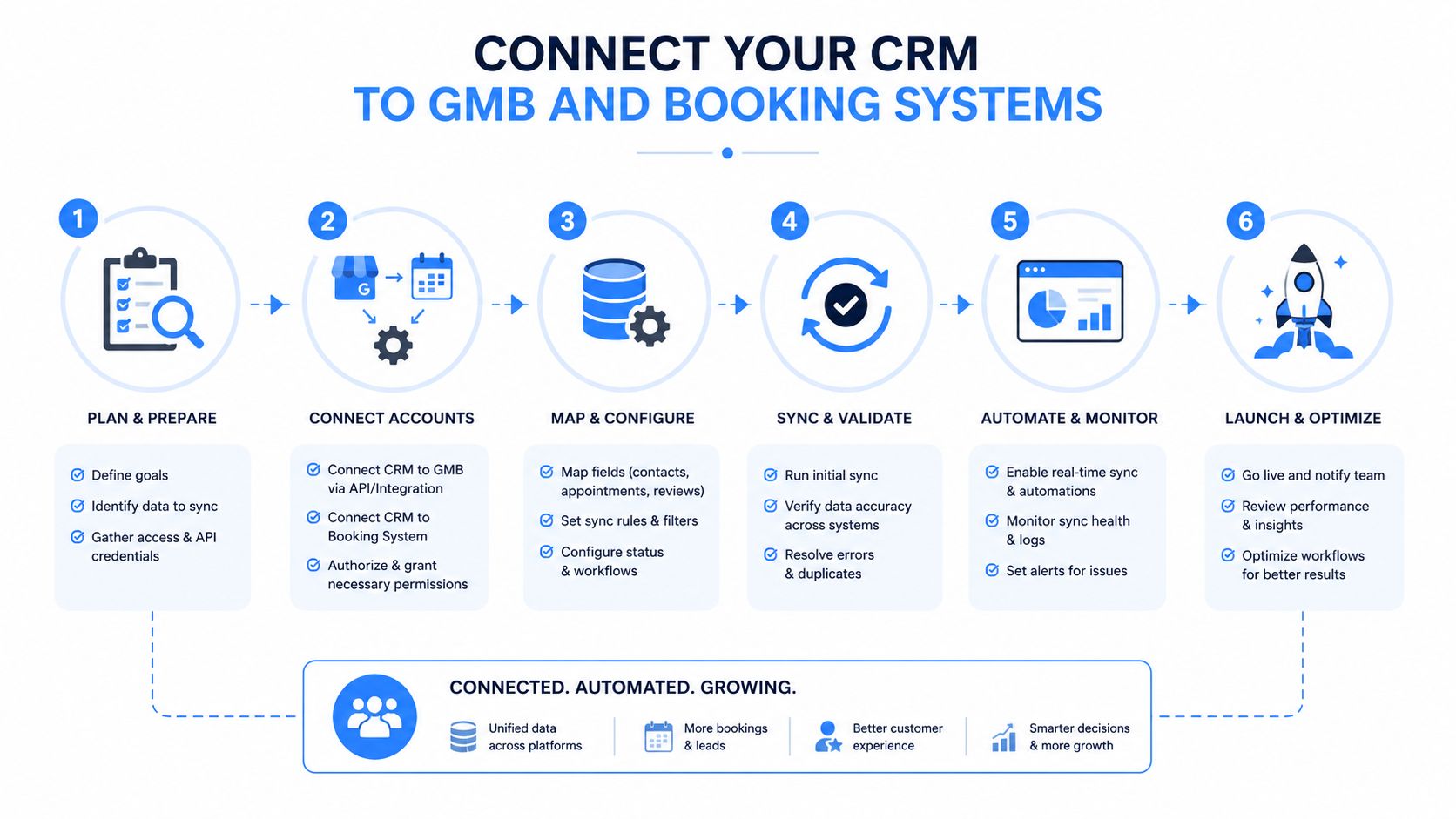
Connecting Your CRM to GMB and Booking Systems
A follow-up workflow can't be reliable if Google Business Profile messages, website forms, calls, and bookings live in separate systems. The integration objective is simple: capture the lead once, preserve the source and context, and let every later event update the same CRM record.
Connect the lead sources first
Start with the CRM as the system of record. Connect Google Business Profile messaging and lead forms through native integrations where available, or through an integration layer such as Zapier when the platforms don't connect directly. Map each field deliberately:
- Contact identity: Name, phone, email, and preferred contact method.
- Service context: HVAC repair, dental consultation, pest inspection, or another specific request.
- Location: City, service area, and address when the customer provides it.
- Attribution: Google Maps, local landing page, organic search, paid campaign, or booking widget.
- Consent record: Source, timestamp, wording shown to the customer, and channel permission.
A missed call from a Google Maps listing should create a CRM event. If the caller doesn't answer a return call, the system can send an approved SMS acknowledgement, assign the lead to the right service area, and record the outcome. Use phone call tracking to connect call activity with the original search and campaign source.
Sync appointment events
Booking software should send events back to the CRM, not just push a calendar invite. Configure workflows for:
- New booking
- Reschedule
- Cancellation
- No-show
- Completed appointment
- Follow-up service recommendation
Platforms such as ServiceTitan, Housecall Pro, and Dentrix can become valuable event sources when their available integrations support the required fields and permissions. A booking should stop lead-nurture messages and begin confirmation reminders. A cancellation should create a recovery path. A completed service should launch a satisfaction or review workflow that respects the customer's consent and the business's communication policy.
The most useful dynamic fields are operational, not decorative. Include the service type, technician or provider name, appointment date, arrival window, office or service-area details, and booking link. AI can help draft variations around these fields, but the CRM must remain authoritative. Never let generated content invent an appointment time or technician assignment.
This short video provides a visual reference for connecting CRM workflows and follow-up operations:
Test the complete journey
Submit a test form, send a test message, place a tracked call, and book a test appointment. Confirm that the CRM creates one record rather than duplicates, that the source survives each handoff, and that replies pause the correct sequence.
Then test exceptions. Cancel the appointment, change the service type, reply with a request for a later callback, and remove consent where applicable. Reliable automation isn't defined by the happy path. It earns trust when unusual events stop the wrong message from being sent.
Tracking KPIs and Staying Compliant With TCPA
Follow up automation needs two control systems: performance measurement and permission management. A sequence that generates activity but can't connect that activity to booked appointments is difficult to improve. A sequence that ignores consent, opt-outs, quiet hours, or state requirements can create legal and reputational exposure.
Track the operating outcomes
Separate automated actions from human actions in the CRM. At minimum, record the lead source, first-response timestamp, channel, reply status, appointment stage, service outcome, and revenue attribution where the business tracks it.
| KPI | HVAC Benchmark | Dental Benchmark | Pest Control Benchmark |
|---|---|---|---|
| Lead-to-appointment conversion | Track by repair type, urgency, city, and source | Track by new-patient service, booking path, and insurance question | Track by inspection request, property type, and service area |
| Average response time | Separate emergency inquiries from routine maintenance | Separate urgent appointment requests from general questions | Separate active infestations from preventive inquiries |
| Sequence completion rate | Identify leads that replied, booked, or were escalated before completion | Measure whether booking or staff contact ends the sequence | Measure whether inspection scheduling ends the sequence |
| Revenue per lead by source | Compare Google Maps, organic pages, calls, and paid campaigns | Compare service pages, profile interactions, and booking widgets | Compare local landing pages, Maps actions, and referral sources |
Don't treat open rates as the final answer. A message can be opened without producing a booking, while a phone call can convert without an email click. Use UTM parameters on booking links, CRM pipeline stages for appointment progress, and call outcomes for phone-generated conversions.
Test one variable at a time
Local service decisions often happen quickly, so testing should focus on operational choices:
- Send timing: Immediate acknowledgement versus a delayed first touch.
- Channel order: SMS before email, or email before a call task.
- Message length: A short confirmation versus a more detailed explanation.
- CTA language: “Choose an appointment” versus “Tell us the best time to call.”
- Personalization: Service type and city versus a generic business introduction.
Keep the audience and trigger consistent while testing. If an HVAC emergency sequence and a routine maintenance sequence share one dashboard, their results can obscure each other.
Treat consent as workflow data
TCPA compliance isn't a footer added after the campaign is built. Consent should be captured at the point of collection, stored with the lead, and checked before each automated channel action. Web forms should explain what the person is agreeing to receive, identify the business, and provide a clear opt-out method where required.
A plain checkbox might read:
I agree to receive calls and recurring texts from [Business Name] about my inquiry and related appointment information. Consent isn't required to purchase. Message and data rates may apply. Reply STOP to opt out.
That wording should be reviewed by qualified counsel for the business's jurisdiction and use case. Don't assume that a Google Business Profile inquiry automatically grants unlimited permission for every future promotional message.
Maintain suppression lists, honor opt-out requests promptly, document consent source and timestamp, and configure quiet hours based on applicable federal and state rules. Pest-control and home-service businesses may also face industry or state requirements affecting customer communication, so the workflow should support location-based rules rather than using one national setting blindly.
Compliance checkpoint: If the system can't show why a person received a message, when consent was collected, and whether an opt-out was honored, it isn't ready for aggressive automation.
How Follow Up Automation Amplifies Transactional Search Wins
Follow up automation is the operational half of local search. Google Maps optimization and local service pages create visibility for transactional search terms, while fast response determines whether that visibility produces a conversation, booking, or completed job.
Google's local-pack framework centers on relevance, distance, and prominence, as explained in this overview of how Google determines local-pack visibility. A business needs accurate service alignment and local authority to compete for the top three map results, but ranking alone doesn't guarantee that staff will answer quickly or follow up consistently.
The complete operating loop looks like this:
- A focused service page or Google Business Profile attracts a search for “roofer near me” or “dentist near me.”
- The form, call, message, or booking widget creates a tagged CRM record.
- Follow up automation acknowledges the inquiry and routes it according to urgency.
- A human handles diagnosis, qualification, scheduling, and service delivery.
- The completed job creates an opportunity for a compliant review request and future relationship follow-up.
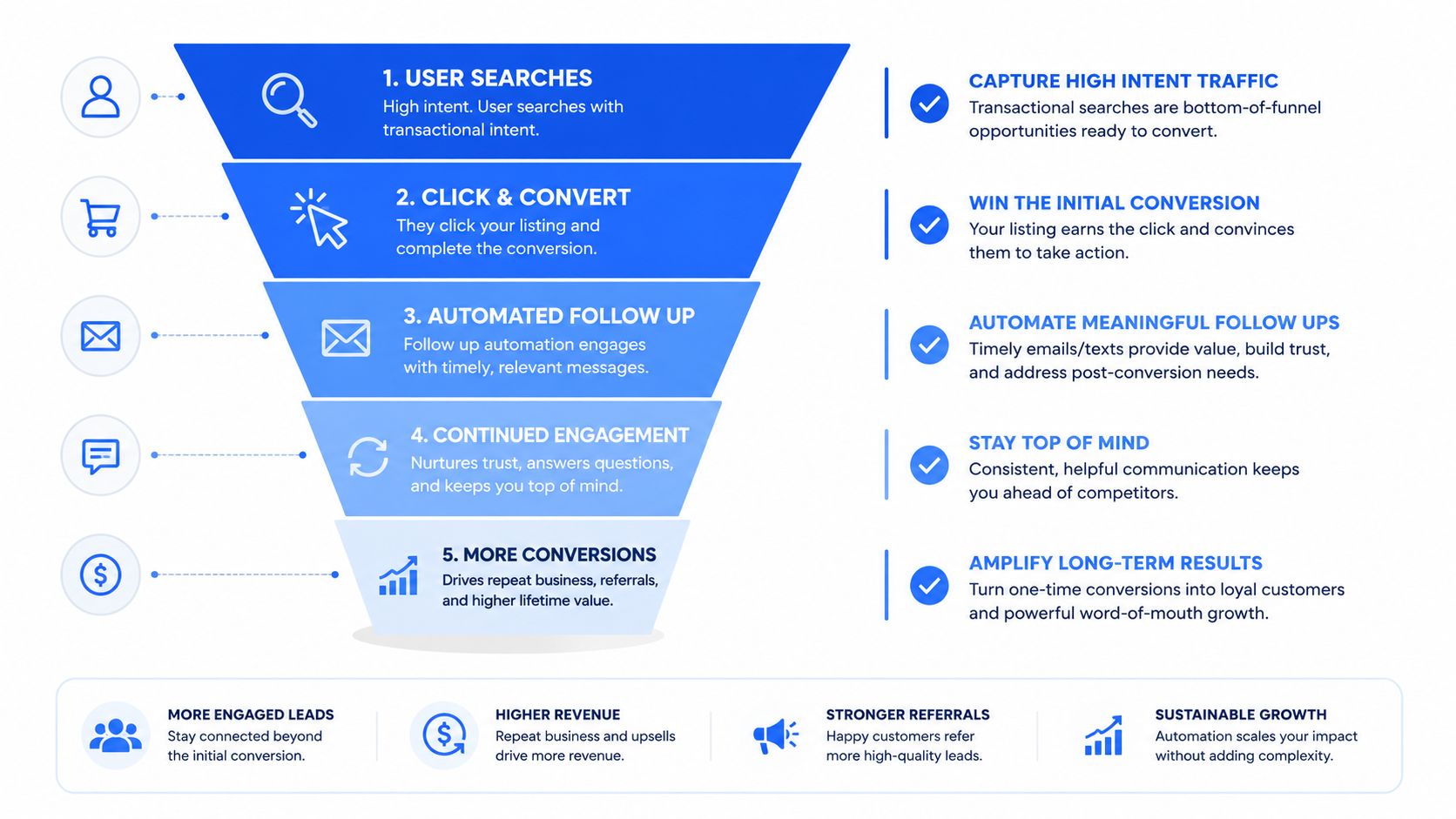
Track this loop by comparing CRM outcomes with Google Business Profile interactions, landing-page queries, call records, and booked appointments. The goal isn't to claim that automation alone improves rankings. The practical goal is to identify which high-intent transactional terms produce real customers, then improve the profile, service page, message, and booking path around those terms.
AI search adds another visibility layer. Research on generative engine optimization for local search describes how businesses can improve their presence in systems such as ChatGPT, Perplexity, and Google SGE by making services, locations, and transactional intent easy for AI systems to identify. Clear service pages and structured content help models classify the business, while a responsive follow-up system helps the business capitalize when that visibility produces an inquiry.
The strongest local operators don't separate SEO, Google Maps, AI optimization, and follow-up operations. They connect them into one measurable customer-acquisition system.
Transactional LLC helps HVAC, plumbing, roofing, pest-control, dental, and other local service businesses target transactional search terms, improve Google Maps visibility, and connect qualified inquiries to practical follow-up systems. Visit Transactional LLC to discuss a focused local SEO and AI optimization strategy built around the searches that lead to calls, bookings, and customers.