


You're answering calls, sending estimates, and doing the work, but when you search for your own service nearby, competitors appear on Google Maps and your business doesn't. Maybe you've already added a listing. Maybe Google is asking for verification again, or showing an address customers should never visit.
Learning how to get on Google Maps starts with choosing the right business setup, not dropping a pin. An accurate, verified Google Business Profile gives Google usable information about your company. Earning visibility for searches that lead to bookings takes additional work.
Which Businesses Qualify for Google Maps
Say a homeowner searches water heater repair near me early in the morning. They can compare nearby businesses and start calling before opening a company website. For the plumber who wants that call, the first question isn't which keywords to add. It's whether the business qualifies and how its location should be represented.
Google's Business Profile eligibility guidance requires in-person customer contact during stated business hours and excludes online-only businesses, lead-generation companies, and businesses using a P.O. box or remote mailbox. A business that travels to customers can qualify without publishing its home address.
Eligibility and address setup by business type
| Business type | Eligible for Maps | Address setup |
|---|---|---|
| Storefront with customer visits (dental office, med spa) | Yes | Show the exact street address |
| Home-based service business (plumber, HVAC, roofer) | Yes | Hide the address and set service areas |
| Mobile or route business (mobile chiropractor, pest control) | Yes | Hide the address and list the cities served |
| Business with a second staffed branch | Yes | One profile per staffed location |
| Online-only store or lead-generation site | No | Not eligible for a Business Profile |
| P.O. box or virtual office only | No | Not eligible at that address |
Choose the setup that matches actual operations
A storefront receives customers at its premises. A service-area business travels to them. A hybrid business does both, so its published address must function as a customer-facing location.
Serving another city doesn't make that city a separate branch. A rented mailing address doesn't establish a staffed operation either. Build the profile around where and how the business operates.
Before creating anything, check:
- Customer contact: Confirm when customers visit you or when your team visits them.
- Location authority: Make sure you own, lease, or have authority to represent the claimed premises.
- Evidence: Gather real signage photos or documentation supporting customer-facing operations.
- Business identity: Use the same real-world name and accurate contact information across your website and listings.
Practical rule: Don't publish a residential address just to put a visible pin in another neighborhood.
Duplicate profiles, virtual offices, keyword-stuffed names, and inaccurate addresses introduce avoidable suspension risks. More listings aren't a substitute for legitimate locations.
How to Create and Verify Your Google Business Profile
Create the listing under an account the business controls permanently. An employee's personal account or an agency-only login can turn a routine ownership change into a recovery problem.
Google's create-and-verify guidance explains that businesses can create a profile through Business Profile Manager or claim an existing unverified listing in Maps; postcard verification uses a five-digit code, and verification review can take up to five working days after the required steps are completed.
Build the listing in the right order
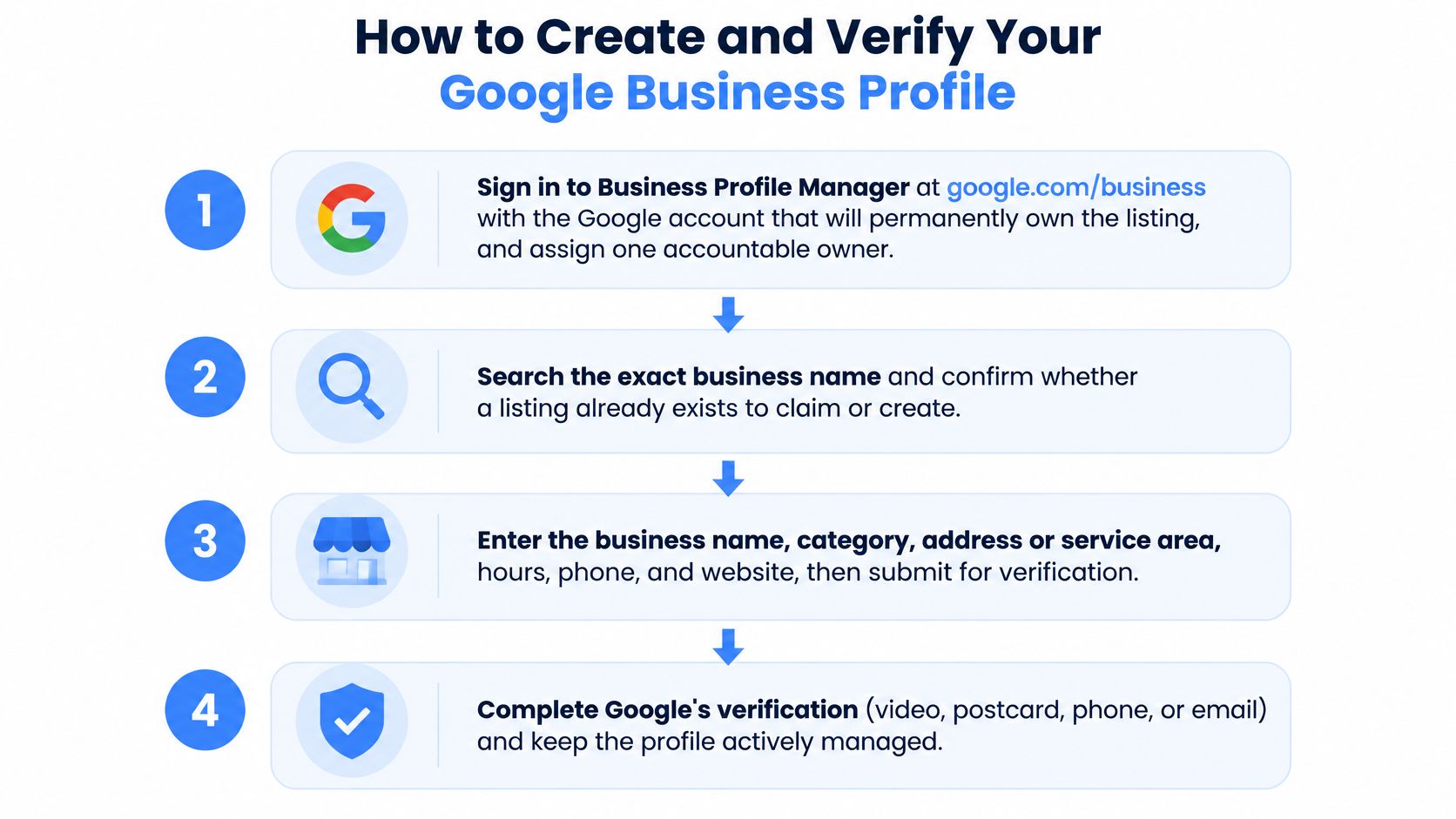
Choose the permanent owner account. Sign in to Business Profile Manager using a business-controlled Google account and assign an accountable owner. Give collaborators appropriate access rather than sharing the owner's password.
Search before creating. Search Google Maps for the exact business name, address, and phone number. If the correct unverified listing exists, claim it instead of creating another profile.
Enter the business name. Use the name customers see on signage, invoices, and your website. For example, enter Summit Plumbing, not Summit Plumbing Best Cheap Plumber Dallas, unless that longer wording is the business's established name.
Select the most specific legitimate primary category. Choose HVAC contractor rather than a broader contractor category when it accurately describes the core business. Add secondary categories only for genuine additional business activities, not every keyword you want to rank for.
Configure the address or service area. Enter a precise customer-facing address, or hide the street address for a business that only travels to customers. List cities or ZIP codes your team serves rather than adding distant places to suggest a larger operating footprint.
Complete contact details and hours. Add the direct business phone number, the relevant website page, regular operating hours, and special holiday hours. Don't advertise around-the-clock availability unless customers can obtain the stated service then.
Complete the verification method Google offers. Follow the assigned video, phone, email, or mail instructions exactly; don't assume you can choose whichever method seems easiest. Prepare signage photos, a branded vehicle, business documents, and evidence that you control the premises where applicable.
Check the published information. After verification, inspect the customer-facing listing rather than assuming every submitted field displays correctly. Test the phone button, website destination, map location, and hours before directing customers to the profile.
The process is straightforward, but ownership and verification deserve careful handling.
Keep a reusable business information record
Save the approved business name, phone, website, description, categories, and location details in a shared document. Keep verification evidence in a separate access-controlled folder.
That record also helps when evaluating other discovery channels. Free AI Directories' DIY AI tool listing guide offers a useful submission workflow for businesses with an actual AI tool to list. It isn't a Google Maps verification shortcut, and an unrelated directory isn't worth joining just to acquire another listing.
Verification establishes control of the business. It doesn't establish that the business deserves the highest position for every nearby search.
Fixing Verification Delays and Suspended Profiles
Creating another listing after a suspension is an expensive mistake. It leaves the original problem unresolved and can introduce a duplicate that you'll also need to clean up. Diagnose the profile's actual state before changing anything.
Google's profile troubleshooting guidance notes that postcard delivery can take up to two weeks, that suspended profiles need reinstatement before contributions can publish, and that an account restriction can affect every associated profile.
Profile states and fixes
| Profile state | What it means | Fix |
|---|---|---|
| Unverified | Listing exists but Google has not confirmed control | Complete the verification method Google assigns |
| Duplicate | Two listings exist for one business | Merge or edit down to one accurate listing through the appropriate support process |
| Disabled location | Google cannot confirm the business exists at the address | Prepare signage photos, a lease or utility bill, and staffed-location photos for review |
| Suspended profile | Enforcement action blocks normal profile activity | Use the available appeal or reinstatement process with organized evidence before attempting more publishing |
Prepare evidence before submitting an appeal
Make the business easy to verify. Organize clear signage photos, a business license, a lease or utility bill, and dated location photos where those documents apply. Names and addresses should support the actual business configuration, not contradict it.
For a service-area operator, document real operations rather than inventing a walk-in office. Follow the evidence requirements presented in your account, because the available appeal route can differ.
Our Google Business Profile suspension guide helps distinguish a policy repair from a verification problem. Correct the underlying issue before asking Google to reconsider it.
Don't treat a fresh listing as an escape route from an unresolved suspension.
Keep an accountable owner responsible for support correspondence and account security. For larger operators, Google's guidance permits bulk verification for at least 10 profiles from the same business, rather than treating unrelated companies as a qualifying group.
Build verification time into moves, ownership changes, and seasonal campaigns. Don't schedule a launch around the assumption that approval will be immediate.
The Three Factors That Decide Map Rankings
Two verified companies can appear differently for the same search because verification isn't a ranking score. Google's local ranking guidance identifies relevance, distance, and prominence as its primary factors and explains that a farther business can outrank a nearer one when it better matches the search.
Relevance concerns the match between your business and the customer's request. A clear category and accurate service information help distinguish an air conditioning repair business from a company that only installs commercial refrigeration.
Distance concerns the business's proximity to the searcher. When someone doesn't specify a location, Google estimates it using available location information. That makes rankings dependent on where the customer searches, not just the phrase they type.
Turn the ranking factors into practical work
Prominence concerns how well-known the business is. Google identifies links, articles, directories, review quantity, and review score among the signals it considers.
Google's local ranking factors and how to influence them
| Ranking factor | What Google measures | What you control |
|---|---|---|
| Relevance | How closely the profile matches the search words and intent | Primary and secondary categories, services, business description, complete fields |
| Distance | How far the business sits from the searcher's location | Accurate address or service areas, consistent name, address, and phone |
| Prominence | How well known and referenced the business is online | Legitimate review acquisition, local citations, links, articles, and press |
The distance row needs an important qualification: accurate information doesn't move your business closer to the searcher. Adding service areas isn't a mechanism for overcoming proximity, and consistent contact details aren't a substitute for a real location.
Spend your effort where it can improve the business's representation. Describe actual services clearly, pursue relevant local references, and invite genuine customer feedback. A useful local article or credible industry listing has a clearer purpose than a collection of unrelated directory submissions.
For a fuller diagnostic framework, use our guide to Google Maps ranking factors. Evaluate individual services and neighborhoods rather than treating a search from your own office as a universal ranking report.
Ranking reality: Verification makes a legitimate profile eligible to appear. It doesn't guarantee visibility on every search or a top-three position.
Nobody can promise the same placement across an entire service area. Search intent, customer location, and competing businesses remain part of the result.
How to Optimize Your Profile for Local Search
Optimization means giving customers and search systems a clear, current account of what your business does. For AI optimization, use the same discipline: make your services, location, availability, and business identity easy to understand rather than stuffing descriptions with repetitive search phrases.
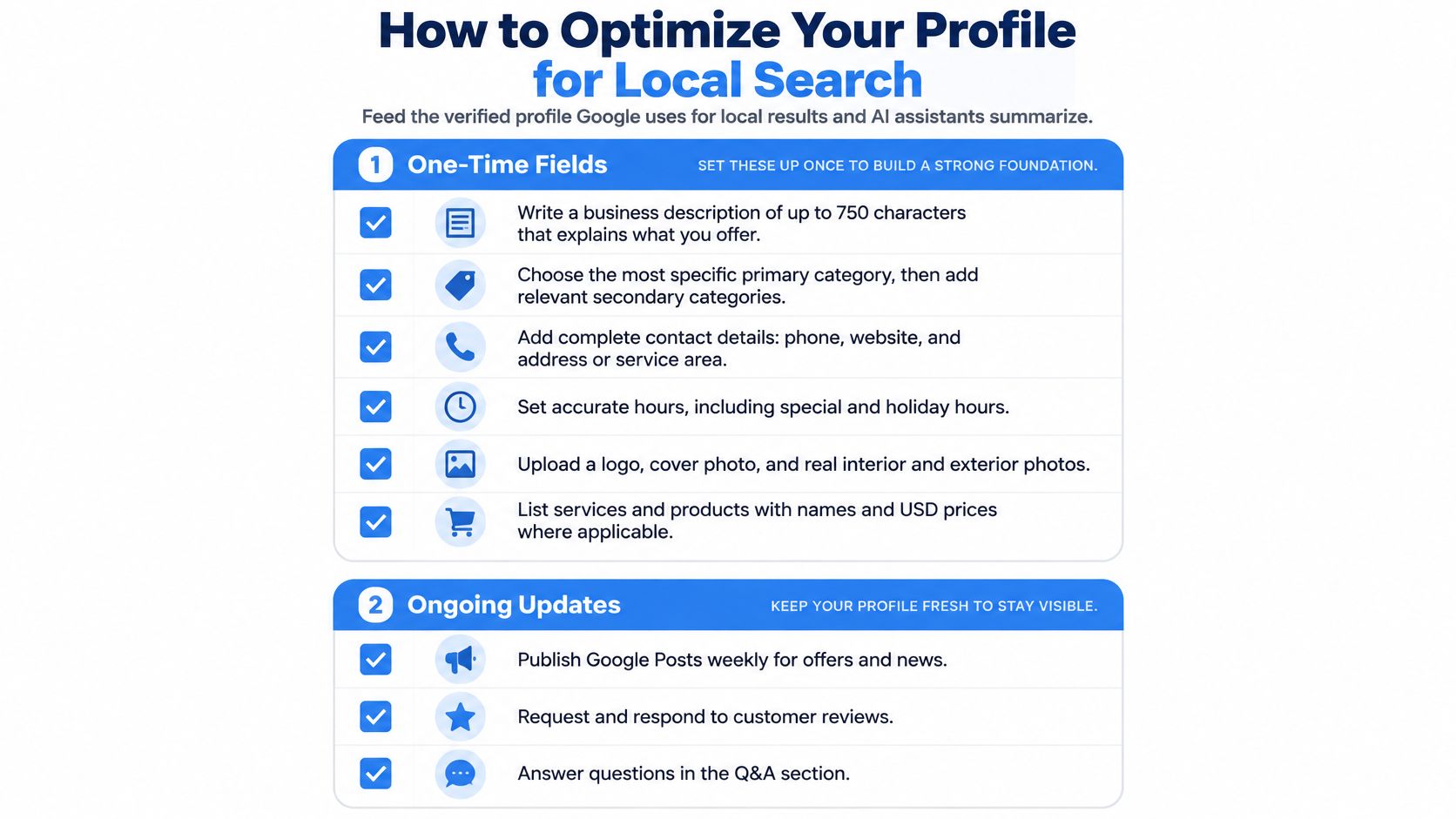
Use this checklist to separate setup work from ongoing maintenance.
Complete the customer-facing fields
Write the business description in plain language. Explain the core service, the area served, and meaningful operational details. A statement about emergency AC repair in Plano is useful when that service and availability are real; a string of city names isn't.
- Services: List each actual service with a short explanation. Distinguish repairs, installation, and maintenance so customers can identify the right offering.
- Photos: Upload a logo, exterior and interior images where relevant, team photos, and genuine work-in-progress images. Don't use stock photos to imply premises or equipment you don't have.
- Questions: Where question-and-answer features are available, answer genuine customer questions about access, scheduling, estimates, and service availability.
- Contact information: Use the right landing page and a working phone number. Make sure the website explains the same services and operating area as the profile.
LLM-oriented content should answer specific customer questions on your website in clear language. That can make the business easier to interpret, but it doesn't guarantee an AI recommendation or inclusion in an assistant's answer.
Keep industry guidance specific. For example, Bornbir's advice on how to get found by expecting families addresses a distinct customer journey. An AC repair page should answer AC repair questions, not combine unrelated industries to chase more keywords.
Establish a weekly maintenance habit
Check the profile weekly for inaccurate hours, unanswered reviews, customer questions, and outdated offers. Add useful job photos and publish Google Posts when you have a genuine seasonal service, offer, or announcement.
Ask for reviews at the handoff, after the customer understands what was completed. Make the process easy, never offer incentives, and don't ask customers to insert predetermined keywords. Reply naturally and avoid exposing private job or customer information.
Keep your public name, address where displayed, and phone consistent across relevant platforms such as Yelp, BBB, Angi, Bing Places, and Apple Maps. Our local SEO citations guide explains how to approach that cleanup without treating every directory as equally valuable.
Review performance monthly instead of reacting to each daily fluctuation: Google's visibility guidance says edits can take up to three days to appear and rankings for new businesses can take up to a month to appear.
Use the following video alongside the checklist when reviewing your profile workflow.
Turn Your Maps Listing into Booked Calls
Transactional searches signal that someone is looking for a provider, not just information. A search such as air conditioning repair near me can come from someone ready to spend money and book help. That intent is why we're called Transactional Marketing.
Audit your profile today. Search your main service and city, record where you appear, and check the category, photos, reviews, and hours. Being absent from the map pack is a reason to investigate, not proof that the listing is broken.
Discovery channels should match customer intent. A directory of US jiu-jitsu academies helps people compare training locations; your service business needs similarly relevant visibility, not indiscriminate directory coverage. Then make booking straightforward with a prominent phone number on your website.
Transactional Marketing offers a free Google Maps audit. Our Google Maps Maximization Program costs $750/month and lists a $250 setup fee alongside the label SETUP FEE WAIVED. The work targets relevant local visibility, not guaranteed positions or a predetermined volume of calls.
Transactional LLC offers Google Business Profile setup, Google Maps optimization, and local SEO focused on transactional searches. Visit Transactional LLC to request your free Google Maps audit and identify which eligibility, profile, and visibility fixes should come first.